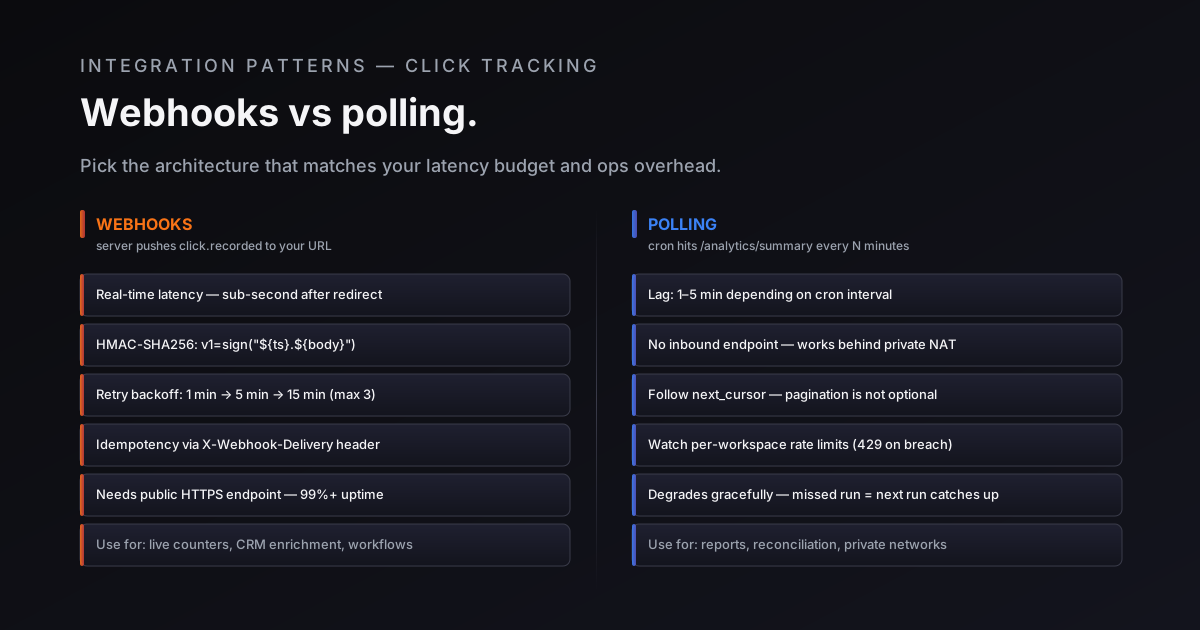
Дві команди, що будують на основі одного й того ж API для скорочення URL-адрес, часто приходять до абсолютно різних архітектур інтеграції. Одна команда хоче мати ендпоінт вебхуку, який реагує на кожен клік у режимі реального часу. Інша пише cron-завдання, яке опитує (поллінг) API аналітики кожні п'ять хвилин. Обидва варіанти є валідними, але для кліків у Elido сьогодні працює лише один: вебхуки для окремих кліків заплановані, але ще не запущені, тому робочий шлях для даних про кліки наразі проходить через поллінг. Рішення між ними має реальні наслідки для затримки (latency), операційних витрат і того, наскільки ваша система деградує, коли щось йде не так.
Цей допис описує реальні компроміси.
Два паттерни
Поллінг (опитування)
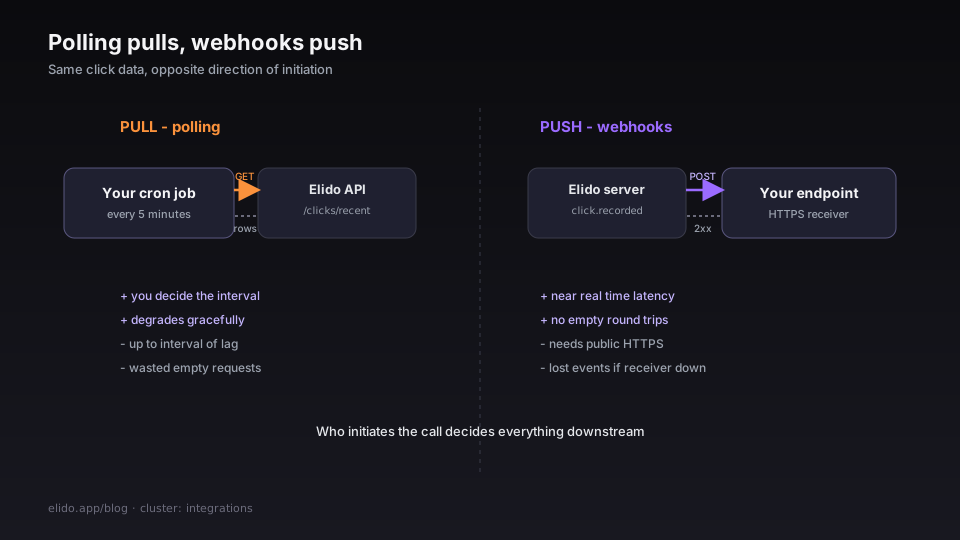
Поллінг означає, що ваш код запитує в API дані про останні кліки за розкладом. Cron-завдання прокидається, викликає /v1/workspaces/{workspace_id}/analytics/clicks/recent або /v1/workspaces/{workspace_id}/analytics/summary, обробляє результати, а потім засинає до наступного інтервалу.
Потік даних базується на витягуванні (pull-based): ваша інфраструктура ініціює кожну взаємодію. API-сервер нічого не знає про ваші внутрішні системи - він просто відповідає на надіслані вами запити.
Вебхуки
Вебхуки означають, що сервер Elido надсилає подію на ваш HTTPS-ендпоінт. Ваш приймач обробляє її, повертає 2xx, і доставка фіксується як успішна. Сьогодні ці події охоплюють посилання та домени (link.created, link.updated, link.expired, domain.verified і ще кілька). Подія click.created для окремого кліку запланована, але ще не надсилається, тому наразі клік не спричиняє жодного вебхуку.
Потік даних базується на проштовхуванні (push-based): платформа ініціює контакт. Ваш ендпоінт має бути доступним з інтернету, потребує TLS і повинен надійно відповідати.
Коли поллінг - це правильний вибір
Поллінг підходить для певного набору умов. Якщо більшість із наведеного нижче стосується вашої ситуації, почніть із поллінгу і переходьте до вебхуків лише тоді, коли конкретна проблема змусить вас це зробити.
Ви контролюєте обидві сторони інтеграції. Коли споживачем є дашборд або інструмент звітності, яким ви володієте та керуєте, поллінг дає вам передбачувану, обмежену поведінку. Ви вирішуєте інтервал; ви вирішуєте часове вікно; ви вирішуєте, як обробляти часткові результати.
Ваш випадок використання є ретроспективним. Щотижневі звіти про кампанії, щомісячні завдання з агрегації та процеси звірки не виграють від субхвилинної затримки. Cron-завдання, що запускається щогодини для /summary або /breakdown/country, архітектурно простіше та легше для розуміння, ніж станний (stateful) приймач вебхуків з обробкою повторних спроб.
У вас немає публічного ендпоінту для експонування. Вебхуки потребують URL-адресу, доступну з інфраструктури Elido. Якщо ваша інтеграція працює всередині приватної мережі, у функції Lambda без стабільної URL-адреси або на локальній машині розробника, налаштування вхідного HTTPS-ендпоінту може коштувати дорожче з точки зору операційної складності, ніж вигода від зменшення затримки.
Обсяг невеликий. При кількох тисячах кліків на день різниця між режимом реального часу та п'ятихвилинною затримкою рідко помітна кінцевим користувачам. Поллінг легко зрозуміти, легко налагоджувати, і він не створює сюрпризів в інфраструктурі.
Коли вебхуки - це правильний вибір
Вебхуки мають сенс, коли низька затримка є вимогою продукту, а не просто побажанням. Для даних про кліки сприймайте цей розділ як план на момент, коли з'явиться click.created; до того часу ті самі випадки використання працюють на поллінгу clicks/recent із коротким інтервалом.
Ви створюєте живий лічильник або UX у реальному часі. Якщо ваш продукт показує користувачам кількість кліків, яка візуально оновлюється протягом декількох секунд після редиректу, поллінг з будь-яким розумним інтервалом буде здаватися помітно застарілим. Обробник вебхуків, який інкрементує лічильник у Redis для подій click.created і відображає його через з'єднання WebSocket або SSE на фронтенді, буде архітектурою, яка досягне цього без перевантаження API аналітики, щойно ця подія з'явиться. Сьогодні найближчий доступний варіант - щохвилинний поллінг clicks/recent, який зупиняється на останньому вже побаченому рядку.
Ви збагачуєте записи в CRM для кожного кліку. Прив'язка події кліку до запису контакту - ідентифікація того, за яким саме посиланням перейшов потенційний клієнт у вашому листі, та оновлення його таймлайну в CRM - критична до часу. До того моменту, як завдання поллінгу наздожене дані через п'ять хвилин, менеджер з продажів уже може зателефонувати клієнту. Обробник вебхуків, який запускає оновлення CRM протягом декількох секунд після кліку, буде правильним інструментом, коли з'являться події для окремих кліків; до того часу скоротіть інтервал поллінгу.
Ви запускаєте робочі процеси, керовані подіями (event-driven). Робочі процеси, що запускаються подіями кліку - надсилання наступного листа після кліку по посиланню, оновлення сегмента підписника, зменшення кількості товару на складі - є природними споживачами вебхуків. Запланована подія click.created має містити достатньо даних, щоб діяти негайно, без додаткового запиту. Робочі процеси, що запускаються змінами посилань, як-от link.created або link.expired, уже можуть використовувати вебхуки.
У вас є стабільний, публічно доступний HTTPS-ендпоінт. Це передумова, від якої залежить усе інше. Якщо у вас уже є продакшн-інфраструктура, яка приймає вхідні вебхуки від інших провайдерів (Stripe, GitHub, Twilio), додати Elido до того самого приймача буде нескладно.
Приховані витрати вебхуків
Вебхуки звучать просто: сервер надсилає POST, ви його обробляєте. Реальна поверхня впровадження більша.
Верифікація підпису
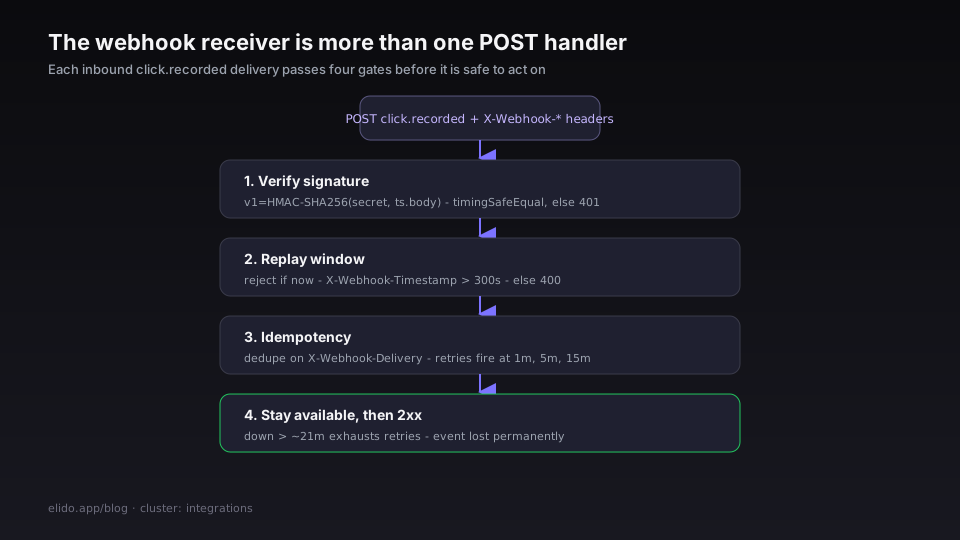
Elido підписує кожну доставку вебхуку за допомогою HMAC-SHA256. Формат підпису - v1=HMAC-SHA256(secret, "${unix_timestamp}.${body}"), що передається в заголовку X-Elido-Signature, а також у X-Webhook-Signature як псевдонімі. Мітка часу надсилається окремо в X-Webhook-Timestamp.
Ви повинні перевірити цей підпис перед обробкою корисного навантаження; посібник із перевірки підписів вебхуків також охоплює Python, Go та ротацію секрету. Приймач, який пропускає верифікацію, оброблятиме будь-який POST-запит, що надійде на ендпоінт, включаючи підроблені запити від будь-кого, хто дізнається URL-адресу вашого вебхуку.
Ось мінімальний обробник Express на TypeScript, який перевіряє підпис перед будь-якими діями з корисним навантаженням:
import express, { Request, Response } from "express";
import crypto from "crypto";

const app = express();

// Використовуйте raw body middleware - JSON-парсери споживають потік перед тим, як ви зможете його хешувати
app.use("/webhook", express.raw({ type: "application/json" }));

function verifySignature(
  secret: string,
  signature: string,
  timestamp: string,
  rawBody: Buffer,
): boolean {
  const message = `${timestamp}.${rawBody.toString("utf8")}`;
  const expected =
    "v1=" + crypto.createHmac("sha256", secret).update(message).digest("hex");
  // Використовуйте timingSafeEqual для запобігання атак на основі часу
  return crypto.timingSafeEqual(
    Buffer.from(signature, "utf8"),
    Buffer.from(expected, "utf8"),
  );
}

app.post("/webhook", (req: Request, res: Response) => {
  const signature = req.headers["x-webhook-signature"] as string;
  const timestamp = req.headers["x-webhook-timestamp"] as string;

  if (!signature || !timestamp) {
    return res.status(400).json({ error: "missing signature headers" });
  }

  // Відхиляти запити, старіші за 5 хвилин
  const age = Math.floor(Date.now() / 1000) - parseInt(timestamp, 10);
  if (age > 300) {
    return res.status(400).json({ error: "payload too old" });
  }

  if (
    !verifySignature(
      process.env.WEBHOOK_SECRET!,
      signature,
      timestamp,
      req.body as Buffer,
    )
  ) {
    return res.status(401).json({ error: "invalid signature" });
  }

  const event = JSON.parse((req.body as Buffer).toString("utf8"));

  if (event.type === "link.updated") {
    // Handle the link event
    console.log("link updated:", event.data);
  }

  // Завжди негайно повертайте 2xx - виконуйте важку обробку асинхронно
  return res.status(200).json({ received: true });
});
Вікно повтору (replay window)
Перевірка мітки часу в наведеному вище прикладі забезпечує те, що в документації Elido називається вікном повтору. Без неї зловмисник, який перехопив одне валідне підписане корисне навантаження, може повторювати його нескінченно - підпис залишається дійсним назавжди, оскільки він обчислюється на основі фіксованої мітки часу. З цією перевіркою навантаження, старіше за п'ять хвилин, відхиляється незалежно від того, чи є підпис валідним.
Встановіть допуск, який може витримати ваша інфраструктура. П'ять хвилин - це стандартне значення, яке також використовує Stripe. Якщо ваш приймач іноді виходить з ладу на кілька хвилин під час розгортання, це вікно дає йому час повернутися в стрій і все одно обробити доставки, що перебували в дорозі.
Повторні спроби та ідемпотентність
Elido повторює невдалі доставки за розкладом затримки: перша повторна спроба відбувається через 5 хвилин після збою, друга - ще через 15 хвилин. За замовчуванням доставка має загалом 3 спроби. Після 3 невдалих спроб доставка позначається як остаточно невдала і з'являється в журналі доставок ендпоінту.
Це означає, що ваш приймач може отримати ту саму подію більше одного разу. Будь-яка обробка, що має побічні ефекти - запис у базу даних, надсилання електронного листа, оновлення лічильника - повинна бути ідемпотентною. Заголовок X-Webhook-Delivery містить стабільний ID доставки, який ви можете використовувати як ключ ідемпотентності.
// Перед обробкою перевірте, чи ця доставка вже була оброблена
const deliveryId = req.headers["x-webhook-delivery"] as string;
const alreadyProcessed = await redis.get(`webhook:delivery:${deliveryId}`);
if (alreadyProcessed) {
  return res.status(200).json({ received: true, duplicate: true });
}
// Позначити як оброблену з TTL, що охоплює вікно повторних спроб
await redis.set(`webhook:delivery:${deliveryId}`, "1", "EX", 3600);
Ваш ендпоінт повинен бути високонадійним
Вікно повторних спроб обмежене. Якщо ваш приймач не працює більше ніж приблизно 20 хвилин (5 + 15), спроби доставити дані вичерпаються, і доставка буде назавжди позначена як невдала. Для подій, де гарантована доставка має значення - збагачення CRM, білінгові хуки - інфраструктура вашого приймача потребує належної доступності, а не аматорського сервера, який періодично перезавантажується.
Це витрата вебхуків, яку команди, нові у роботі з вхідними HTTP-запитами, недооцінюють найчастіше. Поллінг деградує витончено: якщо завдання поллінгу не вдалося, воно просто запуститься знову в наступному інтервалі та наздожене дані. Приймач вебхуків, який недоступний, втрачає події назавжди, якщо у вас немає стратегії звірки.
Приховані витрати поллінгу
Поллінг виглядає просто ззовні. Реальні витрати накопичуються в продакшені.
Затримка є визначальним обмеженням. Cron-завдання, що запускається кожні п'ять хвилин, означає, що дані про кліки застаріли до п'яти хвилин. Для більшості ретроспективних випадків використання це прийнятно; для будь-чого, що бачить користувач - ні. Скорочення інтервалу допомагає, але не усуває затримку, а дуже короткі інтервали (менше хвилини) починають нагадувати "бомбардування" API, а не поллінг.
Марні запити. Більшість інтервалів поллінгу повертають ті самі дані, що й попередній запит. Якщо ви опитуєте посилання з низьким трафіком щохвилини, а кліки надходять приблизно один раз на годину, 59 з кожних 60 запитів не принесуть нічого нового. Ці запити все одно враховуються у вашому ліміті запитів до API (rate limit).
Ліміти запитів (Rate limits). API Elido застосовує ліміти запитів для кожного робочого простору залежно від тарифного плану. Завдання поллінгу, яке часто запускається для багатьох посилань у великому робочому просторі, може досягти цих лімітів, особливо якщо інша автоматизація в тому самому робочому просторі також робить виклики до API. У такому разі API повертає 429 Too Many Requests із заголовком X-RateLimit-Scope: workspace.
Пагінація та пропущені події. Ендпоінт /clicks/recent використовує пагінацію на основі курсора. Якщо ви робите поллінг у фіксованому часовому вікні - ?from=<last_poll>&to=<now> - і обсяг даних у цьому вікні перевищує розмір сторінки, ви пропустите події, якщо не пройдете через усі сторінки за допомогою next_cursor. Реалізація поллінгу, яка не обробляє пагінацію, буде мовчки втрачати дані під навантаженням.
Гібридний паттерн
Для більшості випадків використання в продакшені найкращою відповіддю не є вибір "або-або".
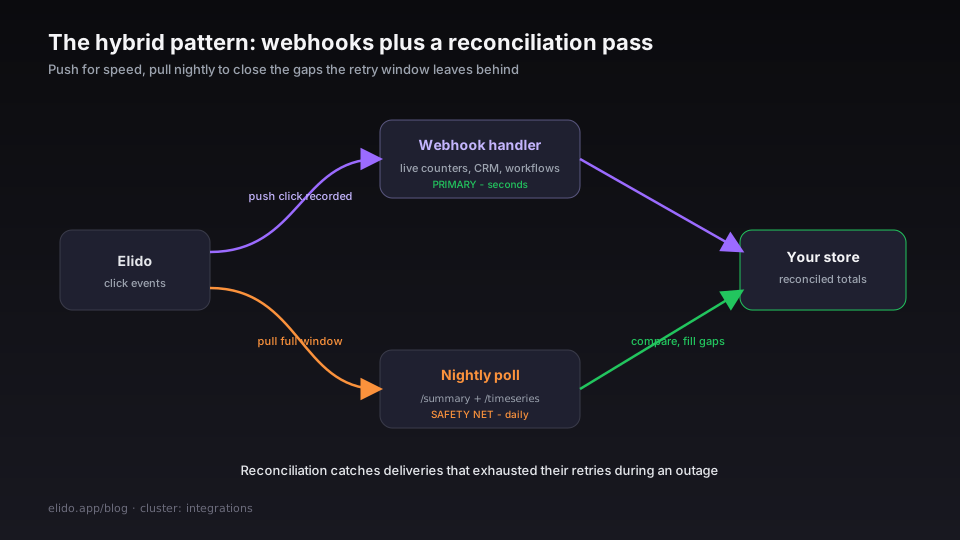
Після появи click.created використовуйте вебхуки як основний шлях для реакції в реальному часі: оновлення CRM, живі лічильники, робочі процеси, керовані подіями. Затримка низька; операційні витрати прийнятні, якщо у вас вже є інфраструктура для вхідних HTTPS-запитів. До того часу швидкий шлях - це поллінг clicks/recent із коротким інтервалом, а наведений нижче етап звірки працює поверх нього так само.
Використовуйте поллінг як щотижневий або щоденний етап звірки: витягуйте повний часовий ряд за попередній тиждень, порівнюйте підсумки з тим, що зафіксував ваш обробник вебхуків, і ідентифікуйте будь-які прогалини. Це дозволяє виявити доставки, які вичерпали вікно повторних спроб під час збою, події, що надійшли не по порядку, та будь-які розбіжності між вашим локальним станом і джерелом істини Elido.
API аналітики добре підходить для цієї ролі. Ендпоінт /summary повертає агреговані підсумки для діапазону дат в одному запиті; ендпоінт /timeseries повертає щоденні сегменти. Завдання звірки, яке запускається один раз на ніч і порівнює кількість кліків, зафіксовану у вашій CRM, з підсумками API за той самий період, може виявити проблеми з цілісністю даних до того, як вони стануть проблемою для клієнтів.
Cron для поллінгу на Python
Поллінг - це те, з чого сьогодні починається кожна інтеграція кліків, і він продовжує працювати після появи вебхуків для окремих кліків. Ось мінімальна реалізація з використанням бібліотеки schedule, яка викликає clicks/recent з п'ятихвилинним інтервалом (у посібнику з API аналітики посилань докладно описано параметри курсора, дати й часового поясу):
import schedule
import time
import requests
import os

API_BASE = "https://api.elido.app/v1"
WORKSPACE_ID = os.environ["ELIDO_WORKSPACE_ID"]
API_KEY = os.environ["ELIDO_API_KEY"]
HEADERS = {"Authorization": f"Bearer {API_KEY}"}

# Newest click already processed, kept across runs. clicks/recent returns
# newest first and next_cursor pages to older rows, so each run reads from
# the top and stops when it reaches this row.
_last_seen = None

def poll_recent_clicks():
    global _last_seen
    params = {"limit": 100}
    newest = None
    done = False

    while not done:
        resp = requests.get(
            f"{API_BASE}/workspaces/{WORKSPACE_ID}/analytics/clicks/recent",
            headers=HEADERS,
            params=params,
            timeout=10,
        )
        resp.raise_for_status()
        body = resp.json()

        for click in body.get("items", []):
            key = (click["ts"], click["link_id"])
            if key == _last_seen:
                done = True
                break
            if newest is None:
                newest = key
            process_click(click)

        next_cursor = body.get("next_cursor")
        if not next_cursor:
            break
        params["cursor"] = next_cursor

    if newest:
        _last_seen = newest

def process_click(click: dict):
    # Replace with your actual processing logic
    print(f"click: link={click['link_id']} country={click.get('country_code')}")

schedule.every(5).minutes.do(poll_recent_clicks)

if __name__ == "__main__":
    poll_recent_clicks()  # run once on startup to catch up
    while True:
        schedule.run_pending()
        time.sleep(10)
У продакшн-розгортанні замініть print на ваш реальний приймач даних - запис у базу даних, виклик API CRM, публікацію в черзі повідомлень - і додайте обробку помилок з експоненціальною затримкою навколо виклику requests.get.
Фільтрація ботів та її значення для вашої інтеграції
Одна деталь, яка впливає на обидва паттерни: рівень редиректів Elido фільтрує кліки ботів перед їх записом. Запити від Googlebot, Bingbot, Slackbot, моніторів доступності, curl, скриптових бібліотек та порожніх User-Agents не зараховуються як кліки, не з'являються в результатах API аналітики і не створюватимуть подій click.created, коли ті з'являться.
Це важливо, тому що це означає, що ваш обробник вебхуків або завдання поллінгу працює з кількістю кліків від людей, а не з необробленою кількістю HTTP-запитів. Якщо ви корелюєте дані кліків Elido з метриками на стороні сервера - логами вашого додатка, логами доступу CDN - очікуйте, що числа Elido будуть нижчими. Ця розбіжність не є помилкою; це фільтр ботів, який видаляє шум до того, як він дійде до вас.
Більш детальну інформацію про те, що охоплює фільтр ботів і як скорер підозрілості позначає граничний трафік, можна знайти в посібнику з аналітики. Про властивості безпеки схеми підпису вебхуків - включаючи формат HMAC, прив'язку мітки часу та те, чому вона запобігає - дивіться в чек-листі безпеки.
На сторінці цін є розбивка того, які тарифні плани включають ендпоінти вебхуків і з якими обмеженнями на обсяг доставки.
Схоже в блозі
- Чому ми використовуємо ClickHouse для аналітики кліків (а не Postgres)
- GA4 server-side tracking через рівень редиректів
- Досягнення p95 < 15 мс для редиректів із FRA, ASH та SGP
- Пояснення атрибуції без кукі: що все ще працює у 2026 році
- Перевірка підписів вебхуків: HMAC-SHA256 у Node, Python та Go
- API аналітики посилань: отримання статистики кліків за API-ключем
Спробуйте Elido
Вставте URL - отримайте коротке посилання
Без реєстрації. Посилання живе 30 днів. Зареєструйтесь, щоб зберегти назавжди.
Безкоштовно, без реєстрації · 2 на день