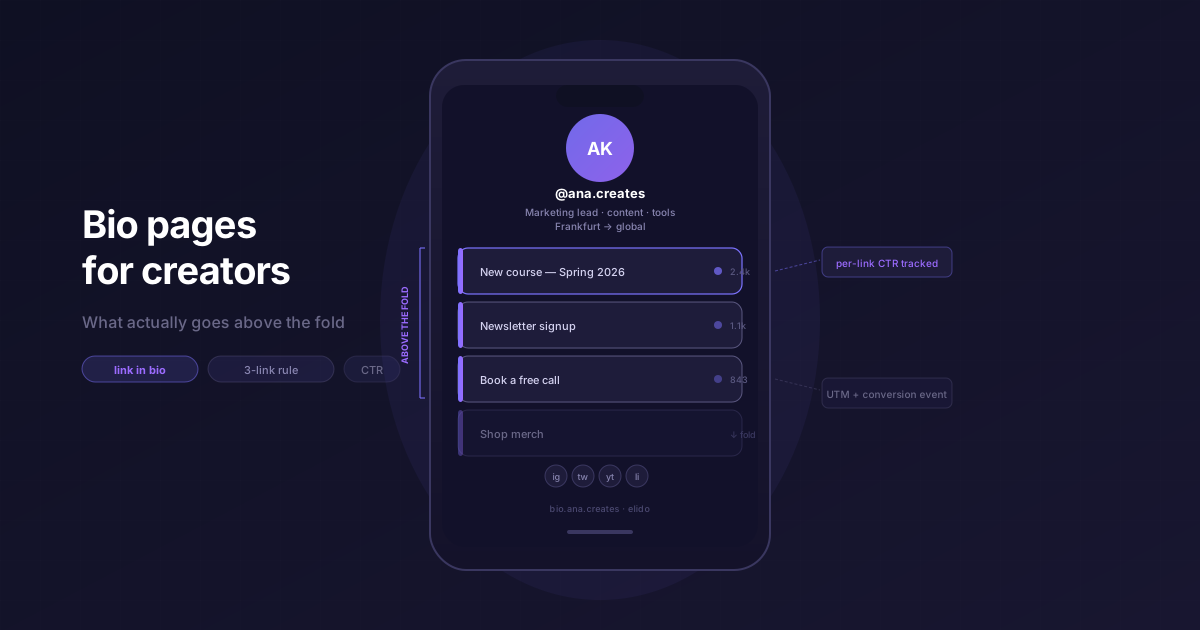
Instagram дає вам рівно одну клікабельну URL-адресу у вашому профілі. Одну. Все, що ви хочете показати (ваш останній запуск, розсилку, курс, посилання для бронювання), має поміститися за цією єдиною точкою входу. Біо-сторінка - це рішення, до якого прийшла економіка креаторів: мінімалістична, оптимізована для мобільних пристроїв сторінка, яка перетворює один тап на меню призначень. Думайте про неї як про роутер, а не просто сторінку. Хтось заходить, бачить ваші варіанти, обирає один. Instagram тепер дозволяє додати до п'яти нативних посилань у біо, але той самий компроміс виникає, щойно вам потрібна аналітика або власний брендинг - про це докладно розповідає матеріал як додати кілька посилань у профіль Instagram.
Справжнє завдання не в тому, щоб «зробити гарну сторінку». Воно в тому, щоб підтримувати 5–15 активних призначень з однієї стабільної URL-адреси, відстежувати конверсії та замінювати їх, жодного разу не оновлюючи біо в Instagram. Спеціалізовані інструменти, такі як Linktree та Beacons, були створені саме для цього. Elido пропонує таку ж саму поверхню як частину своєї функції біо-сторінок, але через іншу структуру - ту, що вже керує вашими короткими посиланнями, аналітикою перенаправлень та кастомними доменами. Перш ніж хапатися за окремий інструмент, варто зрозуміти, що сторінка насправді має робити.
TL;DR
- Хороша біо-сторінка має чотири зони: hero (аватар + біо у два рядки), топові посилання (три призначення над лінією згину на мобільних пристроях), featured (один блок промо, що змінюється) та соціальні мережі (рядок іконок у футері).
- Розміщуйте не більше трьох посилань над лінією згину. CTR різко падає на четвертому посиланні на мобільних пристроях - користувачі припиняють гортати, перш ніж побачать його.
- Кожна плитка в біо - це коротке посилання. Це означає, що UTM-теги для кожного посилання, відстеження кліків та A/B роутинг доступні безкоштовно, якщо ваш сервіс скорочення вже підтримує ці примітиви.
- Сервіс скорочення URL-адрес структурно є кращим хостом для біо, ніж окремий інструмент, тому що він володіє рівнем перенаправлення. Жодних сторонніх переходів, передачі аналітики чи поділу між вендорами.
Чотири зони хорошої біо-сторінки
Біо-сторінка - це не просто список. Макет має передбачувану структуру, і зони виконують різні завдання.
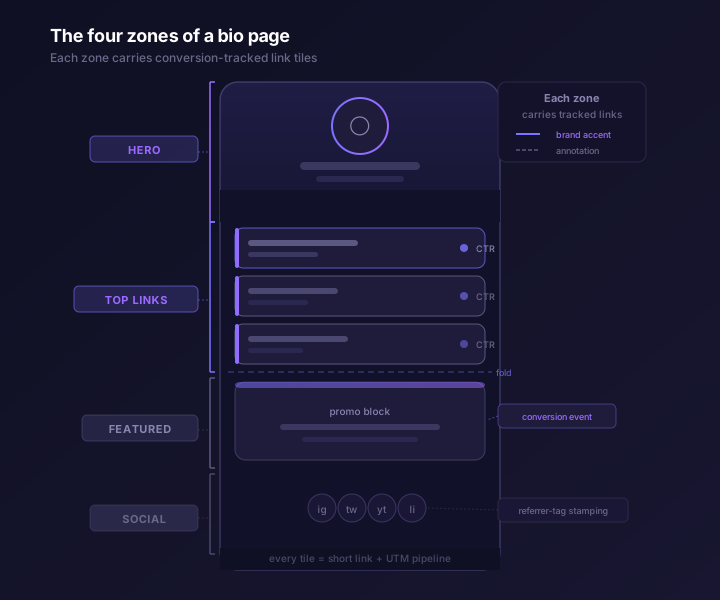
Hero. Аватар, ім'я, біо у два рядки. Це все. Два рядки призначені для посади та локації, або для слогана та однієї відмінної риси. Все, що довше, переноситься на мобільних пристроях і виштовхує посилання за межу видимості. Аватар має бути таким самим, як і в інших ваших соцмережах; послідовна візуальна ідентичність важлива для швидкого впізнавання.
Top links. Три або чотири призначення, впорядковані за пріоритетністю конверсії. Це єдині посилання, які більшість відвідувачів побачать без прокручування. Не чотири посилання - три. Четверте починається нижче лінії згину на стандартному екрані iPhone (логічна роздільна здатність 390×844 pt), і дані про кліки стабільно показують різке падіння на цій позиції. Більше про це в наступному розділі.
Featured. Один блок промо. Це посилання, яке ви хочете змінювати: активна кампанія, новий курс, обмежена пропозиція. Воно знаходиться під топовими посиланнями у візуально відмінній картці, зазвичай із обкладинкою або заголовком. Тільки один featured-елемент. Якщо їх більше одного, жоден не сприймається як головний.
Social. Рядок іконок у футері: Instagram, X, YouTube, LinkedIn, будь-які платформи, якими ви активно користуєтеся. Вони не відстежуються так само, як топові посилання. Це шляхи для ознайомлення, а не для конверсії. Вони потрібні в макеті, тому що закріплюють сторінку у вашій ширшій присутності та знижують когнітивне навантаження на нових відвідувачів, які ще вирішують, чи довіряти вам.
Що розміщувати над лінією згину: максимум три посилання
Області перегляду біо-сторінок на мобільних пристроях мають висоту близько 600–700 пікселів після того, як інтерфейс браузера та зона Hero забирають свою частку. Стандартна картка посилання в кожному великому біо-інструменті має висоту від 54 до 64 пікселів. Три картки по 64px кожна = 192px простору для посилань. Це комфортний розмір. Четверта картка починає виходити за межу видимості на всьому, що менше за нинішній iPhone Pro Max.
Це не просто м'яка рекомендація. Дані про CTR на біо-сторінках у сегменті solutions/marketers є послідовними: третє та четверте посилання отримують приблизно 30–40% від обсягу кліків першого посилання. П'яте посилання та наступні падають до однозначних відсотків. Мобільні користувачі не гортають біо-сторінки так, як стрічки новин. Вони бачать те, що доступно, і тапають по тому, що виглядає релевантним. Позиція - це головний важіль конверсії.
Практичне правило: оберіть три найважливіші постійні (evergreen) призначення та зафіксуйте їх як топові посилання. Ваша підписка на розсилку, флагманський продукт, посилання на бронювання. Розміщуйте сезонний або кампанійний контент у зоні featured, де він має візуальну вагу, не потребуючи високої позиції в списку.
Якщо у вас велика бібліотека посилань (часто для креаторів, які продають кілька продуктів або ведуть багато соцмереж), використовуйте теги або папки для керування всім набором і виводьте лише три в видимій частині. Решта може жити нижче на сторінці або бути прихованою. Показувати 12 посилань тільки тому, що ви можете - це один із найпевніших способів знизити CTR для всіх 12.
Відстеження конверсій для кожного посилання
Кожна плитка на біо-сторінці - це посилання. Це означає, що кожна плитка може містити той самий конвеєр UTM та подій конверсії, що й будь-яке інше коротке посилання, яке ви створюєте. Більшість окремих біо-інструментів розглядають плитки як інертні кнопки з загальною кількістю кліків. Це лічильник переглядів, а не атрибуція.
Що вам насправді потрібно: яке посилання привело до підписки на розсилку, чи мало перше чи третє посилання вищий коефіцієнт конверсії цього тижня, чи клікають відвідувачі з iOS та Android на різні плитки з різною частотою. Ніщо з цього не випливає з простої кількості кліків.
Підхід Elido: кожна плитка біо - це коротке посилання, а короткі посилання містять повний UTM-шаблон вашого робочого простору. Коли цільова сторінка передає подію конверсії назад у conversions API, Elido зіставляє її з вихідним кліком через ID посилання. Ви отримуєте коефіцієнт конверсії для кожної плитки, а не просто кількість кліків.
Біо-сторінка не є окремим ізольованим місцем відстеження. Це ще одна поверхня в тому ж графі атрибуції. Пост про пояснення розумних посилань розкриває рівень роутингу, що лежить в основі.
Чому сервіс скорочення URL-адрес має правильні примітиви
Linktree заповнив реальну нішу у 2016 році. Сервіси скорочення URL-адрес на той час не надавали інтерфейсу конструктора сторінок. Десять років по тому цей розрив скоротився для сервісів скорочення, які побудували біо-сторінки як поверхню виводу.
Структурний аргумент: біо-сторінка - це набір коротких посилань у макеті. Все, що стосується короткого посилання - кастомний домен, брендований слаг, аналітика перенаправлень, A/B роутинг - стосується кожної плитки. Коли біо-сторінка та короткі посилання живуть в одній системі, немає розривів. У вас немає акаунту Linktree, що генерує кліки, які ви не можете приписати до решти вашого стека посилань.
Конкретно, біо-сторінка Elido використовує ту саму інфраструктуру перенаправлення, що й будь-яке інше посилання. Той самий конвеєр подій кліків. Те саме налаштування white-label, якщо ви працюєте з декількома брендами або агентськими процесами. Брендований домен, який ви налаштували для коротких посилань (links.brand.example), - це той самий домен, на якому живе ваша біо-сторінка. Жодного другого запису DNS, жодного другого вендора для керування.
Для агентств, які керують біо-сторінками багатьох клієнтів, ця консолідація є радше практичною, ніж філософською. Один робочий простір, одна конфігурація домену, одне місце призначення аналітики. Альтернатива - підтримувати логіни Linktree та експорт аналітики для кожного клієнта разом зі стеком скорочень, який ви вже ведете. Ці накладні витрати накопичуються.
Чесне порівняння: Linktree та Beacons
Linktree - це стандарт. Якщо хтось каже «інструмент для біо-посилання», він має на увазі Linktree. Продукт має десятирічну довіру креаторів, відшліфований процес онбордингу та набір функцій, який добре охоплює базову біо-сторінку. Їхній безкоштовний тариф підтримує необмежену кількість посилань та один кастомний домен. Платні плани додають аналітику, заплановані посилання, платіжні інтеграції та комерційні блоки. Аналітика слабша, ніж у рішенні на базі сервісу скорочення - Linktree звітує про загальну кількість кліків на посилання, але не підтримує передачу UTM у ваш власний стек аналітики «з коробки», а серверна передача конверсій не вбудована. Для креатора, чий робочий процес атрибуції закінчується на «скільки кліків це отримало», це нормально. Для маркетолога, якому потрібно замкнути цикл до події конверсії - ні.
Beacons більше схиляється до комерції креаторів. Платформа пропонує цифрові вітрини, чайові, сторінки членства та функції медіакітів поряд із функціоналом біо-посилань. Якщо ваша модель монетизації передбачає продаж безпосередньо через біо-сторінку (курси, шаблони, пресети), Beacons має більше нативних інструментів для цього випадку, ніж Elido. Elido не пропонує цифрову вітрину. Біо-сторінка перенаправляє туди, де ви продаєте; вона не хостить транзакцію.
Де виграє Elido: маркетологи, які вже використовують короткі посилання масштабно і хочуть, щоб біо-сторінки жили в тому самому стеку аналітики, а не поруч із ним. Сторінка ціноутворення проста - біо-сторінки доступні на платних планах, без окремих рахунків за біо-інструменти, без комісій за сторінку. Якщо ви платите за сервіс скорочення та біо-інструмент окремо, це варто перевірити.
Де виграє Linktree: чисті робочі процеси креаторів без наявного стека скорочень, і випадки, коли креатор хоче прямих інтеграцій Linktree (Mailchimp, Shopify, Typeform) без налаштування API.
Де виграє Beacons: комерція креаторів із цифровими продуктами. Функції вітрини та членства справді кращі, ніж перенаправлення до стороннього магазину.
Три шаблони, які працюють
Біо для запуску кампанії. Щотижня змінюйте топове посилання відповідно до активної кампанії. Основний слаг залишається незмінним (links.you.example/start), призначення змінюється в дашборді. Ви ніколи не торкаєтеся Instagram. Зона featured містить найбільш терміновий елемент; топове посилання номер один слугує довгостроковим якорем.
Постійне (evergreen) біо. Три стабільні топові посилання: розсилка, флагманський продукт, посилання на бронювання. Один блок featured для всього, що актуально цього місяця. Соціальний футер. Загальний час налаштування: двадцять хвилин. Підтримка: щомісячна заміна блоку featured. Передача UTM означає, що атрибуція вашого ESP залишається чистою, навіть коли джерела трафіку змінюються.
Біо з тегами когорт. Кожен відвідувач, який приходить через посилання в біо Instagram, отримує тег utm_source=instagram-bio на кожному наступному кліку зі сторінки. Якщо ви використовуєте окреме посилання для біо в розсилці з utm_source=newsletter-bio, ви можете сегментувати подальші конверсії за джерелом залучення. Це скаже вам, яка аудиторія насправді купує, а не просто переглядає. Пост про пояснення розумних посилань охоплює механіку роутингу, яка робить це можливим.
Налаштування: три кроки
1. Оберіть домен. Якщо у вас вже є брендований домен для коротких посилань (links.brand.example), біо-сторінка житиме там. Якщо ви починаєте з нуля, підійде будь-який домен, який ви контролюєте. Встановіть CNAME на edge Elido, дозвольте TLS налаштуватися автоматично. Огляд функцій охоплює налаштування DNS.
2. Створіть сторінку. У дашборді відкрийте біо-сторінки та створіть нову сторінку. Додайте блок hero (аватар + біо у два рядки), додайте до трьох топових посилань, додайте блок featured, якщо у вас є активна кампанія, додайте іконки соціальних мереж у футері. Кожна плитка посилання пропонує ввести URL-адресу призначення та, опціонально, UTM-шаблон. Використовуйте UTM-шаблон робочого простору для послідовного тегування або перевизначайте його для окремих плиток, якщо посилання має власну кампанію.
3. Вставте URL-адресу у ваше біо в соцмережах. URL-адреса біо-сторінки - це саме коротке посилання (links.brand.example/bio або будь-який слаг, який ви обрали). Скопіюйте його, відкрийте Instagram, вставте в поле вебсайту. Готово. Сторінка працює, аналітика запущена, і вам ніколи більше не знадобиться оновлювати біо в Instagram, якщо ви не зміните слаг.
Що відрізняє реалізації біо-сторінок, так це те, що відбувається далі: чи можна приписати клік на другій плитці до конверсії, чи вимагає заміна блоку featured окремого логіна, і чи обробляє той самий стек аналітики, що й ваші посилання кампаній, також і вашу біо-сторінку. Для маркетологів, які дбають про повний ланцюжок атрибуції, відповіддю на всі три питання має бути одна і та ж система.
Зовнішні джерела: Довідка Instagram - посилання в біо (доступ станом на 2026-05-12); Про Linktree та його функції (доступ станом на 2026-05-12); Про Beacons (доступ станом на 2026-05-12).
- Ana
Спробуйте Elido
Вставте URL - отримайте коротке посилання
Без реєстрації. Посилання живе 30 днів. Зареєструйтесь, щоб зберегти назавжди.
Безкоштовно, без реєстрації · 2 на день