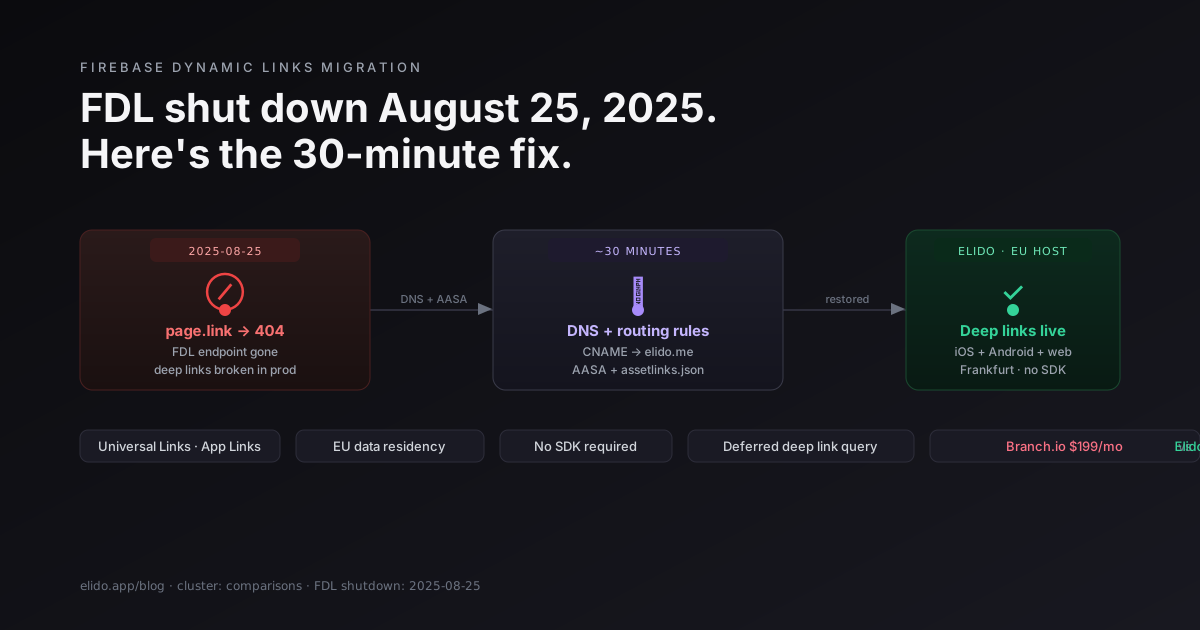
Firebase Dynamic Links отключился 2025-08-25. Каждая FDL-ссылка теперь возвращает 404. Если ваше приложение использовало их для атрибуции установок, отложенного deep-link или постустановочной маршрутизации на конкретный экран, эти потоки сломаны в production прямо сейчас. Branch.io начинается с $199/месяц на тарифе, который заменяет то, что FDL делал бесплатно. Deep-link маршрутизация Elido покрывает те же паттерны за долю стоимости со встроенным хранением данных в ЕС. Сокращатель goo.gl от Google был свернут в той же волне; если у вас тоже остались мертвые ссылки goo.gl, материал Альтернатива сокращателю URL от Google после закрытия goo.gl разбирает и этот случай.
Это кратчайший путь от сломанных FDL-ссылок до работающих Universal Links и Android App Links.
TL;DR
- Firebase Dynamic Links отключился 25 августа 2025 года; все URL вида
*.page.linkвозвращают HTTP 404 с этой даты, согласно FAQ об устаревании Firebase Dynamic Links - Атрибуция установок, постустановочная маршрутизация и отложенные deep-link вашего приложения сломаны, если вы ещё не мигрировали
- Миграция - это изменение DNS, два JSON-файла (один Apple, один Google) и переписывание ссылок, а не переписывание кода
- Входной тариф Branch.io для этого сценария - $199/месяц; Elido Pro покрывает ту же маршрутизацию при значительно более низкой стоимости без покликового учёта
- Не нужно трогать существующий код обработки deep-link на Swift или Kotlin - передача на уровне ОС Universal Link / App Link работает одинаково вне зависимости от того, какой сервис хостит маршрутизацию
Что на самом деле делал Firebase Dynamic Links
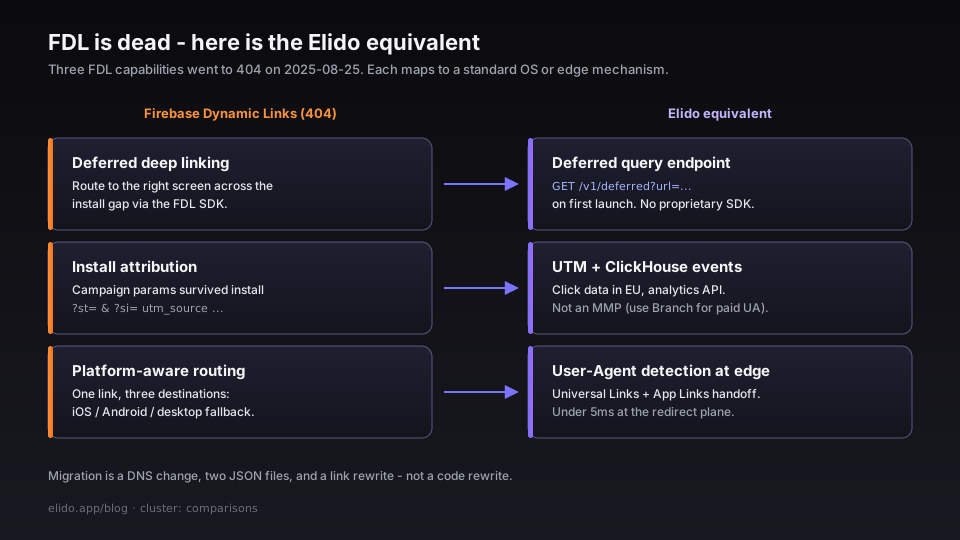
FDL был ответом Google на три проблемы, которые обычные HTTPS-ссылки не могут решить самостоятельно.
Отложенный deep-link. Пользователь на устройстве без вашего приложения нажимает на ссылку. ОС открывает App Store или Play Store. Пользователь устанавливает приложение. Приложение открывается на стандартном главном экране и не знает, что пользователь пытался попасть на конкретный контент. FDL сохранял предполагаемое назначение и передавал его через окно установки - приложение могло запросить SDK FDL при первом запуске и направить пользователя на нужный экран.
Атрибуция установок. Ссылки FDL несли параметры кампании (utm_source, utm_medium, пользовательские параметры через ?st= и ?si=), которые сохранялись через установку. Это механизм, позволявший атрибутировать установку конкретной email-кампании, платному социальному креативу или ссылке инфлюенсера без стороннего MMP.
Маршрутизация с учётом платформы. Одна ссылка, три назначения: iOS-пользователи шли в App Store (или глубоко в приложение при установке), Android-пользователи в Play Store (или в приложение), а браузеры десктопа получали настраиваемый фолбэк URL. Маршрутизация происходила на стороне сервера на edge Google, а не в коде вашего приложения.
Когда FDL отключился, все три возможности одновременно превратились в 404. Если вы использовали FDL SDK в приложении, он вызывает endpoint, которого больше не существует.
Эквивалент в Elido
Elido воспроизводит те же три поведения через определение платформы на edge редиректа и стандартные механизмы deep-link ОС.
Определение платформы на edge. Короткая ссылка Elido при редиректе инспектирует заголовок User-Agent и маршрутизирует на разные назначения в зависимости от платформы: iOS → URL App Store (или универсальная ссылка приложения), Android → URL Play Store (или intent ссылки приложения), десктоп → ваш веб-фолбэк. Это происходит менее чем за 5 мс на уровне редиректа. Нет SDK-вызова, нет обращения к отдельному сервису атрибуции.
iOS Universal Links. Когда приложение установлено на устройстве, iOS перехватывает HTTPS-ссылку до открытия браузера. Это требует отдачи файла Apple App Site Association (apple-app-site-association) с well-known пути вашего кастомного домена. Elido хостит этот файл от вашего имени при настройке кастомного домена с включённой deep-link маршрутизацией. Результат идентичен тому, что давал FDL: приложение открывается прямо на связанном экране.
Android App Links. Тот же механизм на Android, другой формат файла. Файл assetlinks.json Google находится по адресу /.well-known/assetlinks.json на вашем домене. Elido генерирует и отдаёт этот файл, когда вы предоставляете имя пакета приложения и SHA-256 отпечаток сертификата. Android App Links открывают приложение напрямую без браузерного интерстициала.
Передача отложенного deep-link. Для случая через окно установки (у пользователя ещё нет приложения) Elido сохраняет предполагаемый deep-link target относительно короткого URL и открывает его через лёгкий endpoint запроса. Приложение вызывает этот endpoint при первом запуске с коротким URL, с которого была выполнена установка - восстанавливаемым из install referrer на Android (INSTALL_REFERRER) и API атрибуции App Store на iOS - и получает обратно исходный путь deep-link. Нет FDL SDK, нет проприетарного рукопожатия. Руководство по deep links охватывает контракт endpoint запроса.
Полная страница функции доступна по адресу /features/deep-links.
Пошаговая миграция
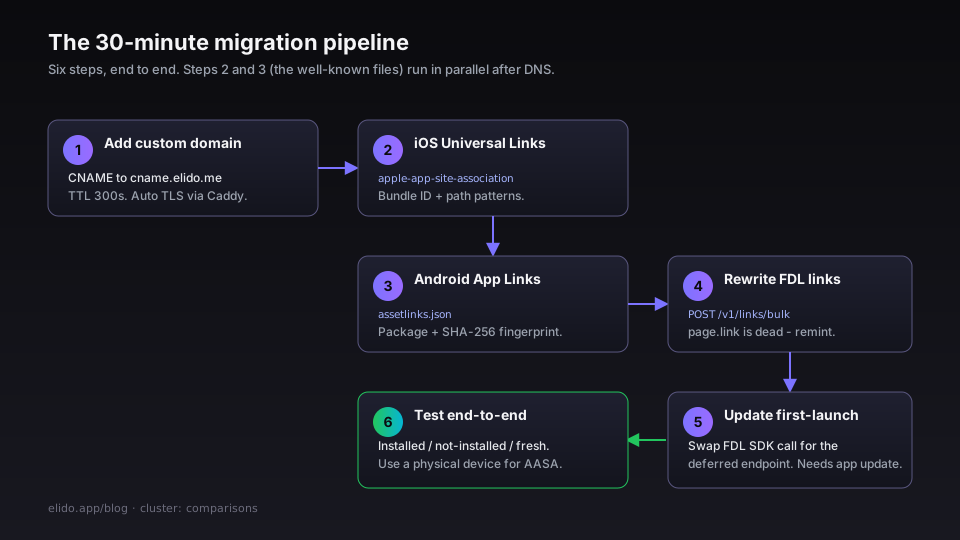
Предполагается, что у вас есть аккаунт Elido на тарифе Pro или выше и кастомный домен, которым вы управляете. Рассчитывайте на 30 минут для простой миграции; добавьте буфер, если ваш объём FDL-ссылок достаточно велик, чтобы потребовать скрипта массового переписывания.
Шаг 1: Добавьте кастомный домен в Elido
В панели Elido перейдите в Workspace → Custom domains → Add domain. Введите нужный брендированный домен (например links.yourapp.com). Elido покажет CNAME-запись для создания.
У вашего DNS-регистратора добавьте CNAME:
links.yourapp.com. CNAME cname.elido.me.
Рекомендация по TTL: снизьте его до 300 секунд за несколько часов до этого, если сейчас он 3600+. Подготовка TLS автоматическая через автоматический TLS по запросу и завершается в течение нескольких минут после распространения DNS.
Шаг 2: Настройте iOS Universal Links (AASA файл)
В настройках домена включите Deep link routing и укажите:
- Идентификатор bundle вашего iOS-приложения (например
com.yourcompany.yourapp) - Паттерны URL-пути, которые должны открывать приложение (например
/l/*для всех коротких ссылок или конкретные пути)
Elido генерирует и отдаёт AASA файл по адресу https://links.yourapp.com/.well-known/apple-app-site-association. Убедитесь, что он резолвится корректно, прежде чем продолжать:
curl -s https://links.yourapp.com/.well-known/apple-app-site-association | python3 -m json.tool
Ответ должен включать ваш bundle ID в массиве applinks.details. CDN iOS кеширует файл AASA и обновляет его по расписанию; для принудительного обновления при тестировании сбросьте AASA-кеш устройства через Developer → Reset в настройках iOS или установите приложение заново.
В файле Info.plist вашего приложения должен быть объявлен связанный домен. Если он уже есть для домена FDL, добавьте новый домен рядом с ним в период перехода:
<key>com.apple.developer.associated-domains</key>
<array>
  <string>applinks:links.yourapp.com</string>
  <!-- оставьте домен FDL в период перехода при необходимости -->
</array>
Шаг 3: Настройте Android App Links (assetlinks.json)
В той же панели настроек deep-link укажите:
- Имя пакета вашего приложения (например
com.yourcompany.yourapp) - SHA-256 отпечаток сертификата подписи вашего release-сборки
Получите отпечаток, если у вас его нет в кеше:
keytool -list -v -keystore release.keystore -alias your-alias | grep SHA256
Elido генерирует и отдаёт файл по адресу https://links.yourapp.com/.well-known/assetlinks.json. Проверка:
curl -s https://links.yourapp.com/.well-known/assetlinks.json | python3 -m json.tool
Intent filter в AndroidManifest.xml должен быть уже настроен для App Links, если вы использовали FDL с функцией автоверификации Android SDK. Если нет, добавьте атрибут android:autoVerify="true" к вашему intent filter deep-link и укажите его на новый домен.
Шаг 4: Перепишите существующие FDL-ссылки
FDL-ссылки имеют вид https://yourapp.page.link/SLUG или https://yourapp.page.link/?link=https%3A%2F%2F...&.... Ни один из паттернов не продолжит работать - домен page.link мёртв.
Если вы создали небольшое количество FDL-ссылок (менее нескольких сотен), перепишите их вручную в панели Elido. Если вы создали тысячи - обычно для email-кампаний или тиражей QR-кодов - используйте API массового импорта Elido:
curl -X POST https://api.elido.app/v1/links/bulk \
  -H "Authorization: Bearer $ELIDO_TOKEN" \
  -H "Content-Type: application/json" \
  -d '{
    "links": [
      {
        "slug": "welcome",
        "destination": "https://yourapp.com/welcome",
        "routing": {
          "ios": "https://apps.apple.com/app/id12345678",
          "android": "https://play.google.com/store/apps/details?id=com.yourcompany.yourapp",
          "fallback": "https://yourapp.com/welcome"
        }
      }
    ]
  }'
Для ссылок, уже напечатанных на физических материалах (упаковка, постеры, визитки), нельзя обновить сам URL - но если напечатанный URL был FDL-ссылкой на кастомном домене, указывающей на домен, которым вы управляете, вы можете перенаправить CNAME этого домена на Elido, и напечатанная ссылка снова начнёт работать с вашей новой конфигурацией маршрутизации.
Шаг 5: Обновите запрос отложенного deep-link при первом запуске приложения
Приложения FDL вызывают FirebaseDynamicLinks.dynamicLinks().handleUniversalLink(url) или эквивалентный метод SDK при первом запуске. Удалите это. Замените вызовом endpoint отложенного deep-link Elido:
// iOS - при первом запуске после установки
let installURL = "https://links.yourapp.com/welcome" // восстановлен из атрибуции StoreKit
let endpoint = URL(string: "https://api.elido.app/v1/deferred?url=\(installURL.addingPercentEncoding(withAllowedCharacters: .urlQueryAllowed)!)")!
URLSession.shared.dataTask(with: endpoint) { data, _, _ in
    guard let data, let result = try? JSONDecoder().decode(DeferredLink.self, from: data) else { return }
    DispatchQueue.main.async { self.navigate(to: result.deepLink) }
}.resume()
Эквивалент для Android использует Play Install Referrer API для получения короткого URL, затем вызывает тот же endpoint. Руководство по deep links содержит полные примеры кода для обеих платформ.
Шаг 6: Сквозное тестирование
Перед переключением протестируйте три случая:
- Приложение установлено, ссылка нажата на устройстве - нажмите на короткую ссылку в Safari/Chrome, убедитесь, что приложение открывается прямо на нужном экране без браузерного интерстициала.
- Приложение не установлено, ссылка нажата - нажмите на ссылку, убедитесь, что она маршрутизирует на правильную страницу App Store / Play Store.
- Приложение установлено из магазина после нажатия ссылки - установите приложение заново, убедитесь, что оно открывается на нужном экране при первом запуске (путь отложенного deep-link).
Тестируйте на физическом устройстве для Universal Links. Симуляторы iOS не надёжно выполняют рукопожатие AASA.
Граничные случаи
Параметры FDL, которые вы читали в приложении. Если ваше приложение вызывало DynamicLink.dynamicLink().url для чтения параметров из FDL-ссылки после открытия, эти параметры теперь исчезли. Вам нужно закодировать ту же информацию в URL назначения короткой ссылки Elido в виде query-параметров и читать их из URL deep-link, который iOS или Android передаёт вашему приложению. Кодирование параметров то же самое - ?screen=onboarding&ref=email_april - просто перенесённое из проприетарной обёртки link= FDL в сам URL назначения.
Потеря атрибуции. Атрибуция FDL была самодостаточной: Google хранил параметры кампании и возвращал их в SDK. Elido хранит данные о кликах (временная метка, платформа, страна, реферер) в нашем аналитическом хранилище и открывает их через analytics API, но не является MMP (партнёром по мобильным измерениям). Если вам нужна вероятностная или детерминированная атрибуция установок в масштабе - когортный анализ, LTV по источнику привлечения, сшивание SKAdNetwork - вам нужен либо MMP (Adjust, AppsFlyer), либо нужно подключить вебхук кликов Elido к своему аналитическому конвейеру. Для большинства инди-приложений и команд ранних стадий, использовавших FDL исключительно для «маршрутизации пользователя на нужный экран», аналитики Elido достаточно. Для команд платного привлечения, работающих с мультиканальной атрибуцией, смотрите следующий раздел.
Существующие короткие URL page.link, уже встроенные в бинарник приложения. Если вы жёстко закодировали короткие URL FDL в коде приложения (payload push-уведомлений, генерируемый на клиенте, реферальные ссылки, создаваемые из приложения), эти строки ссылаются на мёртвый домен. Вам нужно принудительное обновление приложения или серверный endpoint, генерирующий новый короткий URL по запросу. Перенаправить page.link невозможно - Google полностью отключил этот домен.
Длинные URL FDL с закодированными параметрами. FDL поддерживал длинные URL вида https://yourapp.page.link/?link=https%3A%2F%2F...&ibi=com.yourapp&ifl=...&afl=.... Параметры (ibi, ifl, afl, isi) специфичны для FDL. Сопоставьте их с полями маршрутизации Elido: ifl (iOS фолбэк) → routing.ios, afl (Android фолбэк) → routing.android, ibi (iOS bundle ID) уже настроен на уровне домена в Elido. Параметр link становится вашим URL назначения.
Хранение данных в ЕС. Если ваше приложение работает в ЕС и вы обрабатываете данные пользователей ЕС, события редиректа - включая IP-адреса и строки User-Agent - являются персональными данными по GDPR. FDL был размещён на глобальной инфраструктуре Google с обработкой в США. Elido по умолчанию размещён в регионе ЕС; события кликов из ЕС остаются в ЕС. Страница доверия и обзор соответствия требованиям охватывают договорные детали.
Когда вам действительно нужен Branch.io
Elido является правильным выбором для большинства приложений, использовавших FDL для маршрутизации экранов и базовой атрибуции установок. Это неправильный выбор, если вы зависите от:
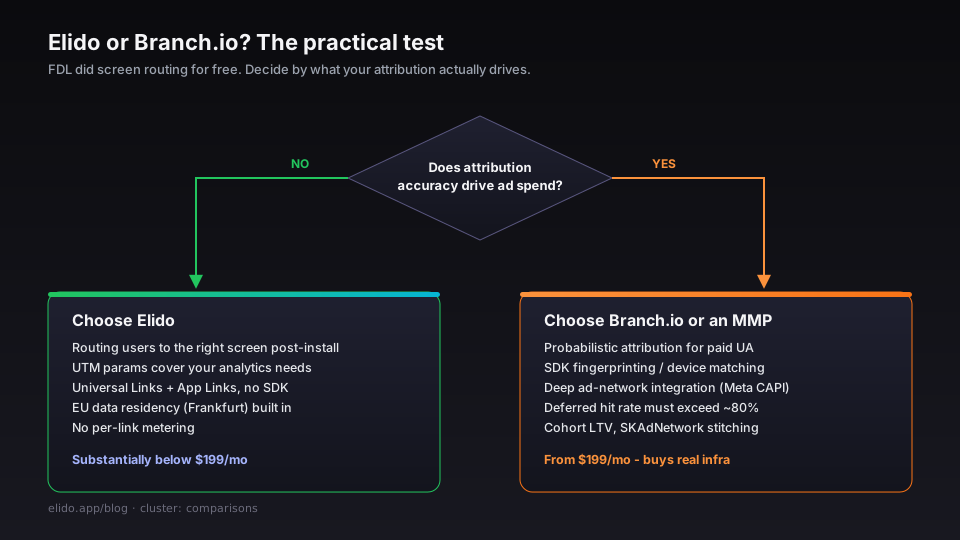
Вероятностная атрибуция для платного привлечения. Branch интегрируется с рекламными сетями (Meta, Google, TikTok, Snap) через постбэки и может вероятностно атрибутировать установки, когда детерминированный отпечаток недоступен - например, на iOS 14.5+ без согласия на ATT. Elido не занимается вероятностной атрибуцией. Если ваша команда роста запускает платное привлечение и нуждается в сверке установок с рекламными расходами на уровне когорт, Branch или MMP (Adjust, AppsFlyer) является правильным инструментом для этой конкретной задачи.
Снятие отпечатков и сопоставление устройств на уровне SDK. SDK Branch собирает сигналы устройства (разрешение экрана, IP, язык, часовой пояс) для снятия отпечатка устройства через окно установки без опоры на install referrer. Сопоставление только по referrer ухудшается в средах, где referrer удаляется - если вашему показателю попадания отложенного deep-link нужно превышать ~80%, подход на уровне SDK работает лучше.
Глубокая интеграция с конкретными рекламными сетями. Branch имеет специализированные интеграции с CAPI Meta, отслеживанием конверсий Google и events API TikTok, которые выходят за рамки того, что покрывает серверная переадресация конверсий Elido. Если ваш стек атрибуции тесно связан с одной из этих сетей, ознакомьтесь с документацией по конкретной интеграции Branch перед переходом.
Практический тест: если вы использовали FDL преимущественно для маршрутизации пользователей на нужный экран после установки, и ваши потребности в атрибуции покрыты UTM-параметрами в вашем аналитическом инструменте, Elido заменяет FDL при более низкой стоимости. Если вы занимаетесь перформанс-маркетингом в масштабе, и точность атрибуции определяет бюджетные решения, это реальное ценностное предложение Branch, и $199/месяц покупают реальную инфраструктуру для этого.
Частые вопросы
В моём приложении FDL-ссылки находятся в payload push-уведомлений - что произойдёт, когда пользователи на них нажмут?
Ссылки указывают на page.link, который возвращает 404. Обработчик ссылок ОС передаёт ошибку 404 браузеру или обработчику универсальных ссылок вашего приложения, который завершится с ошибкой. Вам нужно обновить сервис push-уведомлений для генерации коротких ссылок Elido. Если payload генерируется на стороне сервера (правильный подход), это однострочное изменение - вызывать API Elido вместо FDL API. Если payload генерируется на клиенте из жёстко заданных шаблонов, потребуется обновление приложения.
Нужно ли выпускать обновление приложения для завершения миграции?
Для отложенного deep-link запроса (маршрутизация через окно установки) - да, нужно заменить вызов FDL SDK на вызов endpoint Elido, что требует обновления приложения. Для Universal Links и Android App Links к уже установленному приложению обновление не требуется, как только DNS и файлы AASA/assetlinks.json на месте - ОС запрашивает эти файлы с сервера, а не из бинарника приложения. Исключение: если ваш Info.plist / AndroidManifest.xml ещё не объявляет новый домен как связанный, это требует обновления приложения.
Что происходит с кликами по старым FDL-ссылкам после завершения миграции?
Если старая ссылка была на домене page.link: ничего - этот домен мёртв и ссылки невосстановимы. Если вы использовали кастомный домен для FDL (менее распространено, но поддерживалось), перенаправьте CNAME домена на Elido и настройте эквивалентные правила маршрутизации; старые URL снова начнут резолвиться.
Есть ли у Elido SDK?
Elido не требует SDK для Universal Links или App Links - это нативные механизмы ОС. Для запроса к endpoint отложенного deep-link вы делаете стандартный HTTPS-вызов; зависимость от SDK не нужна. Если хотите типизированный клиент, Go SDK Elido, TypeScript SDK и Python SDK - все они оборачивают API deep links, но iOS/Android SDK не существует и он вам не нужен. Это сделано намеренно - чем меньше сторонних SDK в production-приложении, тем лучше.
Сколько времени занимает распространение AASA / assetlinks.json?
После распространения DNS (от нескольких минут до часа в зависимости от TTL) файлы AASA и assetlinks.json сразу доступны с edge Elido. iOS обновляет свою кешированную копию AASA при установке приложения и периодически после этого; задержка, которую вы заметите при тестировании, - это устаревание кеша iOS, а не задержка отдачи Elido. Для чистого теста устанавливайте приложение заново после распространения DNS-изменения.
Если вас интересует полный набор функций deep-link, страница /features/deep-links охватывает матрицу поддержки платформ и глубину правил маршрутизации. Для деталей о хранении данных в ЕС, актуальных для мобильных приложений, собирающих данные пользователей ЕС, обзор соответствия требованиям содержит DPA и список субобработчиков, который запросит ваша команда по конфиденциальности.
По теме в блоге
- Deep links без SDK: как на самом деле работают Universal Links и App Links
- Хранение данных в ЕС для маркетинговых инструментов: что на самом деле спрашивает ваш DPO
- Смарт-ссылки: маршрутизация по устройству, гео, времени суток и рефереру
- Миграция с Bitly без поломки ссылок: плейбук по режимам сбоев
- Альтернатива сокращателю URL от Google после закрытия goo.gl
- Что такое диплинк? Простое объяснение
- Что такое динамическая ссылка? Редактируемые, отслеживаемые URL
Частые вопросы
В моём приложении FDL-ссылки находятся в payload push-уведомлений - что произойдёт, когда пользователи на них нажмут?
Ссылки указывают на page.link, который возвращает 404. Обработчик ссылок ОС передаёт ошибку 404 браузеру или обработчику универсальных ссылок вашего приложения, который завершится с ошибкой. Вам нужно обновить сервис push-уведомлений для генерации коротких ссылок Elido. Если payload генерируется на стороне сервера (правильный подход), это однострочное изменение - вызывать API Elido вместо FDL API. Если payload генерируется на клиенте из жёстко заданных шаблонов, потребуется обновление приложения.
Нужно ли выпускать обновление приложения для завершения миграции?
Для отложенного deep-link запроса (маршрутизация через окно установки) - да, нужно заменить вызов FDL SDK на вызов endpoint Elido, что требует обновления приложения. Для Universal Links и Android App Links к уже установленному приложению обновление не требуется, как только DNS и файлы AASA/assetlinks.json на месте - ОС запрашивает эти файлы с сервера, а не из бинарника приложения. Исключение: если Info.plist / AndroidManifest.xml ещё не объявляет новый домен как связанный - это требует обновления приложения.
Что происходит с кликами по старым FDL-ссылкам после завершения миграции?
Если старая ссылка была на домене page.link - ничего, этот домен мёртв и ссылки невосстановимы. Если вы использовали кастомный домен для FDL (менее распространено, но поддерживалось), перенаправьте CNAME домена на Elido и настройте эквивалентные правила маршрутизации - старые URL снова начнут резолвиться.
Есть ли у Elido SDK?
Elido не требует SDK для Universal Links или App Links - это нативные механизмы ОС. Для запроса к endpoint отложенного deep-link вы делаете стандартный HTTPS-вызов; зависимость от SDK не нужна. Если хотите типизированный клиент, Go SDK Elido, TypeScript SDK и Python SDK - все они оборачивают API deep links, но iOS/Android SDK не существует и он вам не нужен. Это сделано намеренно - чем меньше сторонних SDK в production-приложении, тем лучше.
Сколько времени занимает распространение AASA / assetlinks.json?
После распространения DNS (от нескольких минут до часа в зависимости от TTL) файлы AASA и assetlinks.json сразу доступны с edge Elido. iOS обновляет свою кешированную копию AASA при установке приложения и периодически после этого; задержка, которую вы заметите при тестировании, - это устаревание кеша iOS, а не задержка отдачи Elido. Для чистого теста устанавливайте приложение заново после распространения DNS-изменения.
Попробуйте Elido
Вставьте URL - получите короткую ссылку
Без регистрации. Ссылка живёт 30 дней. Зарегистрируйтесь, чтобы оставить её навсегда.
Бесплатно, без регистрации · 2 в день