O TikTok preenche seus valores UTM para você. O LinkedIn não. Essa única assimetria define como você cria o rastreamento para mídia paga, porque uma plataforma recompensa um modelo e a outra pune cada erro de digitação.
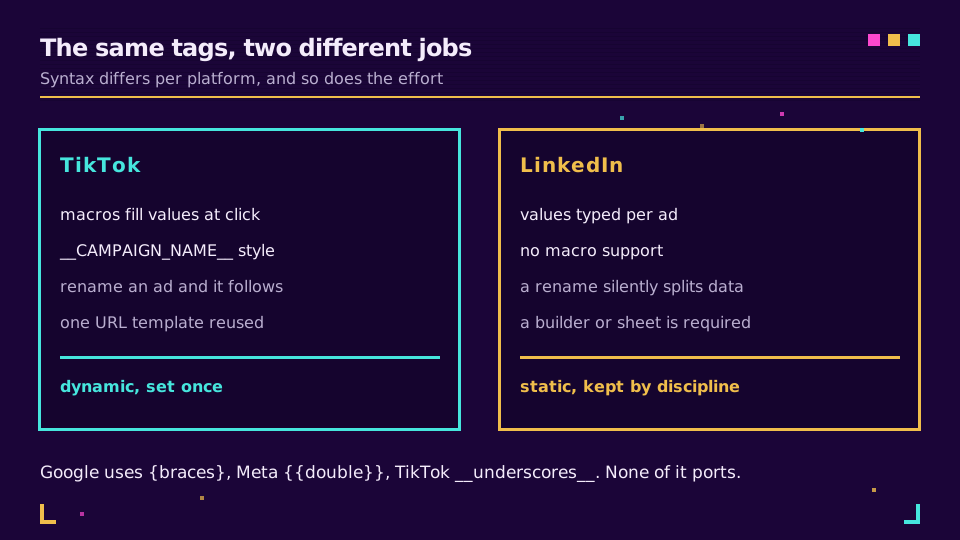
No TikTok, macros como __CAMPAIGN_NAME__ se expandem no momento do clique, então um único modelo de URL cobre todos os anúncios e uma renomeação é aplicada automaticamente. No LinkedIn, cada valor é digitado na URL de destino no nível do anúncio, o que significa que uma convenção documentada e um criador são as únicas coisas entre você e duas linhas para uma campanha.
Este é o equivalente para mídia paga de parâmetros UTM para anúncios no Google e na Meta. Os fundamentos estão em parâmetros UTM explicados, e, se as tags já estiverem chegando erradas, parâmetros UTM não aparecem no GA4 é a versão de solução de problemas.
TikTok: Deixe as Macros Fazerem o Trabalho
O TikTok Ads Manager aceita parâmetros dinâmicos que se expandem quando alguém clica. Um modelo funcional:
https://example.com/landing
  ?utm_source=tiktok
  &utm_medium=paid_social
  &utm_campaign=__CAMPAIGN_NAME__
  &utm_content=__CREATIVE_NAME__
  &utm_term=__PLACEMENT__
Defina isso uma vez no nível do anúncio e ele resistirá ao uso real. Renomeie uma campanha na interface e a tag a acompanhará, porque o valor é resolvido no momento do clique, e não copiado no momento da configuração.
Duas regras mantêm tudo organizado. Codifique utm_source e utm_medium em vez de derivá-los de uma macro, para que o agrupamento de canais permaneça estável independentemente do nome dado por alguém à campanha. E mantenha a saída da macro totalmente fora de utm_medium, porque um criativo chamado "Summer Sale v3" se tornaria um medium, e o GA4 classificaria tudo como Unassigned.
A sintaxe é específica da plataforma de uma forma que importa: o TikTok usa dois sublinhados, o Google usa chaves simples e a Meta usa chaves duplas. Copie um modelo da Meta para o TikTok e a string literal {{campaign.name}} aparecerá nos seus relatórios como nome de campanha.
LinkedIn: Não Há Macro, Então Crie a Disciplina
O LinkedIn Campaign Manager recebe parâmetros UTM como parte da URL de destino em cada anúncio, e não há substituição dinâmica. Tudo é digitado.
Isso traz três consequências que vale a pena planejar.
Uma campanha renomeada não atualiza suas tags, então o relatório mantém o nome antigo enquanto a interface mostra o novo. Decida os nomes antes do lançamento e trate-os como imutáveis depois disso.
Maiúsculas, minúsculas e espaços separam linhas silenciosamente. Q3_Launch e q3_launch são duas campanhas no GA4, e ninguém percebe até que um relatório mensal tenha metade dos números. Use tudo em minúsculas, sempre, e sublinhados no lugar de espaços.
E, como o valor é digitado por anúncio, uma campanha com doze anúncios tem doze chances de errar utm_content. Crie as URLs em uma planilha ou em um criador e cole-as, em vez de digitá-las diretamente no anúncio. A orientação do LinkedIn sobre URLs de anúncios explica onde o campo fica.
A Convenção Que Funciona nas Duas Plataformas
Fixe o vocabulário uma vez e aplique-o em todos os lugares:
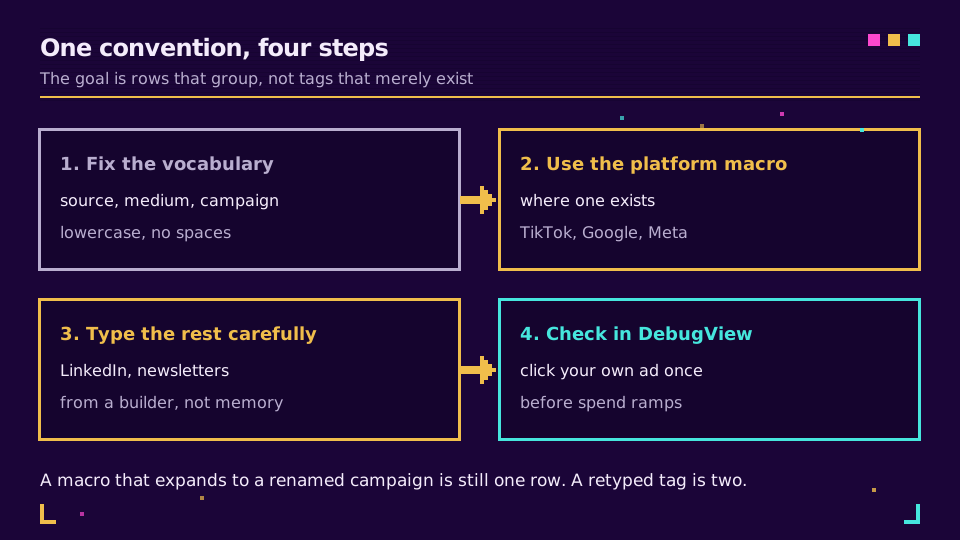
utm_sourceé a plataforma:tiktok,linkedin. Uma palavra, em minúsculas.utm_mediumé a categoria, de uma lista fechada que sua ferramenta de analytics reconhece:paid_socialoucpc. Nunca o nome da plataforma, nunca o nome de um criativo.utm_campaigné a campanha, em um formato que você possa ordenar:2026q3_launché melhor queSummer Launch Final FINAL.utm_contentdiferencia os criativos e é onde uma macro deve ficar quando houver uma.
Convenções de nomenclatura UTM traz a versão mais longa, incluindo como documentá-la para que uma pessoa nova na equipe a siga sem precisar perguntar.
Depois, automatize o que puder e restrinja o que não puder. Um encurtador de links com criador de UTM transforma medium em uma lista suspensa, removendo toda essa categoria de erros de digitação dos links criados manualmente.
Quer usar o criador em vez de uma planilha? Crie uma conta no plano gratuito, crie as URLs do LinkedIn ali e cole-as no Campaign Manager.
Onde os Links Curtos Entram e Onde Não Entram
Um limite útil que evita discussões: não envolva URLs de destino de anúncios pagos em um encurtador.
As plataformas de anúncios precisam ler e expandir suas próprias macros, executam sua própria medição de cliques e algumas rejeitam ou reescrevem cadeias de redirecionamento. Coloque o destino com tags no anúncio e deixe a plataforma fazer seu trabalho.
Links curtos entram em todos os outros lugares da mesma campanha: a publicação orgânica que promove o anúncio, o link na bio, o código QR no estande do evento, a newsletter. São lugares em que você controla tudo de ponta a ponta, e nos quais um domínio de marca e dados de cliques são só vantagens. Como rastrear links de mídias sociais explica como manter orgânico e pago comparáveis em um único relatório.
Verifique Antes de Aumentar o Orçamento
Faça um teste, no primeiro dia, gastando cerca de um euro: abra o DebugView do GA4, clique no seu próprio anúncio e leia o evento recebido.
Você está verificando uma coisa: se os valores da campanha chegam como texto expandido, e não como o nome literal da macro. utm_campaign=__CAMPAIGN_NAME__ permanecendo sem expansão na URL significa que a sintaxe está errada para aquela plataforma, e esse é o erro mais comum de toda esta área. Detectá-lo no primeiro dia custa um euro; detectá-lo na revisão mensal custa o mês inteiro.
Leia a Série Principal
Este artigo faz parte do cluster de tutoriais. Comece com parâmetros UTM explicados, depois veja rastrear campanhas UTM de ponta a ponta para o fluxo completo e parâmetros UTM para anúncios no Google e na Meta para as outras duas plataformas.
Relacionados no Blog
Perguntas frequentes
Quais parâmetros UTM devo usar para anúncios no TikTok?
utm_source=tiktok, utm_medium=paid_social, um nome de campanha e, depois, as macros dinâmicas para o restante. O TikTok aceita macros como __CAMPAIGN_NAME__, __ADGROUP_NAME__, __CREATIVE_NAME__ e __PLACEMENT__, que se expandem no momento do clique, para que um anúncio renomeado continue sendo registrado na mesma estrutura.
O LinkedIn aceita parâmetros UTM dinâmicos?
Não. O Campaign Manager do LinkedIn não tem um sistema de macros, então cada valor UTM é digitado na URL de destino no nível do anúncio. Isso torna uma convenção de nomenclatura documentada e um criador de URLs obrigatórios, e não opcionais, porque um valor redigitado separa silenciosamente uma campanha em duas linhas.
Qual é a sintaxe de macro em cada plataforma de anúncios?
O Google usa chaves simples, a Meta usa chaves duplas e o TikTok usa dois sublinhados ao redor do nome. Os nomes também diferem, então um modelo copiado entre plataformas produz texto literal na URL em vez de um valor. Crie um modelo por plataforma.
As tags UTM devem ficar na URL do anúncio ou em um link curto?
Na URL de destino que a plataforma veicula. As plataformas de anúncios precisam ver e expandir suas próprias macros, então envolver a URL do anúncio em um encurtador pode quebrar isso. Links curtos servem para publicações orgânicas, bios e materiais impressos, nos quais você controla o caminho do clique de ponta a ponta.
Por que meu tráfego de mídia paga está aparecendo como Unassigned no GA4?
Porque utm_medium contém um valor que o agrupamento de canais não reconhece. Use paid_social ou cpc em vez de tiktok-ads ou sponsored, e coloque a parte descritiva em utm_source e utm_campaign. O medium é uma categoria, não um rótulo.
Como testo as tags antes de gastar dinheiro?
Abra o DebugView do GA4, clique no seu próprio anúncio uma vez e confirme que os valores da campanha chegam como texto expandido, e não como nomes literais de macros. Fazer isso no primeiro dia custa um euro do orçamento e evita duas semanas de dados inutilizáveis.
Experimente Elido
Cole uma URL, obtenha um link curto
Sem cadastro. O link vive 30 dias. Cadastre-se para mantê-lo para sempre.
Grátis, sem necessidade de registo · 2 por dia