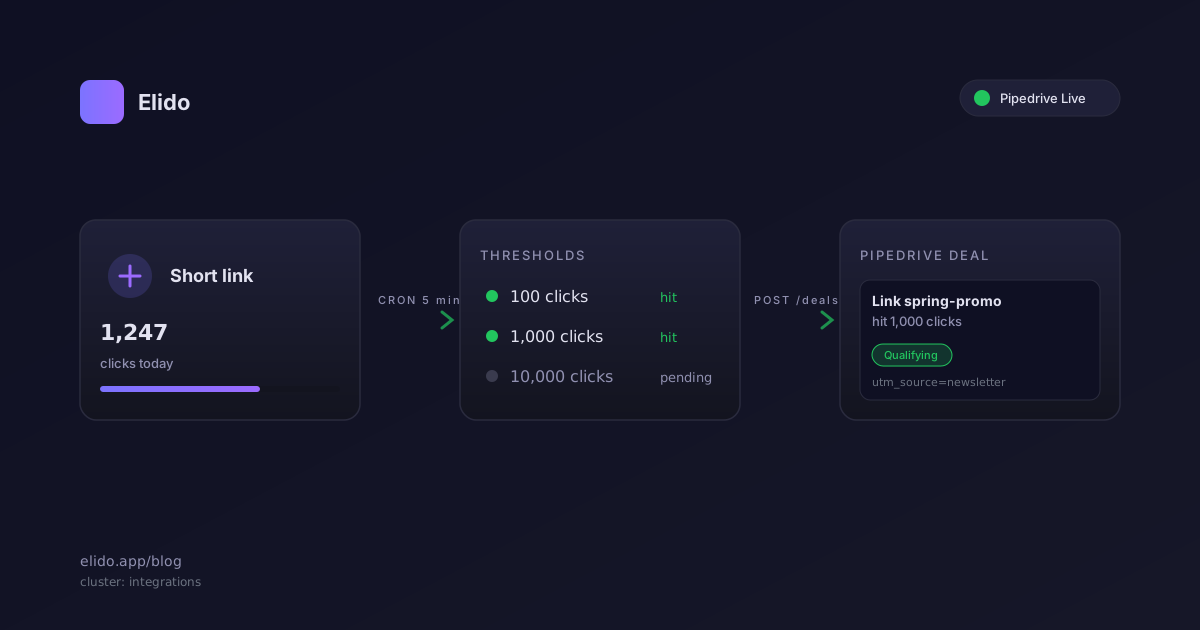
O rastreamento de cliques de link no Pipedrive pelo Elido transforma marcos de link curto em eventos de pipeline. Quando um dos seus links ultrapassa 100, 1.000 ou 10.000 cliques, um cron de 5 minutos cria um negócio no funil do Pipedrive que você escolheu, com título trazendo o slug do link e o marco. Notas de negócio carregando a origem da UTM e um link profundo de volta ao Elido estão planejadas. Sem Zapier no meio, sem exportação manual, sem lembrete no calendário para checar relatórios de link.
Essa é a manchete. A mecânica importa mais, então este post percorre as três coisas que equipes de sales ops precisam confiar antes de ativar isso. Primeiro, como o fluxo de Conectar realmente funciona: onde o Personal API token vive, o que o seletor de funil está lendo, e como o token é armazenado depois que você o cola. Segundo, o que o cron de limite faz em cada execução e como ele evita criar negócios duplicados quando um link viraliza da noite para o dia. Terceiro, o que você pode e não pode mudar além dos três limites padrão, e o que está planejado a seguir.
O Pipedrive ficou Ao vivo no Elido em 22 de maio de 2026. Antes disso, ficou em Beta por duas semanas enquanto resolvíamos casos extremos envolvendo IDs de estágio e rotação de token. O código da integração vive em services/api-core/internal/integrations/pipedrive/ se você faz self-host e quer ler o código-fonte. Onde algo abaixo está planejado em vez de lançado, o post diz isso.
Conectando o Pipedrive em dois minutos
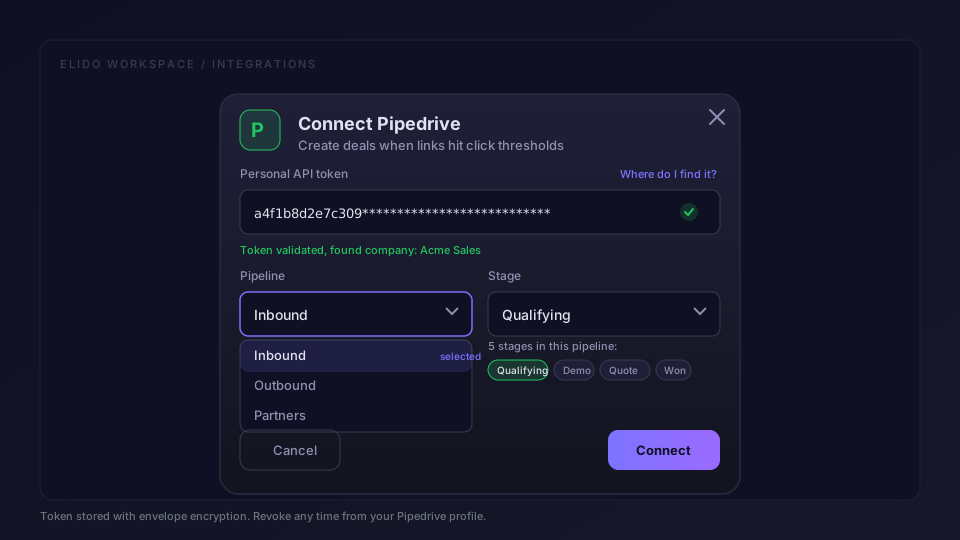
Abra o catálogo de integrações no seu workspace do Elido e clique no card do Pipedrive. O modal de Conectar pede uma coisa primeiro: um Personal API token. Você o obtém na sua conta do Pipedrive abrindo o menu de perfil, escolhendo Personal preferences, depois a aba API. O próprio guia do Pipedrive sobre como encontrar o Personal API token tem o caminho exato com capturas de tela, já que a interface deles muda mais ou menos a cada trimestre.
Cole o token. O Elido faz duas coisas em segundo plano. Ele valida o token chamando GET /users/me contra a API do Pipedrive, o que confirma que o token está ativo e nos diz a qual empresa do Pipedrive o token pertence. Ele também extrai a lista de funis ativos daquela empresa, para que o próximo passo no modal mostre opções reais, não campos de texto livre.
O modal então faz mais uma pergunta: em qual funil os novos negócios devem cair? O menu suspenso é preenchido a partir dos seus dados ao vivo do Pipedrive. Se você tem três funis chamados Inbound, Outbound e Partners, você vê esses três. Escolha o que combina com o trabalho, geralmente Inbound para sinais vindos de marketing, e clique em Connect. Os negócios caem no primeiro estágio daquele funil; escolher um estágio alvo diferente está planejado.
O que acontece com o token depois de Conectar. O Elido o criptografa antes de tocar o Postgres, usando envelope encryption com uma chave de criptografia de dados por tenant, envolvida por uma chave KMS de workspace. O blob envolvido é o que fica na tabela integration_credentials. O token em texto puro só existe em memória durante o tempo de vida de uma única chamada de API, e nunca o registramos em log, nem em verbosidade de debug. Se você rotacionar o token no Pipedrive, a próxima execução do cron recebe um 401 e o Elido marca a integração como precisando de reautenticação, o que aparece como um banner no workspace, não uma falha silenciosa. A higiene de rotação é responsabilidade sua, a quebra é barulhenta.
O seletor de funil é um detalhe pequeno, mas importante. Um modo de falha comum em integrações de CRM é criar negócios no funil errado porque a integração foi construída quando a empresa tinha um funil e agora tem seis. Deixar o usuário escolher ao Conectar, e mostrar a lista atual em vez de usar uma em cache de um mês atrás, elimina toda essa classe de erro. Você também pode reconectar a qualquer momento para mudar o alvo do seletor sem perder o histórico de limites.
O que o cron de 5 minutos realmente faz
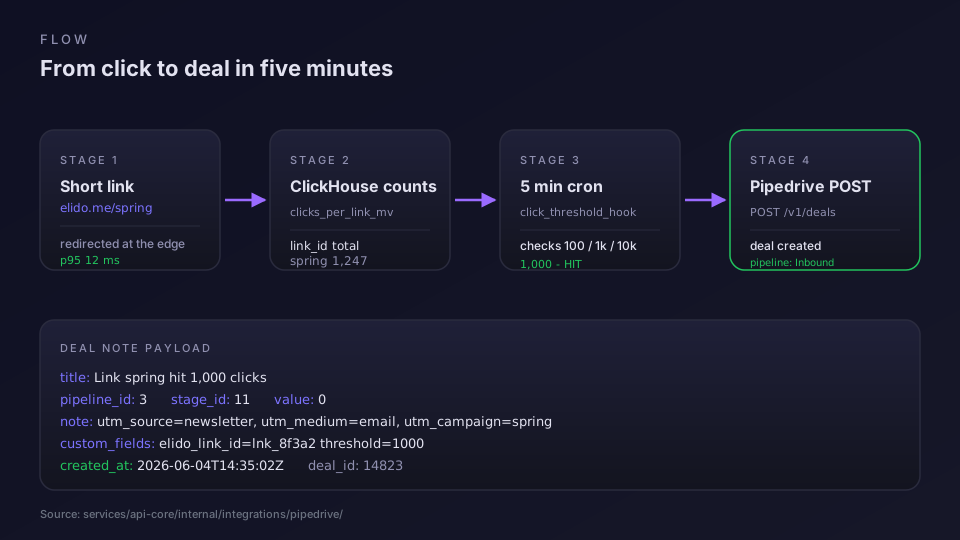
Dentro de services/api-core existe um job chamado click_threshold_hook. Ele roda a cada cinco minutos. A cada execução ele faz três coisas em ordem, por workspace que tem o Pipedrive conectado.
Primeiro, ele lista os links ativos do workspace e lê o contador de cliques contínuo de cada um, o mesmo contador que o serviço de redirecionamento incrementa a cada clique. Links excluídos e inativos são ignorados.
Segundo, ele compara o novo total de cada link contra os limites registrados. Os limites padrão são 100, 1.000 e 10.000. Para cada link, o Elido registra todo limite que já produziu um negócio em uma linha de integration_pipedrive_deals chaveada por workspace, link e limite. Se um link estava em 80 cliques na última execução e agora está em 240, a comparação mostra que o limite de 100 foi ultrapassado e o de 1.000 ainda não foi tocado. Marcamos 100 como atingido e enfileiramos uma criação de negócio. Se um link saltou de 80 para 1.200, tanto o 100 quanto o 1.000 foram ultrapassados, então enfileiramos duas criações.
Terceiro, para cada negócio enfileirado, o Elido chama a Deals API do Pipedrive com um POST para /deals. O corpo define o ID do funil a partir do seletor de Conectar, nomeia o negócio Engagement: <slug> (<threshold> clicks), e deixa o valor em zero. Escrever a origem, o meio e a campanha de UTM em uma nota de negócio com um link de volta para a visão de analytics do Elido está planejado, assim como armazenar o ID do link em um campo personalizado do Pipedrive.
Algumas coisas que esse cron não faz. Ele não repete dentro de uma execução. Se o Pipedrive retorna um erro, nada é registrado para aquele limite, então a próxima execução simplesmente tenta de novo. O limite de taxa do Pipedrive é, na prática, de 100 requisições a cada 2 segundos por token de empresa, o que é folga suficiente para os volumes que a maioria das equipes vai atingir. Ele também só olha links ativos, então links excluídos ou inativos nunca criam negócios.
A prevenção de duplicatas se apoia nessa tabela. Antes de cada criação, o cron verifica uma linha (workspace_id, link_id, threshold_bucket) existente, e a inserção depois é protegida por uma restrição de unicidade nas mesmas três colunas, então uma falha e uma nova execução não produzem um segundo negócio para o mesmo marco.
Estendendo além dos três padrões
Os limites lançados são 100, 1.000 e 10.000. A maioria das equipes mantém esses porque eles mapeiam naturalmente para uma narrativa de vendas. Cem cliques é um sinal suave que vale uma olhada. Mil é uma campanha que vale uma ligação. Dez mil é quente o suficiente para que um representante já devesse estar se movendo. Dito isso, você pode querer números diferentes, e hoje você não consegue defini-los.
A integração com Pipedrive do Elido usa os mesmos três grupos para todo workspace, e ainda não existe endpoint nem configuração para uma lista de limites personalizada.
Gatilhos mais ricos estão no roadmap em vez de lançados. O plano de integração inclui um gatilho de limite delimitado por uma campanha com uma UTM candidata a negócio, e um gatilho de conversão que cria um negócio carregando o valor de pedido capturado. Estágios alvo configuráveis pelo usuário e campos personalizados do Pipedrive como Deal Source ou Lead Channel também estão planejados para a próxima versão. Até chegarem, se você precisa de um filtro de UTM ou de um agregado por pasta, faça polling na API de analytics do Elido a partir do seu próprio job e crie o negócio pela API do Pipedrive você mesmo.
Onde o token vive e como rotacioná-lo
Uma seção curta porque isso aparece em toda revisão de segurança. O Personal API token é criptografado em repouso usando AES-256-GCM com uma chave de criptografia de dados por tenant. A própria DEK é envolvida por uma chave em nível de workspace no nosso KMS, e só o processo api-core consegue desembrulhá-la. Não existe token em texto claro em nenhum log, nenhum backup, nenhum rastro de erro. Testamos isso com uma injeção de falha que forçou um 401 do Pipedrive no meio de uma requisição, e o caminho de erro remove o token da resposta antes que ela chegue ao Sentry.
Para rotacionar: gere um novo Personal API token no Pipedrive, revogue o antigo, depois cole o novo no modal de Conectar do Elido novamente. A integração valida o novo token, o substitui no lugar, e a próxima execução do cron o usa. Se você esquecer de atualizar o Elido depois de revogar o token antigo, a próxima execução do cron recebe um 401 e a integração entra em um estado de Precisa de Reautenticação, visível como um banner amarelo no painel do workspace. Sem tokens mortos silenciosos.
No self-host o KMS é plugável: baseado em arquivo por padrão, troque por HashiCorp Vault ou o KMS da sua nuvem. A ADR-0036 cobre a versão longa.
Onde isso se encaixa em um funil mais amplo
Gatilhos de negócio no Pipedrive a partir de cliques são uma peça de um padrão maior. Contagens de clique são um indicador antecedente, não um número de receita, então você geralmente quer que fluam para um CRM onde o resto do contexto de vendas vive. O negócio é a entrega: o marketing fez o trabalho dele, as vendas assumem. Dali em diante seus workflows normais do Pipedrive assumem: atribuir o negócio a um representante, pontuá-lo, movê-lo pelos estágios, fechá-lo.
Se você também está encaminhando conversões para plataformas de anúncios, os mesmos dados de clique alimentam os dois fluxos. O recurso de rastreamento de conversão cuida do lado dos anúncios, a integração com o Pipedrive cuida do lado do CRM, e os dois nunca disputam o mesmo evento. Vemos essa combinação com mais frequência na página da solução para profissionais de marketing, onde toda a stack é aquisição paga levando a links com marca própria levando a um funil de CRM.
Para analistas que querem manter seus números honestos, dois posts anteriores cobrem as preocupações a montante. Analytics de link curto: o que medir cobre quais métricas de clique realmente correlacionam com receita, e Rastreie UTMs de ponta a ponta cobre a higiene de UTM que torna as notas de negócio úteis em vez de ruidosas. Os dois combinam bem com essa integração, já que o negócio que o Pipedrive cria só é tão útil quanto os dados de UTM que carrega.
Um último detalhe sobre planos. A integração com o Pipedrive está disponível em todo nível pago do Elido, e o teste gratuito de 14 dias a inclui, para que você possa validar sua lista de limites antes de assinar. Workspaces gratuitos podem criar a conexão para teste, mas o cron não dispara para links gratuitos. A página de preços tem o detalhamento por nível.
Checklist de configuração
Imprima isto, faça uma vez.
- No Pipedrive: menu de perfil, Personal preferences, aba API, copie o token.
- No Elido: Integrações, card do Pipedrive, Connect.
- Cole o token. Espere a validação.
- Escolha o funil. Padrão para Inbound; os negócios caem no primeiro estágio dele.
- Clique em Connect.
- Espere cinco minutos. Envie alguns cliques de teste. Observe o primeiro negócio cair.
É isso. Se você faz self-host, o cron roda dentro do processo api-core em vez de como um job separado, e precisa da conexão Redis e da chave mestra de segredos configuradas; sem qualquer uma delas, ele pula silenciosamente. No Elido Cloud o cron é gerenciado para você.
Perguntas frequentes
Como funciona o rastreamento de cliques de link no Pipedrive no Elido?
O Elido mantém um contador de cliques contínuo por link curto, e um cron de 5 minutos verifica cada workspace conectado em busca de links que ultrapassaram 100, 1.000 ou 10.000 cliques. Quando um limite é atingido, o Elido chama a Deals API do Pipedrive e cria um negócio no funil que você escolheu ao Conectar, no primeiro estágio dele. O título do negócio nomeia o slug do link e o marco, por exemplo Engagement: spring-sale (1000 clicks).
Preciso de um plano pago do Pipedrive para usar a integração?
Qualquer plano do Pipedrive que permita gerar um Personal API token funciona, o que hoje inclui todo nível do Pipedrive a partir do Essential. A integração só usa a Deals API pública, então você não precisa do Advanced ou superior para a conexão em si. Algumas ações posteriores, como campos personalizados, também existem em níveis mais baixos, mas os limites de campo por nível do lado do Pipedrive ainda se aplicam.
Por que a integração do Pipedrive é por colagem de token em vez de OAuth?
O Pipedrive aceita OAuth para apps do marketplace, mas integrações privadas de workspace ainda dependem de um Personal API token, que é mais rápido de lançar e mais fácil de rotacionar. O token é criptografado em repouso com envelope encryption no Elido, nunca é registrado em log, e você pode revogá-lo do seu perfil do Pipedrive em dois cliques. Vamos migrar a integração para OAuth quando o Pipedrive abrir isso para tenants fora do marketplace.
Posso mudar quais limites criam negócios?
Os padrões são 100, 1.000 e 10.000 cliques, que combinam com como a maioria das equipes de vendas trata sinais suaves, médios e quentes. Hoje eles são fixos para todo workspace: não existe configuração ou API para uma lista de limites personalizada. Um gatilho de limite delimitado pela UTM de uma campanha está no roadmap da integração, mas ainda não foi lançado.
O que acontece se uma contagem de clique ultrapassar dois limites em cinco minutos?
O cron dispara uma vez por limite por link, então um link que se move rápido, indo de 80 para 1.200 cliques entre execuções, vai criar dois negócios em sequência: um para o marco de 100, outro para o de 1.000. Cada limite que já produziu um negócio fica registrado por link, então uma nova tentativa nunca cria uma duplicata, e um único link pode produzir no máximo três negócios ao longo de sua vida, um por marco.
Experimente Elido
Cole uma URL, obtenha um link curto
Sem cadastro. O link vive 30 dias. Cadastre-se para mantê-lo para sempre.
Grátis, sem necessidade de registo · 2 por dia
Continuar lendo
- IntegraçõesEncurtador de URLs do Brevo: short links de marca em campanhas
- IntegraçõesMonitoramento de URLs no Datadog: métricas de redirecionamento para links curtos
- IntegraçõesEncurtador de URL no GitHub Actions: links curtos a partir do seu CI
- IntegraçõesEncurte links nas notas de release e rastreie cada download