
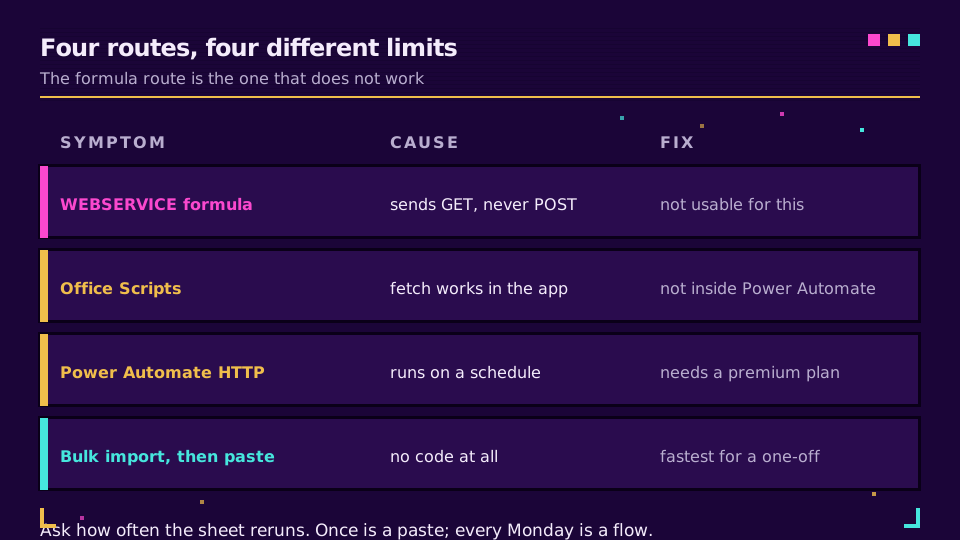
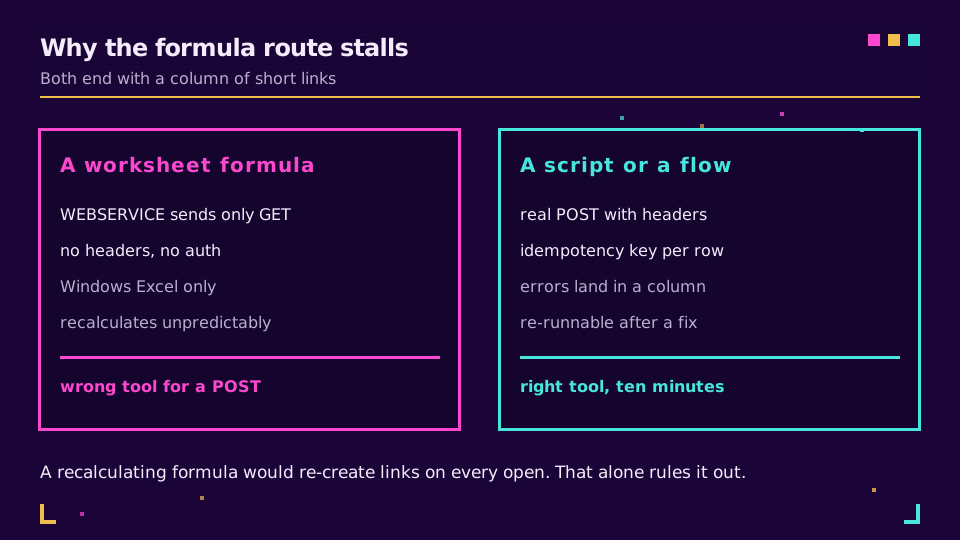
O Excel não consegue encurtar uma URL com uma fórmula. WEBSERVICE envia uma solicitação GET sem cabeçalhos nem corpo, e uma API moderna de encurtador precisa de um POST com um cabeçalho Authorization e JSON. Ela também funciona apenas no Windows. Todo tutorial baseado em fórmulas que você encontrar usa um serviço que aceitava a URL longa como parâmetro de consulta, e esses serviços desapareceram.
Então, a verdadeira pergunta é qual dos três caminhos funcionais combina com a sua planilha: um Office Script, um fluxo do Power Automate ou uma importação em lote com copiar e colar. A resposta depende quase inteiramente da frequência com que a planilha precisa ser executada.
Caminho um: um Office Script
O Office Scripts executa TypeScript na pasta de trabalho e pode chamar uma API externa com fetch. Este é o caminho para uma planilha que você abre e executa manualmente.
async function main(workbook: ExcelScript.Workbook) {
  const sheet = workbook.getActiveWorksheet();
  const rows = sheet.getUsedRange().getValues();

  for (let i = 1; i < rows.length; i++) {
    const destination = String(rows[i][0]);
    if (!destination || rows[i][1]) continue; // skip blanks and already-done rows

    const response = await fetch("https://api.elido.app/v1/links", {
      method: "POST",
      headers: {
        Authorization:
          "Bearer " + workbook.getWorksheet("Config").getRange("B1").getText(),
        "Content-Type": "application/json",
        "Idempotency-Key": destination, // stable per row, so a re-run creates nothing
      },
      body: JSON.stringify({ destination_url: destination }),
    });

    const link = (await response.json()) as { short_url: string };
    sheet.getCell(i, 1).setValue(link.short_url);
  }
}
Três limitações aparecem em sequência.
A principal é esta: chamadas fetch externas funcionam quando o script é executado no Excel e não quando o Power Automate o executa. Um script que funciona perfeitamente na guia Automate falha com fetch is not defined no momento em que um fluxo o aciona, e essa surpresa já custou uma tarde a muita gente.
Não há armazenamento de segredos nem fluxo de OAuth, então a chave fica no script ou em uma célula. Lê-la de uma planilha Config, como acima, é um pouco melhor porque o script pode ser compartilhado sem a chave, mas a própria pasta de trabalho agora é uma credencial.
Além disso, a API de destino precisa permitir a chamada a partir da origem do script. A documentação do Office Scripts exige CORS para recursos externos, algo que a maioria das APIs públicas atende e algumas internas não.
A linha if (rows[i][1]) continue é o que torna seguro executar o script duas vezes: as linhas que já têm um link curto são ignoradas, e a chave de idempotência cobre o restante.
Caminho dois: um fluxo do Power Automate
Para qualquer coisa agendada, um fluxo é a resposta mais adequada, porque é executado independentemente de alguém estar com a pasta de trabalho aberta.
A estrutura é esta: um gatilho de recorrência ou de arquivo, List rows present in a table do conector do Excel, um loop apply-to-each com a ação HTTP fazendo POST para o endpoint de links e, depois, Update a row escrevendo o link curto de volta.
Duas coisas devem ser consideradas antes de criá-lo. A ação HTTP genérica é um conector premium, então esse caminho depende da sua licença, não da sua habilidade. E o fluxo pode armazenar a chave da API em uma entrada segura ou buscá-la no Azure Key Vault, uma melhoria real em relação ao caminho do Office Script: a credencial deixa de morar em um arquivo que as pessoas enviam por e-mail umas às outras.
Se o fluxo processar centenas de linhas, adicione um limite de concorrência ao apply-to-each. A distribuição paralela padrão é generosa o suficiente para acionar o limite de taxa da API, e a correção é uma configuração, não uma reformulação.
Caminho três: exportar, importar em lote, colar de volta
Para uma tarefa pontual, este caminho supera os dois anteriores em tempo até a conclusão. Exporte a coluna de destinos para CSV, passe-a pela importação em lote do encurtador, baixe o resultado e cole os links curtos de volta ao lado dos originais.
Sem conector premium, sem chave em uma pasta de trabalho e sem script para manter. O guia de importação em lote do Google Sheets explica o formato do arquivo, que é o mesmo independentemente da planilha que o produziu, e a geração em lote de códigos QR aborda a versão em que cada linha também precisa de um código imprimível.
A regra de decisão é simples. Uma vez significa colar. Toda segunda-feira significa um fluxo. Sempre que alguém abrir a pasta de trabalho significa um Office Script.
Quer experimentar primeiro o caminho de copiar e colar? Crie uma conta no plano gratuito, importe um CSV de cinco linhas e veja se vale a pena criar a automação.
Por que uma fórmula continuaria sendo inadequada
Suponha que WEBSERVICE pudesse fazer POST. Ainda assim, seria a ferramenta errada, porque as fórmulas recalculam de acordo com a agenda do Excel, não com a sua. Abra a pasta de trabalho e cada linha enviará a solicitação novamente. Sem uma chave de idempotência, isso cria um link duplicado por linha a cada abertura; com uma, é apenas uma rajada de tráfego inútil que consome seu limite de taxa.
Tudo que cria um recurso deve ficar em um código executado quando você manda, não em uma célula que recalcula quando o aplicativo decide. Vale internalizar isso para além deste caso: é o mesmo motivo pelo qual as pessoas se dão mal ao colocar RAND() ou NOW() em uma planilha que alimenta um relatório.
Como devolver o resultado à planilha
Qualquer que seja o caminho escolhido, escreva quatro colunas, não duas: a URL original, o link curto, o slug e uma mensagem de status ou erro. Assim, uma execução que terminou pela metade fica evidente e pode ser executada novamente, em vez de produzir uma coluna com lacunas silenciosas.
Guarde o arquivo. Quando alguém perguntar daqui a três meses qual link foi usado em qual envio, a planilha será a resposta, e reconstruí-la a partir do painel dará mais trabalho do que mantê-la. Se os mesmos links precisarem de dados de cliques ao lado, como rastrear cliques em links explica a parte da exportação.
Leia a série principal
Este artigo faz parte do cluster de engenharia. Comece pelo guia gratuito da API de encurtador de URLs para entender o formato da solicitação e, depois, consulte limites de taxa e idempotência para se comportar corretamente em um loop. Para a versão em PowerShell do mesmo trabalho com CSV, veja como encurtar uma URL no PowerShell.
Relacionado no blog
Perguntas frequentes
Posso encurtar uma URL com uma fórmula do Excel?
Não com uma API moderna de encurtador. WEBSERVICE envia uma solicitação GET sem cabeçalhos, então não consegue autenticar nem enviar um corpo JSON, e funciona apenas no Windows. Qualquer tutorial que mostre um encurtador baseado em fórmula usa um serviço antigo que aceitava a URL longa como parâmetro de consulta.
Como encurto URLs no Excel, então?
Três caminhos funcionam: um Office Script com fetch para uma execução pontual dentro do aplicativo, um fluxo do Power Automate com a ação HTTP para qualquer coisa agendada ou a exportação da coluna para CSV seguida de uma importação em lote. Escolha com base na frequência de execução da planilha, não no que parece mais engenhoso.
Por que o fetch falha no meu Office Script quando o Power Automate o executa?
Porque chamadas fetch externas não estão disponíveis no runtime do Power Automate, apenas quando o script é executado no próprio Excel. O script que funciona na guia Automate do aplicativo falha com fetch is not defined quando um fluxo o aciona, e essa é a surpresa mais comum neste caso.
O Office Scripts oferece suporte a OAuth ou armazenamento de segredos?
Não. Não existe fluxo de login nem armazenamento de segredos, então uma chave precisa ser codificada no script ou lida de uma célula. Trate qualquer pasta de trabalho que contenha esse script como uma credencial: não a compartilhe amplamente e use uma chave limitada à criação de links.
Como evito criar links duplicados sempre que a planilha recalcula?
Envie uma chave de idempotência derivada da URL de destino, para que uma solicitação repetida retorne o link existente em vez de criar um novo. É também por isso que uma fórmula seria a ferramenta errada mesmo que pudesse fazer POST: as fórmulas recalculam no próprio ritmo e criariam links todas as vezes.
Qual é a maneira mais rápida de encurtar algumas centenas de linhas uma única vez?
Exporte a coluna para CSV e use a importação em lote do encurtador, depois cole os links curtos retornados ao lado dos originais. Sem código, sem conector premium, e leva alguns minutos. Automatize apenas quando o mesmo trabalho se repetir em uma agenda.
Experimente Elido
Cole uma URL, obtenha um link curto
Sem cadastro. O link vive 30 dias. Cadastre-se para mantê-lo para sempre.
Grátis, sem necessidade de registo · 2 por dia