Якщо коротке посилання починає віддавати 404 о третій ночі, ви хочете отримати алерт там, де вже чергує ваш on-call. Для більшості інженерних команд це Discord; для ops- і growth-команд у Європі - нерідко Telegram. Elido надає Beta-інтеграції для обох. У цій статті розберемо, що і куди вставляти, який JSON приходить на іншому кінці та три сценарії збоїв, які застають команди зненацька в перший тиждень.
Два факти одразу. Перший: обидва конектори працюють виключно через вставку токена. Ви генеруєте webhook URL або токен бота у UI провайдера, вводите його в Elido - і інтеграція активна. Ми нічого не налаштовуємо автоматично на стороні Discord або Telegram: їхні API цього не підтримують. Другий: кожен алерт генерується тим самим event bus, що обслуговує функцію webhooks, тому контракти payload стабільні й задокументовані.
Чому ці два - Beta, а не Live
Каталог інтеграцій Elido присвоює статус Live тоді, коли одним кліком ми можемо виконати три дії: зареєструвати ресурс провайдера, призначити потрібні scope-и і видалити все при відключенні. Notion, Linear і Pipedrive відповідають цьому критерію, бо надають OAuth і API для управління ресурсами.
Discord-вебхуки і Telegram-боти - ні. Webhooks API Discord потребує користувача-бота з дозволом Manage Webhooks у конкретному каналі; керованого нами flow згоди просто не існує. Telegram ще складніший: BotFather - це чат-інтерфейс без машинозчитуваного видавання токенів. Тому ми просимо вас витратити 90 секунд на налаштування у провайдера, а все решта беремо на себе. Токен зберігається в нашому сховищі з конвертним шифруванням і ніколи не залишає webhook-диспетчер api-core.
Значок Beta означає: «працює, payload-и стабільні, але UX підключення/відключення потребує одного додаткового кроку». Якщо вам потрібен авто-провіжн вже сьогодні, Slack має статус Live і працює на тому ж pipeline трансформерів.
Покрокове налаштування: починаємо з Discord
У Discord відкрийте потрібний канал, натисніть на іконку шестерні та виберіть Інтеграції -> Вебхуки -> Новий вебхук. Дайте йому ім'я на кшталт elido-alerts, за потреби завантажте аватар Elido з /blog/covers і скопіюйте URL вебхука. Він виглядає так:
https://discord.com/api/webhooks/123456789012345678/AbCdEf-tokenstring
Цей URL - секрет. Будь-хто, хто його отримає, зможе постити у ваш канал. Поводьтеся з ним як із паролем.
В Elido перейдіть до Налаштувань робочого простору -> Інтеграції -> Discord. Вставте URL, виберіть типи подій у мультиселекті (broken_link, click_threshold, scan_failure, redirect_chain_change, qr_scan_anomaly) і збережіть. Форма спочатку надсилає синтетичну тестову подію; якщо Discord поверне щось відмінне від 204, збереження не відбудеться і ви побачите помилку прямо у формі.
Telegram налаштовується у два кроки. Відкрийте чат із BotFather, виконайте /newbot, придумайте ім'я і скопіюйте токен. Він має вигляд 7891234567:AAH-tokenstring. Потім додайте бота до чату, куди хочете отримувати алерти (особистий чат, група або канал), і надішліть будь-яке повідомлення. В Elido вставте токен, натисніть «Знайти чати», виберіть потрібний зі списку видимих боту чатів і збережіть.
Крок «Знайти чати» виконує одноразовий виклик getUpdates Telegram для переліку chat ID, які вже бачив ваш бот. Якщо список порожній - бот доданий, але ще не отримав жодного повідомлення. Надішліть йому будь-яке повідомлення і спробуйте знову.
Реальна структура payload
Саме тут більшість туторіалів «алерти в чат» стають розпливчастими. Ось що насправді приходить.
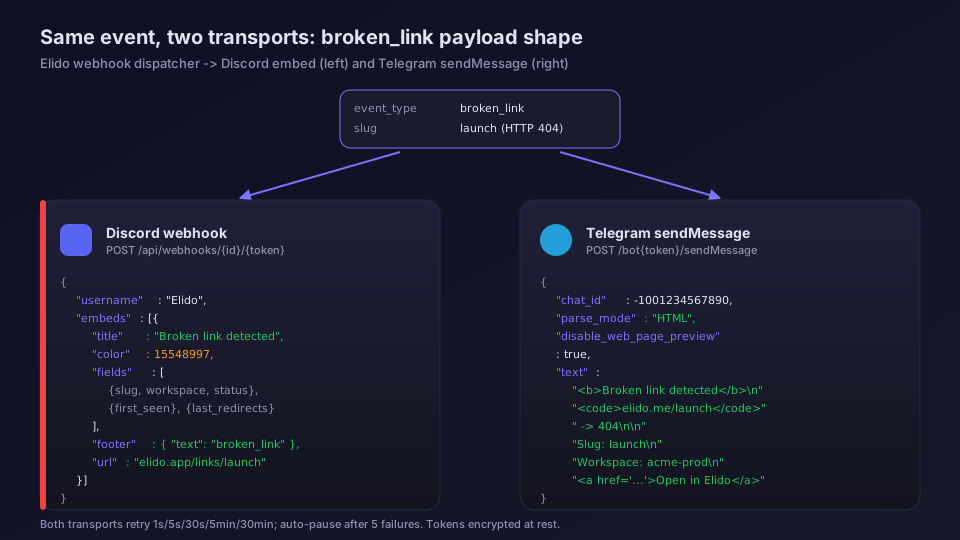
Для Discord ми надсилаємо один embed на подію, а не застарілий рядок content. Трансформер у services/api-core/internal/webhooks/delivery/transformers.go формує таку структуру:
{
  "username": "Elido",
  "embeds": [
    {
      "title": "Broken link detected",
      "description": "https://elido.me/launch -> 404 Not Found",
      "color": 15548997,
      "timestamp": "2026-06-04T09:14:22.000Z",
      "fields": [
        { "name": "Slug", "value": "launch", "inline": true },
        { "name": "Workspace", "value": "acme-prod", "inline": true },
        { "name": "Status", "value": "404", "inline": true },
        { "name": "First seen", "value": "2026-06-04 09:13:11 UTC" },
        { "name": "Last 5 redirects", "value": "blocked since 09:13:11" }
      ],
      "footer": { "text": "Elido alerts - broken_link" },
      "url": "https://elido.app/links/launch"
    }
  ]
}
Ціле число color - це десяткове значення hex-коду. Ми використовуємо чотири рівні важливості: info 3447003 (синій), success 2280516 (зелений), warn 15844367 (бурштиновий), error 15548997 (червоний). Детальніше про цей маппінг - трохи нижче.
Telegram працює інакше. Ми використовуємо parse_mode: "HTML", бо Markdown V2 вимагає екранувати десятки символів і швидко стає нечитабельним. Виклик sendMessage виглядає так:
{
  "chat_id": -1001234567890,
  "parse_mode": "HTML",
  "disable_web_page_preview": true,
  "text": "<b>Broken link detected</b>\n<code>elido.me/launch</code> -> 404\n\nSlug: <code>launch</code>\nWorkspace: <code>acme-prod</code>\nFirst seen: 2026-06-04 09:13:11 UTC\n\n<a href=\"https://elido.app/links/launch\">Open in Elido</a>"
}
Ми встановлюємо disable_web_page_preview у true, щоб чат не роздувався, коли URL алерту розгортав би превью. Превью посилань у черговому треді лише заважають.
Обидва транспорти повторюють спроби з однаковим backoff-ом: 1с, 5с, 30с, 5хв, 30хв. Після п'яти невдач інтеграція автоматично призупиняється і надсилається електронний лист. Кожна спроба логується у ClickHouse і доступна через посібник з observability.
Маппінг рівня важливості на колір
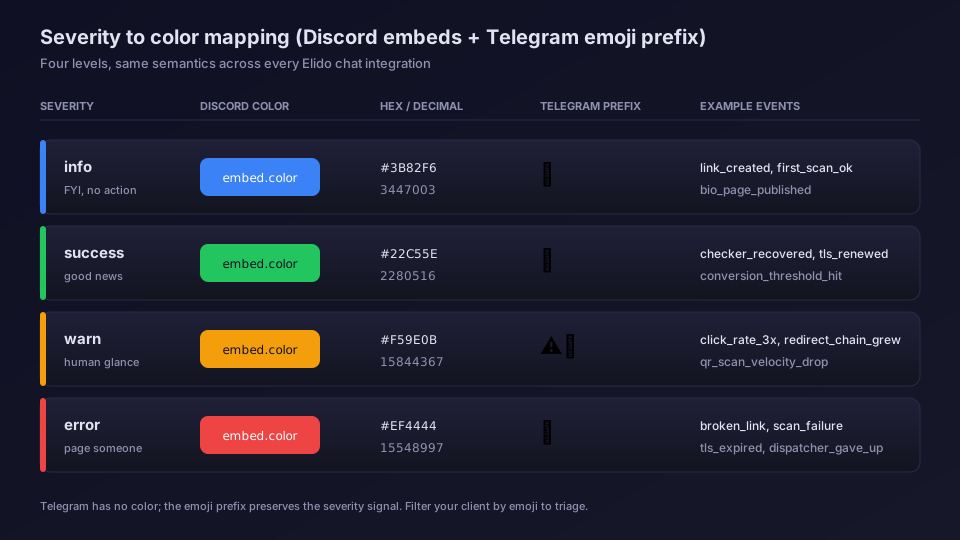
Колір - єдиний сигнал, який користувачі Discord бачать з першого погляду. Ми обрали чотири рівні важливості і суворо дотримуємося їх в усіх інтеграціях з підтримкою кольору:
- info (#3B82F6, синій) - нове посилання створено через API, перше сканування призначення, опублікована bio-сторінка. Не потребує дій, лише інформація.
- success (#22C55E, зелений) - link checker відновлено, сертифікат оновлено для кастомного домену, досягнуто порогу конверсії.
- warn (#F59E0B, бурштиновий) - швидкість кліків у 3 рази вища за 7-денне базове значення, ланцюжок редиректів виріс із 2 до 4 хопів, швидкість QR-сканувань впала на 80%. Варто подивитися.
- error (#EF4444, червоний) - broken_link, scan_failure (Google Safe Browsing позначив ваш цільовий URL), TLS кастомного домену закінчився, webhook-диспетчер здався після 5 спроб.
Telegram не рендерить кольори, тому на початку кожного повідомлення ми додаємо емодзі, що відповідає рівню: синій ромб, зелена галочка, жовте попередження, червоний хрест. Та сама семантика, інший транспорт. Щоб відфільтрувати Telegram-алерти у клієнті лише до червоних подій, шукайте хрест у тексті повідомлення.
Типові сценарії збоїв (і як їх розпізнати)
У продакшені виникають три проблеми. Їх легко усунути, якщо знати, що шукати.
Rate limit Discord на активному вебхуку. Discord обмежує кожен webhook URL до 50 запитів на секунду і приблизно 30/хв у стійкому режимі. Підключіть вебхук до кожного click_threshold вірусної кампанії - і ви його досягнете. Симптоми: алерти приходять пачками із затримкою 30-60 секунд, відповіді 429 у лозі інтеграції. Рішення: увімкніть throttle per-event (за замовчуванням вимкнено), щоб події, що виникли протягом 10-секундного вікна, об'єднувалися в один embed.
Режим конфіденційності Telegram-бота. Режим конфіденційності увімкнено за замовчуванням для нових ботів і впливає лише на те, які повідомлення бот може читати у групах. Вихідні виклики sendMessage він не зачіпає. Справжній підводний камінь: коли ви додаєте бота до групи, Telegram вимагає, щоб бот отримав хоча б одне повідомлення, перш ніж getUpdates повернути цей chat_id. Якщо «Знайти чати» повертає порожній список - відправте боту будь-яке повідомлення і спробуйте знову. Для каналів (не груп) додайте бота як адміністратора з правом публікації - попереднє повідомлення не потрібне.
Ротація токена. Обидва транспорти зберігають секрет у зашифрованому вигляді через шар конвертного шифрування з ADR-0036. Відкритий текст ніколи не потрапляє до Postgres або логів. Коли токен витікає (скріншот у Slack, запис в audit log Discord, якого там не повинно бути), ротація - це два кліки: відкликання у провайдера, вставка нового значення в Elido. Рядок інтеграції, фільтри подій і історія ClickHouse залишаються незмінними, бо прив'язані до UUID інтеграції, а не до секрету.
Коли обирати що
Якщо ваша команда живе в Discord - використовуйте Discord. Формат embed багатший, inline-поля відображаються передбачувано на десктопі і мобайлі, а кольорове позначення важливості дістається безкоштовно.
Якщо ваша команда в Telegram (характерно для європейських ops-команд, команд розробників у Східній Європі та продуктів, пов'язаних із крипто) - використовуйте Telegram. API getUpdates і sendMessage гранично простий, а HTML-режим закриває 95% потреб форматування.
Якщо потрібно обидва - використовуйте обидва. Кожна інтеграція - окремий рядок із власним фільтром подій, тому ви можете направляти події error-важливості до Discord, а попередження - до Telegram-групи «фонового шуму». Деякі наші клієнти роблять саме так.
Для всього, що за межами чату - оновлення CRM, маркетингова автоматизація, BI-пайплайни - правильними інструментами є Zapier і API вебхуків. Чат - для людей, що реагують на події. Вебхуки - для систем, що реагують на події.
Для чого не варто їх використовувати
Не використовуйте Discord або Telegram як єдиний монітор link-rot. Чат є ефемерним. Якщо алерт промайнув під час насиченого запуску - ви його не знайдете. Використовуйте чат як високосигнальний шар поверх нормального observability-стека: link checker Elido для синтетичних перевірок, Datadog або Sentry для трейсів, і чат - для подій, які людина справді має побачити.
Не включайте персональні дані у payload алертів. Стандартний payload містить slug посилання та ID робочого простору - ніколи IP кліку або ідентифікатор відвідувача. Якщо ви додаєте кастомні метадані через API і вони містять особисті дані, вони потраплять до історії чату Discord або Telegram. Жоден із цих провайдерів не входить до списку DPA більшості компаній. Обмежуйтеся операційними даними.
Що у планах
Автоматичний провіжн для Discord можливий, якщо ми перейдемо на модель Discord-бота замість споживача вебхука. Прототип готовий. Ключ у тому, щоб дати користувачам можливість надати боту Elido доступ до каналу через OAuth-подібний consent flow, після чого ми створимо вебхук на стороні сервера. У плані наступного кварталу цього немає, але це перевело б Discord у Live.
Для Telegram чистого шляху немає. BotFather - інтерфейс лише для людей, тому повний автоматичний провіжн неможливий. Оновлення планів доступні у changelog.
Потрібна чат-платформа, яку ми ще не підтримуємо (Mattermost? Microsoft Teams через Power Automate?), напишіть команді на /about. Тарифи та ліміти місць - на сторінці цін; Discord і Telegram доступні з плану Pro і вище.
Поширені запитання
Як надсилати алерти про короткі посилання Elido до каналу Discord?
Створіть Discord-вебхук у налаштуваннях каналу, скопіюйте URL і вставте його у форму інтеграції Elido за адресою /integrations. Виберіть потрібні типи подій (broken-link, click-threshold, scan-failure) і збережіть. Перший алерт надійде протягом хвилини у вигляді кольорового embed зі slug-ом посилання, payload події та прямим посиланням на дашборд Elido.
Чому Discord і Telegram мають статус Beta, якщо більшість інших інтеграцій Elido позначені як Live?
Жоден із цих провайдерів не надає API, що дозволяло б нам автоматично реєструвати вебхук або бот від вашого імені. Ви один раз вставляєте токен або URL, ми зберігаємо його в зашифрованому вигляді - і на цьому налаштування закінчується. Live-інтеграції, як-от Notion чи Linear, дозволяють нам викликати API провайдера для створення і видалення ресурсів. Discord і Telegram поки що цього не підтримують, тому ми тримаємо їх у Beta до того часу, поки UX не зрівняється.
Який rate limit у Discord для webhook-алертів?
Discord дозволяє 50 запитів на секунду на кожен webhook URL, плюс окремий глобальний ліміт на токен бота. Elido об'єднує події, що надходять швидко одна за одною, в один embed, якщо за 10 секунд їх більше 5. Якщо ліміт перевищено, Discord повертає 429, і ми дотримуємося заголовка Retry-After перед повторним надсиланням.
Чи блокує режим конфіденційності Telegram-бота алерти про посилання?
Режим конфіденційності стосується лише повідомлень людей у групах, але не вихідних викликів sendMessage вашого бота. Elido надсилає алерти через токен вашого бота на chat_id, вказаний під час налаштування, тому режим конфіденційності тут не має значення. Важливо інше: бот має бути доданий до чату і мати право надсилати повідомлення ще до того, як прийде перший алерт.
Чи можна замінити скомпрометований токен Telegram-бота без втрати історії алертів?
Так. Зверніться до BotFather, виконайте /revoke, згенеруйте новий токен і вставте його в Elido у той самий рядок інтеграції. chat_id та фільтри подій залишаються прив'язаними до запису інтеграції, тому історичні логи алертів у /docs/guides/observability надалі доступні для запитів. Старий токен перестає працювати в момент відкликання через BotFather, тому виконуйте заміну під час планового технічного обслуговування.
Спробуйте Elido
Вставте URL - отримайте коротке посилання
Без реєстрації. Посилання живе 30 днів. Зареєструйтесь, щоб зберегти назавжди.
Безкоштовно, без реєстрації · 2 на день
Читати далі
- ІндустріїГлибокі посилання Telegram: відстежуйте t.me та стартові посилання бота
- ІнтеграціїСкорочувач URL для Brevo: брендовані короткі посилання в кампаніях
- ІнтеграціїМоніторинг URL-адрес у Datadog: метрики редиректів для коротких посилань
- ІнтеграціїСкорочувач URL для GitHub Actions: короткі посилання з CI