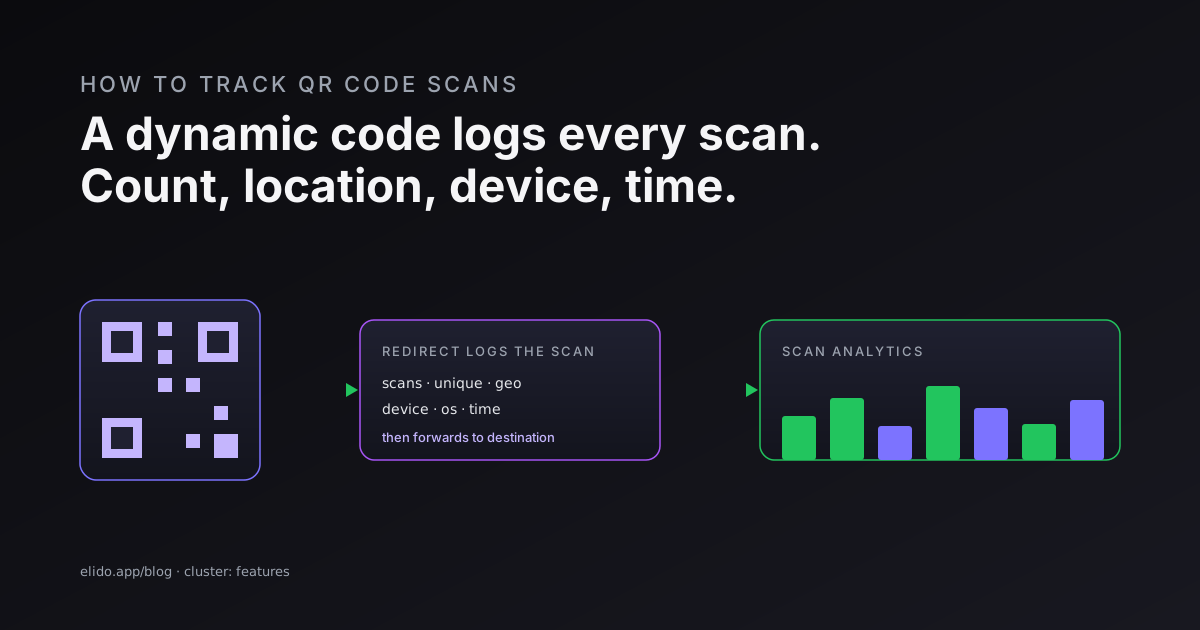
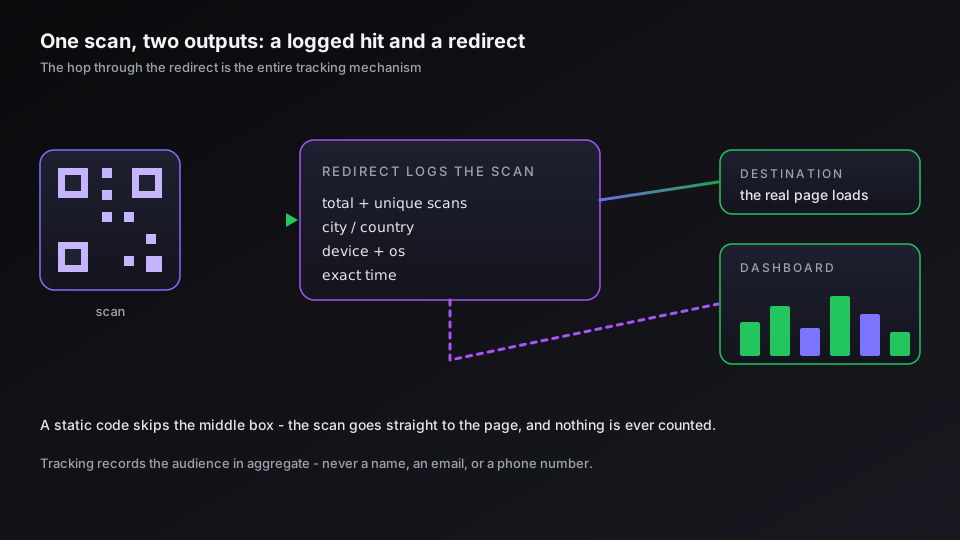
To track QR code scans, use a dynamic QR code rather than a static one. A dynamic code stores a short redirect URL instead of the destination itself, so every scan passes through a service you control and gets logged before the person lands on the page. That one hop is the entire mechanism: each scan is recorded with its time, rough location, device, and operating system, then the visitor continues to the real destination without noticing a thing. You read the totals in a scan analytics dashboard.
A static QR code cannot do this. It bakes the destination straight into the black-and-white pattern, so the scan goes directly there and never touches anything you own - there is nothing to count. So the decision that determines whether you can track scans at all happens before you generate the code, not after. Pick dynamic if the scans matter.
The honest limit, up front: tracking tells you the shape of your audience, not their names. You learn how many people scanned, from roughly where, on what device, and when. You do not learn who they are. If you are still choosing a code type, how to create a QR code covers that step, and the end-to-end UTM tracking guide is the cornerstone for tying scans back to full campaigns.
What QR Code Tracking Actually Records
A trackable QR code logs a fixed set of signals on each scan, and it helps to know exactly what is in that set before you build a campaign around it.
- Scan counts. Total scans is the raw number of times the code was read, repeats included. Unique scans estimates how many distinct devices did the scanning, which is the closer proxy for reach.
- Location. Scans resolve to a city and country from the network, not a street address. Good enough to compare a poster in Berlin against one in Lisbon; not precise enough to identify anyone.
- Device and OS. Whether the scan came from an iPhone or an Android, the operating system version, and often the browser. This is where you learn that, say, your restaurant menu skews iOS.
- Time. The exact timestamp, which turns into a scan-over-time curve. For a print or out-of-home campaign, the shape of that curve tells you when your audience is actually in front of the code.
Some platforms layer on real-time scan notifications and a map view, but the four signals above are the core of any QR code analytics worth the name. Notice what is missing: no name, no email, no phone number. That absence is deliberate and worth keeping in mind when you set expectations with a client or a boss.
Dynamic vs Static: Why Only One Is Trackable
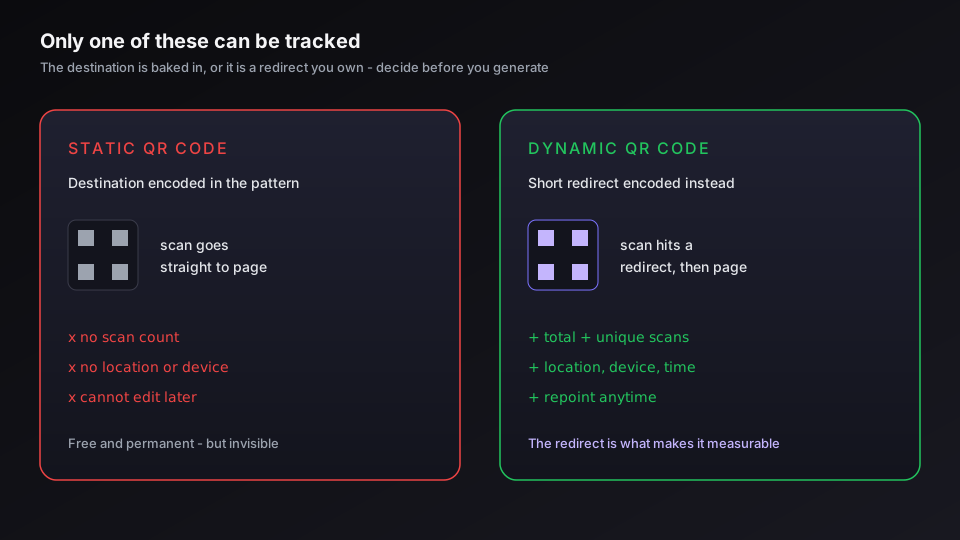
The split between a dynamic QR code and a static one decides everything about tracking, so it is worth being precise. The two look identical when printed and scan the same way. They behave like different objects.
A static code encodes the destination URL inside the pattern. The scan reads the pattern and goes there directly. Nothing sits in between, which is why a static code is free and never expires - and also why its scans can never be counted. A dynamic code encodes a short redirect URL instead. The scan hits that redirect, the redirect logs it, and then it forwards to wherever you currently point the code. That hop is what makes the scan measurable, and it is the same hop that lets you repoint a printed code to a new destination later.
So the rule is blunt: if you need scan analytics, the code has to be dynamic. We dig into the wider trade-off in dynamic vs static QR codes, but for anything you intend to measure, the choice is already made.
There is one workaround for a static code. Point it at a branded short link rather than the raw destination, and the link's own redirect carries the tracking even though the QR pattern is static. You scan, the link logs the hit, you read it in the link's report. It is the same trick that makes link click tracking work, applied to a printed code.
Setting Up Trackable QR Codes Step by Step
Getting from zero to a measurable code is short. The order matters more than the tooling.
- Create the destination as a short link first, ideally on your own domain, so the QR code and the link share one report instead of two.
- Generate a dynamic QR code from that link. Any decent QR code generator that offers dynamic codes will do; on a link platform the code is just another view of the link.
- Tag the destination with UTM parameters if it leads to a site you measure in an analytics tool. This is what connects a scan to what the person does next.
- Test the finished code on more than one phone, in the lighting it will live in, before you print a single copy. Most QR failures are a code printed too small or too dense, not a tracking problem.
That sequence gives you both layers of data from one object. The QR codes feature covers the generation side, and the QR code operations guide walks through the dashboard.
If you want one editable, measurable code instead of gluing a generator to a separate analytics tool, create a free Elido workspace and generate a trackable QR code from any link.
Reading the Numbers: Scans Are Not Conversions
A scan count is a vanity metric until you connect it to something that matters. This is the step most QR campaigns skip, and it is why so many report "we got 4,000 scans" and nothing else.
Two layers do the connecting. Native scan analytics tell you about the scan itself - how many, where, on what device, when. UTM parameters on the destination tell Google Analytics 4 what those people did after they arrived: which pages, which signups, which purchases. Scan data without the second layer is reach without outcome. When the destination is a form, the submission count is that second layer, and the gap between it and the scan count is the whole story, as QR codes for Google Forms shows, and QR codes for data collection applies to check-in and feedback too. Behavioral data without the first is outcome with no idea how people got there. You want both, and a trackable QR code pointed at a tagged short link gives you both from a single print.
This is also where QR scans stop being a separate silo and join the rest of your reporting. A scan becomes one more entry in your link analytics, comparable against email, social, and paid - so you can finally answer whether the poster outperformed the newsletter. For the wider framework of what to measure and what to ignore, short link analytics: what to measure lays it out.
Keep It Safe and On-Brand
Two things make a tracked QR code worth scanning. The first is design: a branded QR code with your logo and colors earns more scans than a plain one because it reads as intentional rather than like spam. The second is trust. People have learned to be wary of QR codes, and with reason - so where you place a code, and whether scanners can preview where it leads, affects your scan rate as much as the design does. If you run public-facing codes, are QR codes safe? quishing explained is worth reading before you print, because a sticker-over-your-poster attack will quietly tank a campaign you spent real money on.
The technical format itself is stable and well documented - the QR standard is ISO-published, and the structure of the format has not meaningfully changed in years. What moves is the layer you add on top: the redirect, the analytics, and the brand. Get the code dynamic, point it at a short link, tag the destination, and a QR code stops being a printed novelty and becomes a measurable channel you can defend in a report.
Related on the Blog
- How to create a QR code: static, dynamic, trackable
- Dynamic vs static QR codes: which one breaks first
- Branded QR code design: logos, color, and scannability
- How to track link clicks: what you can and can't see
- Are QR codes safe? quishing and how to stay protected
- Bulk QR code generation: from a CSV to print-ready files
- QR codes and GDPR: what a scan collects and what you owe
- QR code for data collection: forms, check-in, inventory
- QR code for a Google Form: create, track, and repoint it
Sıkça sorulan sorular
How do I track scans on a QR code?
Use a dynamic QR code instead of a static one. A dynamic code holds a short redirect URL, so every scan passes through a service you control and gets logged - count, rough location, device, and time - before the person reaches the destination. You then read those numbers in a scan analytics dashboard. A static QR code points straight at the destination, so the scan never touches anything you own and there is nothing to count. The choice between static and dynamic is the whole game; make it before you generate the code, because you cannot convert one into the other afterward.
Can you track who scanned a QR code?
No - not by name. QR code tracking records aggregate, technical signals: how many scans, from roughly which city or country, on what device and operating system, and at what time. It does not reveal a person's identity, phone number, or email. You only ever tie a scan to a named individual if that person then takes an identifying action you are allowed to record, such as logging in or submitting a form on the destination page, and even then it is the form that identifies them, not the QR code.
How do I track QR code scans for free?
Most QR code generators and link platforms include basic scan tracking on a free tier - usually a total scan count and a rough location and device split. That is enough to tell whether a printed code is getting traction. What tends to sit behind a paid plan is history depth, per-scan detail, real-time notifications, and the ability to export the data. For a single campaign a free tier is often fine; for ongoing measurement, check what the free version withholds before you commit a print run to it.
Can you track a static QR code?
Not on its own. A static QR code encodes the destination directly in the pattern, so the scan goes straight there with no hop you can measure. The workaround is to make the static code point at a trackable short link rather than the raw URL. The pattern is still technically static, but the link it carries routes through a redirect, so you recover the scan count and location data through the link's analytics. If you want native scan tracking without that trick, use a dynamic QR code.
How do I track QR code scans in Google Analytics?
Point the QR code at a destination URL tagged with UTM parameters, and Google Analytics 4 will attribute the resulting sessions to that campaign. This gives you the behavioral half - what people do after they land. It does not give you scan-level data like total scans or device at the moment of scan, because GA4 only sees the visit, not the scan. Real QR measurement uses both layers: native scan analytics for the scan itself, and UTM tags for what happens on the site afterward.
What data can you get from a QR code scan?
A dynamic QR code typically logs total scans, unique scans, the city and country a scan came from, the device type and operating system, the browser, and the exact time. Some platforms add real-time scan notifications and a map view. What you never get is personal identity - the data describes the audience in aggregate, not by name. Paired with UTM tags on the destination, the same scan can also be followed into on-site actions like signups or purchases.
Elido'yu deneyin
Bir URL yapıştırın, çalışan bir kısa bağlantı alın
Kayıt gerekmez. Bağlantı 30 gün boyunca yaşar. Sonsuza kadar saklamak için kaydolun.
Ücretsiz, kayıt gerekmez · Günde 2