Integracja skracacza URL z Notion przeszła z Beta do Live 4 czerwca 2026 roku dla samego połączenia: jedno kliknięcie OAuth, bez wklejania sekretów. Synchronizacja bazy danych zbudowana na tym jest planowana i jeszcze niedostępna. Gdy zostanie wdrożona, Elido będzie czytać URL-e w dowolnej wybranej przez Ciebie bazie danych, wybijać brandowane krótkie linki na Twojej domenie, zapisywać je z powrotem do tabeli i obserwować zmiany miejsc docelowych, z mapą pól konfigurowalną per baza danych.
Ten artykuł omawia krok połączenia OAuth, który działa na żywo, a potem planowaną sześciokolumnową strukturę i dwukierunkowy przepływ edycji z rozwiązywaniem konfliktów. Jeśli czytałeś wcześniejszy przewodnik po krótkich linkach w Notion, to jest głębsze ujęcie.
OAuth jednym kliknięciem: co faktycznie się dzieje, gdy naciśniesz Connect
Stare przepływy z wklejaniem tokena prosiły o wygenerowanie wewnętrznego tokena integracji Notion, wklejenie go, a potem ręczne udostępnienie każdej bazy danych integracji. To zniknęło. Nowy przepływ to trzy kliknięcia: Connect w Elido, wybór workspace'u i baz danych na ekranie zgody Notion, gotowe. Taniec OAuth stosuje się do standardu z dokumentacji uwierzytelniania API Notion. Notion nie obsługuje PKCE, więc wymiana to zwykły przepływ kodu autoryzacyjnego chroniony parametrem state.
Notion nie ma wyboru per uprawnienie w momencie autoryzacji; możliwości są ustawiane po stronie integracji Elido, a Ty wybierasz, które strony i bazy danych może widzieć. Możliwości są celowo wąskie:
- read_content - czyta właściwości Destination, Tags i Title na wybranych przez Ciebie bazach danych.
- insert_content - tworzy nowe wiersze, gdy poprosisz Elido o wybicie linku ze źródła zewnętrznego (Zap, webhook, CSV).
- update_content - zapisuje z powrotem właściwości Short URL, Clicks, QR i Last Synced.
Elido nigdy nie prosi o odczyt całego workspace'u ani o strony, których nie zaznaczyłeś. Notion egzekwuje to też po stronie serwera: zapytanie do bazy danych spoza nadania zwraca 403. Referencja API Notion dla operacji na bazach danych omawia czasowniki, których używa integracja.
Gdy zakończysz zgodę, Twoja przeglądarka trafia do api.elido.app/v1/oauth/notion/callback z kodem autoryzacyjnym. api-core wymienia kod na token dostępu, szyfruje token (zgodnie z ADR-0036) i zapisuje go w external_oauth_connections. Token w postaci jawnej nigdy nie dotyka dysku ani logów. Wiersz ląduje też w logu audytu, żeby administrator widział, kto połączył jaki workspace Notion i kiedy.
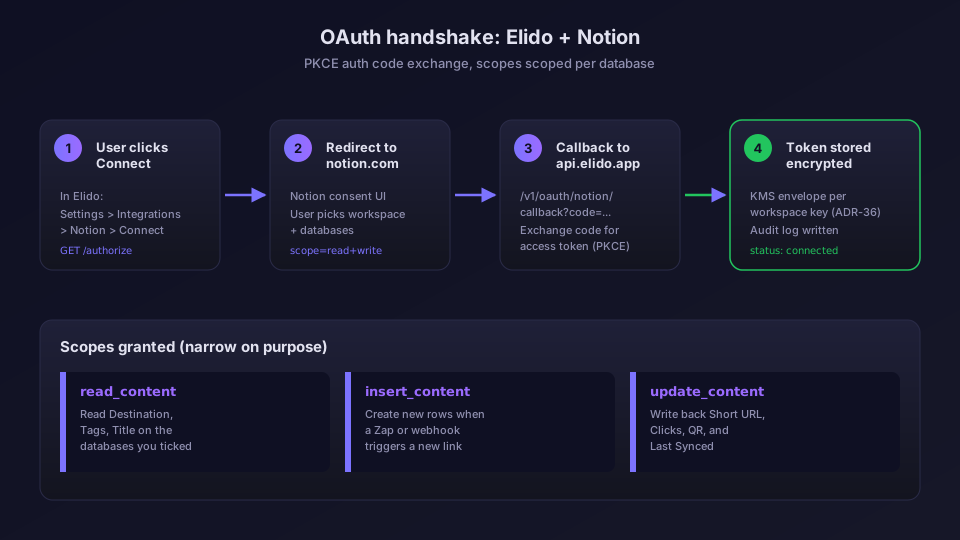
Przycisk połączenia znajduje się na zakładce Integrations per workspace, tak samo jak każdy inny dostawca w katalogu integracji. Strona integracji Notion ma zrzut ekranu z ekranem zgody. Uprawnienia można odwołać z panelu Settings, Connections w Notion; Disconnect w Elido oznacza połączenie jako odwołane po stronie Elido.
Dwa tryby: dołącz albo utwórz
W trybie dołączania wskazujesz Elido istniejącą bazę danych z właściwością URL. Elido dodaje kolumny, których potrzebuje (i tylko te), bez zmiany nazw czegokolwiek. W trybie tworzenia Elido tworzy świeżą bazę danych "Elido Links" wewnątrz wybranej przez Ciebie strony. Większość zespołów wybiera dołączanie, bo ich tabela kampanii już istnieje z kwartałami historii. Tak czy inaczej, schemat poniżej jest identyczny.
Mapowanie pól: sześć kolumn i dlaczego wyglądają właśnie tak
Wszystko od tego miejsca do instrukcji konfiguracji opisuje planowaną synchronizację, nie to, co działa dzisiaj. Dziś połączenie pozwala Elido wylistować Twoje udostępnione bazy danych i tworzyć w nich wiersze przez klienta API.
Oto układ kolumn, którego używa integracja. Nazwy są domyślne, możesz je zmienić per baza danych w Settings, Notion, Field map.
| Kolumna | Typ w Notion | Kierunek | Uwagi |
|---|---|---|---|
| Short URL | URL | Zapisuje Elido | Tylko do odczytu po stronie użytkownika; edycja nic nie robi. |
| Destination | URL | Zapisuje Notion | Cel, na który wskazuje krótki link. Edytowalne. |
| Tags | Multi-select | Dwukierunkowe | Tagi są scalane przez sumę zbiorów przy konflikcie. |
| Clicks | Number | Zapisuje Elido | Odpytywane co 5 minut. Tylko do odczytu. |
| QR | Files | Zapisuje Elido | PNG 1024px kodu QR dla krótkiego URL. |
| Last Synced | Date | Zapisuje Elido | Znacznik czasu UTC ostatniego dotknięcia synchronizacji. |
Kilka wyborów wartych wyjaśnienia.
Clicks celowo nie jest na żywo. Notion nie ma prymitywu strumieniowego, a bombardowanie ich endpointu przy każdym kliknięciu spaliłoby limit szybkości. Pięć minut odpowiada świeżości, jakiej potrzebuje większość zespołów operacyjnych. Dla czasu rzeczywistego, zdarzenie webhooka per kliknięcie jest na mapie drogowej; dopóki nie zostanie wdrożone, pobieraj kliknięcia z API analityki. Notion to widok kampanii; strumień analityki to hydrant.
QR to właściwość Files, nie URL. Notion nie renderuje zewnętrznych adresów URL obrazów w tabelach, ale renderuje załączone pliki jako miniatury. Elido przesyła PNG przy pierwszej synchronizacji i przesyła ponownie tylko, jeśli krótki URL się zmieni. Zobacz stronę funkcji kodów QR i przewodnik po QR GS1.
Tags jest dwukierunkowe z sumą zbiorów. Jedyna kolumna, w którą piszą obie strony. Otaguj wiersz "launch-2026" w Notion, Elido ma "winter-promo" z Zapa, przy następnej synchronizacji oba tagi istnieją po obu stronach. Usunięcia się propagują. Log audytu zapisuje każdą zmianę.
Dla parametrów UTM przewodnik po szablonach UTM dołącza szablon do folderu, żeby każdy link dziedziczył właściwy utm_source. Kolumna Destination zostaje czysta, a Elido dopisuje parametry w momencie rozwiązywania kliknięcia przez inteligentne reguły linków.
Dwukierunkowy przepływ edycji: kto wygrywa, gdy Notion i Elido się nie zgadzają
To jest część, na której zespołom zależy najbardziej, bo narzędzia synchronizacji mają historię cichych nadpisań. Oto umowa.
Planowany worker wewnątrz api-core odpytuje każdą połączoną bazę danych co pięć minut o zmiany od ostatniego znacznika wodnego last_edited_time. Przy zmianie właściwości ładuje mapę pól i decyduje o własności. Reguły są stałe:
- Notion jest właścicielem: Destination, Tags (strona zapisu), Title.
- Elido jest właścicielem: Short URL, Clicks, QR, Last Synced.
- Współdzielone: Tags (strona odczytu, obie strony widzą scalony zbiór).
Jeśli pole będące własnością Notion zmieniło się w Notion, Elido aktualizuje stan wewnętrzny i emituje zdarzenie integration.notion.sync. Jeśli pole będące własnością Elido się zmieniło (tyknięcie licznika kliknięć), Elido zapisuje je z powrotem przy następnej synchronizacji.
Ciekawym przypadkiem jest kolizja. Załóżmy, że zmieniasz Destination w Notion o 14:02:10, a Zap zapisuje nowe Destination do Elido o 14:02:30, w tym samym pięciominutowym oknie. Notion jest właścicielem Destination, więc Notion wygrywa. Elido odrzuca zapis Zapa, publikuje komentarz na wierszu ("Konflikt Destination o 14:02:30, zachowano wartość Notion, zobacz log audytu") i emituje zdarzenie konfliktu, które można subskrybować przez webhooki. Zap nasłuchuje i decyduje, czy ponowić, czy zaalarmować.
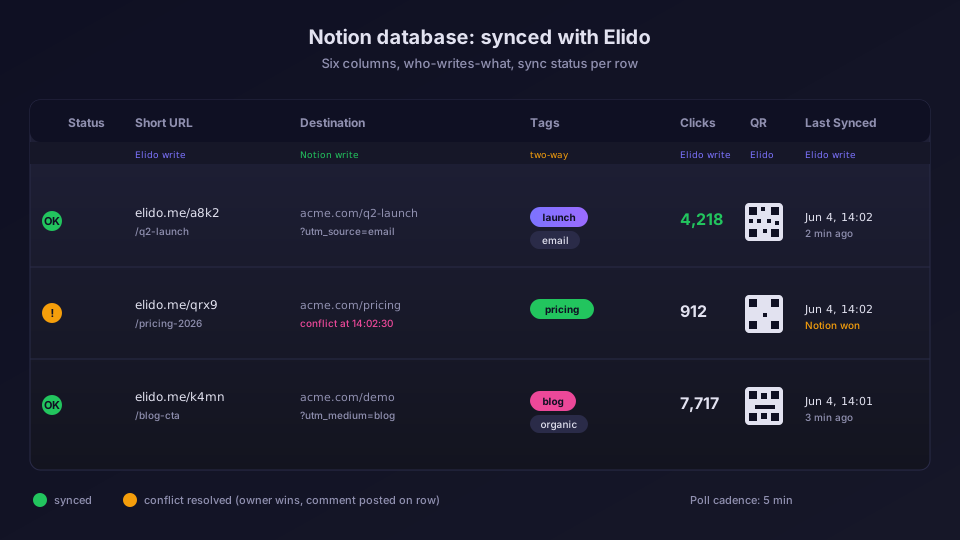
Nigdzie żadnych cichych nadpisań. Każdy zapis jest logowany. Każdy konflikt dostaje komentarz na wierszu. Dla trwałego zapisu przepuść strumień audytu do swojego hurtowni przez przewodnik po eksporcie do ClickHouse albo uderz bezpośrednio w API GraphQL.
Kiedy zmiana miejsca docelowego NIE powinna się propagować
Czasem edytujesz Destination jako szkic. Pomagają dwa wzorce.
Właściwość Status jako zabezpieczenie. Dodaj Select o nazwie "Sync" z opcjami Draft, Live, Paused. Integracja synchronizuje tylko wiersze, gdzie Sync = Live. Przygotuj w Draft, przełącz na Live, następne tyknięcie to podejmie. Większość zespołów marketingowych w końcu tego używa.
Wstrzymaj całą bazę danych. Settings, Notion, pauza per baza danych. Przydatne podczas migracji albo edycji masowych.
Instrukcja konfiguracji: od zera do pierwszego zsynchronizowanego wiersza w 4 minuty
Krok 1 działa dzisiaj. Kroki od 2 do 5 pojawiają się wraz z planowaną synchronizacją.
- Połącz Notion. Ustawienia workspace'u, Integrations, Notion, Connect. Wybierz workspace, zaznacz bazy danych, Allow.
- Wybierz bazę danych. Settings, Notion, "Add database." Lista rozwijana pokazuje każdą bazę danych, do której udzieliłeś dostępu. Wybierz jedną.
- Zmapuj pola. Potwierdź Destination, Title i resztę. Brakujące właściwości? Elido oferuje ich utworzenie.
- Wybierz domenę. Wybierz brandowaną domenę dla krótkich linków. Jeszcze nie masz własnej domeny? Wybierz domyślną; migracja to później jedno kliknięcie.
- Zapisz i uzupełnij wstecznie. Elido czyta każdy wiersz, generuje krótki link dla każdego z Destination, ale bez Short URL, i zapisuje z powrotem. Istniejące Short URL pozostają nietknięte.
Czas rzeczywisty to około 4 minuty dla 200 wierszy. Większe uzupełnienia wsteczne trafiają na limit trzech żądań na sekundę Notion na darmowych workspace'ach. Baza danych z 5000 wierszami uzupełnia się wstecznie w około 30 minut; worker paczkuje i wznawia samodzielnie po ograniczeniu szybkości.
Kiedy używać tego, a kiedy Zapiera albo bezpośrednio API
Istnieją trzy ścieżki, nie wykluczają się wzajemnie.
Natywna integracja to właściwy domyślny wybór, jeśli praca dzieje się w Notion. OAuth, rozwiązywanie konfliktów, log audytu, mapa pól, bez kodu.
Zap jest właściwy dla wielokrokowych workflow ("gdy dodany zostanie wiersz ORAZ wyląduje reakcja na Slacku, wtedy stwórz link"). Dla mapowania jeden-do-jednego wiersz-do-linku natywna integracja jest szybsza i tańsza. Zobacz wpis o automatyzacji Zapier.
REST API jest właściwe, jeśli budujesz niestandardowy workflow na Elido. Dla deweloperów budujących integracje produktowe, źródło pod services/api-core/internal/integrations/notion/ jest wystarczająco małe, żeby przeczytać je za jednym razem.
Porównując do Bitly czy Rebrandly: żaden nie ma natywnej integracji z Notion w momencie pisania. Oba wymagają Zapiera albo niestandardowego skryptu. Zobacz stronę vs Bitly po różnicę i stronę z cennikiem po to, które plany zawierają nieograniczone bazy danych Notion.
Rozwiązywanie problemów: cztery kwestie, które nas dotknęły w Beta
Podczas Bety pojawiły się cztery klasy problemów. Kilka dotyczy planowanej synchronizacji, a nie żywego połączenia, ale warto wiedzieć, czego szukać.
"Database not found" po zmianie nazwy workspace'u. Jeśli administrator Notion zmieni nazwę workspace'u, identyfikator workspace'u pozostaje stabilny, ale cachowane metadane po naszej stronie stają się nieaktualne nawet na godzinę. Obejście: uderz w "Force re-sync" w Settings, Notion. TTL cache jest ustawiony na 15 minut na produkcji, więc to głównie artefakt Bety.
Limit szybkości podczas dużego uzupełnienia wstecznego. Limit Notion per integracja to trzy żądania na sekundę. Baza danych z 5000 wierszami mocno w to uderza podczas początkowego uzupełnienia. Worker wycofuje się wykładniczo (250ms, 500ms, 1s, 2s, z limitem 8s) i wznawia. Zobaczysz "Throttled by Notion, resuming" w logu aktywności; to normalne.
Niezgodność typu właściwości. Najczęstszy błąd z Bety. Użytkownik wybrał kolumnę Notion typu "Text" dla Destination zamiast "URL." Walidator mapy pól teraz flaguje to przy zapisie i odmawia kontynuacji. Jeśli widzisz "Destination must be a URL property," najpierw zmień typ kolumny w Notion.
Użytkownik wielu workspace'ów ze współdzielonymi bazami danych. Jeśli ten sam człowiek jest członkiem dwóch workspace'ów Notion i oba chcą połączyć Elido, każdy workspace potrzebuje własnego nadania OAuth. Token jest per workspace, nie per użytkownik. Przepływ połączenia obsługuje to poprawnie; po prostu spodziewaj się kliknięcia Connect dwa razy.
Dla wszystkiego, czego nie ma na tej liście, strona kontaktowa prowadzi bezpośrednio do zespołu integracji. Widzimy tam problemy szybciej niż w ogólnym wsparciu.
Co pojawi się dalej
Dwa kolejne kroki na mapie drogowej. Przepis "formularz Notion na krótki link", żeby wysłanie formularza wybijało śledzony link. I dwukierunkowa synchronizacja na właściwości Workspace, żeby link mógł podążać, gdy przenosisz wiersz między bazami danych. Oba na torze do Q3; odnotujemy je w changelogu.
Żeby zmierzyć wpływ, wprowadzenie do analityki krótkich linków omawia, które metryki faktycznie się liczą i jak skonfigurować wiersze dashboardu Notion, żeby odpowiadały na właściwe pytania.
Najczęściej zadawane pytania
O jakie uprawnienia prosi integracja z Notion?
Elido prosi o insert_content, update_content i read_content na stronach albo bazach danych, które wybierzesz w kroku zgody OAuth. To wystarczy, żeby dodawać nowe wiersze, zapisywać z powrotem krótkie URL-e i liczniki kliknięć oraz czytać zmiany miejsc docelowych. Elido nigdy nie prosi o dostęp do całego workspace'u, a nadanie uprawnień jest ograniczone do tego, co zaznaczysz w interfejsie zgody Notion.
Czy mogę edytować docelowy URL w Notion i sprawić, żeby Elido za tym podążyło?
To jest planowane zachowanie, jeszcze niewdrożone: obserwator pola będzie odpytywał co pięć minut o zmiany właściwości Destination. Jeśli URL się zmieni, Elido zaktualizuje cel linku w api-core, zapisze nowy wiersz w logu audytu i wystrzeli webhook, żeby systemy niżej w łańcuchu wiedziały. Sam krótki URL nigdy się nie zmienia, więc istniejące kody QR i wydrukowane materiały nadal działają.
Jak działa rozwiązywanie konfliktów, gdy obie strony edytują jednocześnie?
To są planowane reguły synchronizacji. Notion jest źródłem prawdy dla Destination, Tags i Title. Elido jest źródłem prawdy dla Short URL, Clicks, QR i Last Synced. Jeśli właściwość koliduje w oknie synchronizacji, wygrywa strona, która jest właścicielem pola, a przegrana dostaje komentarz na wierszu wyjaśniający, co się stało. Nie ma cichego nadpisania.
Czy integracja działa z darmowym planem Notion?
Tak, z dwoma zastrzeżeniami. Darmowe workspace'y Notion mają limit API trzy żądania na sekundę, więc bardzo duże bazy danych (5000+ wierszy) synchronizują się partiami po 100 z małym opóźnieniem wycofania. Po drugie, integracja potrzebuje administratora w workspace'ie Notion, żeby zatwierdzić nadanie OAuth za pierwszym razem. Potem każdy z prawami edycji bazy danych może wyzwolić ręczną ponowną synchronizację.
Co się stanie, jeśli odłączę integrację?
Elido oznacza połączenie jako odwołane po swojej stronie; Notion nie ma endpointu odwołania tokena, więc usuń też połączenie Elido pod Settings, Connections w Notion. Istniejące wiersze zostają w bazie danych z nienaruszonymi krótkimi URL-ami, ale Clicks i Last Synced przestają się aktualizować. Ponowne połączenie później podejmuje od miejsca, w którym skończyło, i uzupełnia liczniki kliknięć, które nazbierały się podczas rozłączenia.
Wypróbuj Elido
Wklej URL, otrzymaj krótki link
Bez rejestracji. Link działa 30 dni. Zarejestruj się, aby zachować go na zawsze.
Za darmo, bez rejestracji · 2 dziennie