Linear trafił do statusu Live w katalogu integracji Elido 2026-05-22. Pierwszym zdarzeniem, jakie wdrożyliśmy, było broken_link_hook - gdy nasz skaner wykryje martwy krótki link, tworzy issue w Linear w zespole wybranym podczas konfiguracji Connect, z metrykami kliknięć w treści i labelami dobieranymi na podstawie tagu. Ten wpis to inżynierski spacer po kulisach: jak działa uwierzytelnianie, jak wygląda ładunek JSON i jak rozszerzyliśmy tę samą rurę na skoki progu kliknięć, żeby dyżurny dostawał zgłoszenie zamiast pagera o 3 nad ranem.
Jeśli w produkcji utrzymujesz setki albo tysiące krótkich linków, ten scenariusz awarii już znasz. Marketing zmienia cel kampanii, nowy URL zwraca 404, i nikt tego nie zauważa, dopóki klient nie zrobi zrzutu ekranu martwego linku na Bluesky. Linear to miejsce, w którym Twój zespół i tak triażuje bugi, więc to tam trafia zgłoszenie.
Łączenie z Linear przez Personal API Key
Integracja z Linear korzysta z Personal API Key, a nie z OAuth. Zdecydowaliśmy się na to z trzech powodów: klucze API są przypisane do przestrzeni roboczej, lepiej niż tokeny OAuth związane z pojedynczym użytkownikiem przetrwają zmiany wśród adminów, a dokumentacja Linear API: Authentication wprost zaleca je do zadań typu server-to-server.
Klucz wygenerujesz w Linear: Settings, API, Personal API keys, Create key. Nadaj mu nazwę elido-integration, żeby później móc go odwołać bez zgadywania, o który chodzi. Skopiuj klucz (zaczyna się od lin_api_) i wklej go w karcie integracji Linear w panelu Elido.
Co dzieje się dalej: wykonujemy zapytanie viewer, żeby zwalidować klucz, a potem zapytanie teams, żeby wypełnić listę wyboru zespołu. Wybierasz zespół domyślny. Ten wybór zapisuje wiersz w integration_configs w Postgresie, razem z ID zespołu przypisanym przez Linear. Jeśli masz wiele zespołów, na tym samym ekranie możesz dodać routing oparty na tagach - więcej o tym poniżej.
POST /v1/workspaces/:id/integrations/linear/connect
{
  "api_key": "lin_api_<redacted>",
  "default_team_id": "TEAM_a1b2c3",
  "default_priority": 2,
  "labels": ["short-link", "auto-filed"]
}
W tle serwis api-core przechowuje klucz zaszyfrowany w spoczynku (encrypted at rest) w schemacie envelope-encryption z ADR-0036. Odszyfrowany klucz istnieje w pamięci wyłącznie na czas samego wywołania GraphQL. Nigdy nie logujemy surowej wartości, a UI logów integracji pokazuje tylko ostatnie 4 znaki.
Jeden haczyk: Personal API Key w Linear są przypisane do użytkownika, który je utworzył. Jeśli ten użytkownik odchodzi z firmy i offboardujesz jego miejsce (seat) w Linear, klucz umiera razem z nim. Dobrą praktyką jest stworzenie w Linear użytkownika typu service (my używamy [email protected]) i wygenerowanie klucza z tego konta.
Zdarzenie broken_link_hook - co je wyzwala i co jest w treści
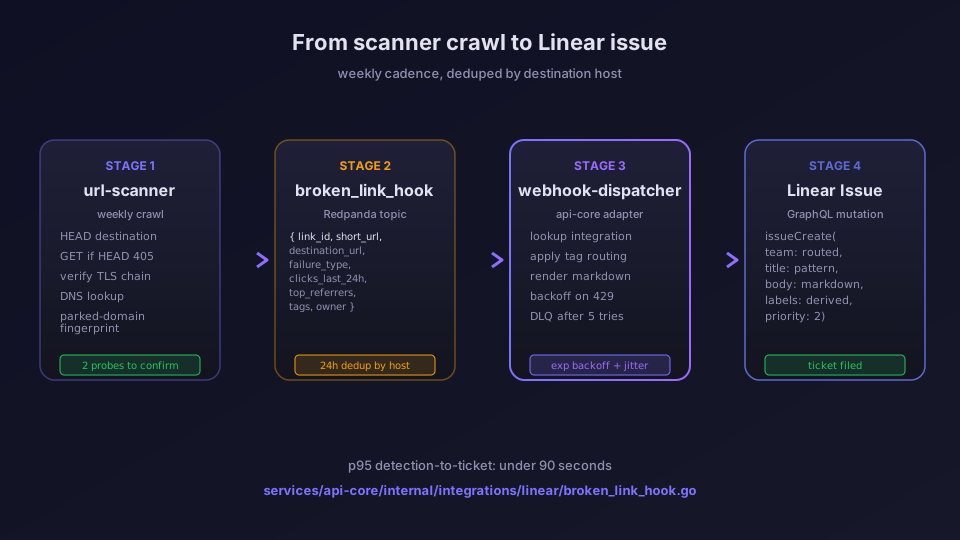
Nasz serwis url-scanner co tydzień przeszukuje każdy aktywny krótki link w Twojej przestrzeni roboczej. Dla każdego linku wykonuje HTTP HEAD na celu, potem GET, jeśli HEAD nie jest wspierany, a następnie waliduje łańcuch TLS. Cztery warunki uruchamiają stan martwego linku:
- HTTP 4xx albo 5xx przy dwóch kolejnych próbach (sprawdzamy dwukrotnie, żeby wchłonąć przejściowe 500)
- TLS wygasły albo self-signed tam, gdzie tydzień wcześniej był ważny
- DNS NXDOMAIN - host docelowy już się nie rozwiązuje
- Dopasowanie odcisku domeny zaparkowanej - cel się rozwiązuje, ale treść odpowiedzi pasuje do znanego szablonu squattera (utrzymujemy niewielki zestaw odcisków)
Gdy zajdzie którykolwiek z tych czterech przypadków, skaner publikuje zdarzenie link.broken do Redpandy. webhook-dispatcher je konsumuje, sprawdza Twoje aktywne integracje, a dla Linear materializuje poniższy ładunek.
Oto prawdziwy ładunek broken_link_hook, przechwycony z naszego środowiska staging (niektóre pola pominięte):
{
  "event": "link.broken",
  "link_id": "01J9V7QXMZ8K2Y3N4P5R6T7W8Z",
  "short_url": "https://s.elido.me/spring-launch",
  "destination_url": "https://oldcampaign.example.com/landing",
  "failure_type": "http_5xx",
  "failure_detail": "502 Bad Gateway, 2 consecutive probes",
  "last_working_at": "2026-05-28T14:22:00Z",
  "detected_at": "2026-06-04T03:11:42Z",
  "clicks_last_7d": 2841,
  "clicks_last_24h": 412,
  "top_referrers": [
    { "host": "linkedin.com", "clicks": 1203 },
    { "host": "twitter.com", "clicks": 488 },
    { "host": "direct", "clicks": 612 }
  ],
  "tags": ["campaign-spring-2026", "paid"],
  "owner_email": "[email protected]"
}
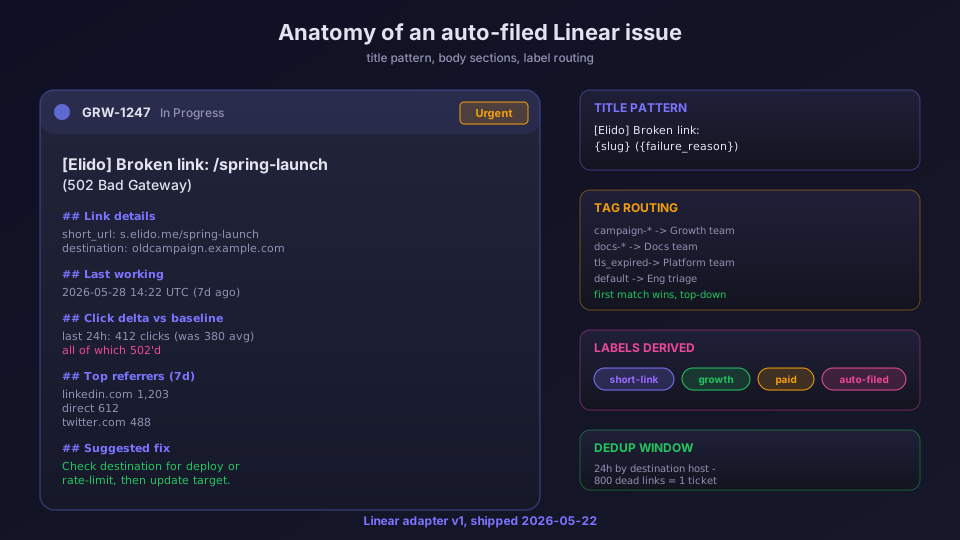
Adapter Linear w services/api-core/internal/integrations/linear/broken_link_hook.go bierze ten ładunek i buduje mutację GraphQL względem Issues API Linear. Tytuł issue ma stały wzorzec, dzięki czemu dyżurny może go wygrepować:
[Elido] Broken link: /spring-launch (502 Bad Gateway)
Treść to ustrukturyzowany Markdown w pięciu sekcjach: szczegóły linku, znacznik czasu ostatniego działania, delta kliknięć względem 7-dniowej wartości bazowej, trzej najwięksi referrerzy oraz blok sugerowanej naprawy. Blok sugerowanej naprawy patrzy na failure_type i dobiera podpowiedź z szablonu - dla http_5xx brzmi ona "Sprawdź, czy cel nie ma rate limitu albo nie jest w trakcie wdrożenia", a dla parked_domain - "Domena mogła wygasnąć albo zostać przejęta, zarchiwizuj ten link", i tak dalej.
Labele są przypisywane z dwóch źródeł: domyślnego zestawu labeli (skonfigurowanego przy Connect) oraz dynamicznych labeli wyprowadzanych z listy tagów. Jeśli tag pasuje do paid albo organic, dodajemy go jako label, żeby PM-owie mogli filtrować swoje widoki w Linear.
Deduplikacja, rate limity i dead-letter queue
Deduplikujemy zdarzenia broken_link_hook według hosta docelowego przez 24 godziny. Jeśli oldcampaign.example.com padnie, a wskazuje na niego 800 krótkich linków, dostajesz jedno zgłoszenie w Linear z listą wszystkich 800 krótkich URL-i w treści, a nie 800 osobnych zgłoszeń. To była twarda lekcja z wczesnej bety - pierwszy klient, który trafił na martwą domenę, został zasypany zgłoszeniami.
Endpoint GraphQL w Linear ma globalny rate limit na przestrzeń roboczą. Nasz webhook-dispatcher śledzi nagłówek Retry-After i stosuje wykładniczy backoff z pełnym jitterem, do pięciu prób. Po piątej próbie zdarzenie ląduje w dead-letter queue. Wpisy DLQ zobaczysz w Settings, Integrations, Linear, Failed events i możesz odtworzyć dowolny z nich jednym kliknięciem. DLQ jest też dostępne przez funkcję webhooks do programistycznego odtwarzania.
Progi kliknięć i niestandardowe triggery
Ten sam adapter Linear konsumuje zdarzenia click_threshold_hook. Progi definiujesz per link albo per kampania w panelu Elido, a my tworzymy issue w Linear, gdy link przekroczy pasmo. Obecnie obsługiwane są dwa typy pasm:
- Spike (skok): kliknięcia w ostatniej godzinie przekraczają N razy kroczącą 7-dniową wartość bazową na godzinę (domyślne N to 3). Przydatne do wyłapywania wiralowości albo, mniej przyjemnie, ruchu botów.
- Cliff (spadek): kliknięcia w ostatniej godzinie spadają poniżej 10% kroczącej wartości bazowej. Przydatne do wyłapywania martwych kampanii - jeśli płatna reklama została wstrzymana wyżej w łańcuchu, zobaczysz zgłoszenie w Linear jeszcze przed standupem marketingu.
Oto ładunek click_threshold_hook:
{
  "event": "link.click_threshold",
  "link_id": "01J9V7QXMZ8K2Y3N4P5R6T7W8Z",
  "short_url": "https://s.elido.me/spring-launch",
  "band": "spike",
  "current_hour_clicks": 8421,
  "baseline_hourly_clicks": 612,
  "multiplier": 13.76,
  "top_referrers": [
    { "host": "news.ycombinator.com", "clicks": 6203 },
    { "host": "direct", "clicks": 1488 }
  ],
  "tags": ["campaign-spring-2026"],
  "triggered_at": "2026-06-04T11:14:00Z"
}
Dla skoku blok sugerowanej naprawy brzmi: "Zweryfikuj, czy to ruch organiczny, a nie kampania podszywająca się pod referrera (referrer-spoofing). Sprawdź powyższy podział referrerów". Dla spadku: "Potwierdź, że kampania nadal działa wyżej w łańcuchu. Jeśli została wstrzymana, zarchiwizuj ten link".
Routing oparty na tagach między wieloma zespołami
Domyślny wybór zespołu sprawdza się w 20-osobowej przestrzeni roboczej. Dla większych organizacji chcesz, żeby zgłoszenie dotyczące linku marketingowego trafiało do zespołu Marketing, a zgłoszenie dotyczące linku z dokumentacją - do zespołu Documentation. Właśnie to załatwia routing oparty na tagach.
Reguły routingu mieszkają w integration_configs.routing_json i są oceniane od góry do dołu. Reguła wygląda tak:
[
  {
    "tag_glob": "campaign-*",
    "team_id": "TEAM_growth",
    "labels": ["growth", "urgent"]
  },
  { "tag_glob": "docs-*", "team_id": "TEAM_docs", "labels": ["docs"] },
  {
    "tag_glob": "internal-*",
    "team_id": "TEAM_internal",
    "labels": ["internal"]
  },
  { "default": true, "team_id": "TEAM_a1b2c3" }
]
Wygrywa pierwsza reguła, której glob pasuje do przynajmniej jednego tagu na linku. Jeśli nic nie pasuje, zdarzenie przejmuje reguła domyślna. Składnia globów jest taka sama jak w zapisanych filtrach widoków (saved-view filters) Linear, więc PM-owie już ją znają.
Możesz też kierować routing według failure_type. Niektóre zespoły chcą, żeby wszystkie awarie TLS trafiały do zespołu platform, bo zwykle oznaczają błędną konfigurację certyfikatu na niestandardowej domenie tenanta. Dodaj regułę kluczowaną failure_type: tls_expired i gotowe.
Niestandardowe triggery przez webhooki
Nie każdy zespół chce zakładać zgłoszenia w Linear dla każdego typu zdarzenia, jaki publikujemy. Pełny katalog zdarzeń jest udokumentowany na stronie funkcji webhooks, ale najczęstsze zestawienia, jakie zespoły konfigurują obok Linear, to:
link.createddo zespołu w Linear na potrzeby audytów nowych linków (rzadkie, zwykle dla zespołów compliance)domain.takeover_detectedna niespodzianki TLS na niestandardowych domenachlink.scan_completena cotygodniowe zgłoszenia podsumowujące (jeden issue na przebieg skanowania, z listą wszystkich oznaczonych linków)
Jeśli zdarzenia, którego potrzebujesz, nie ma w katalogu, możesz zbudować własne za pomocą ogólnego celu webhook i naszego przewodnika po observability. Albo po prostu zgłoś feature request na naszej publicznej tablicy w Linear - meta, ale rekurencyjnie.
Cennik i co dostajesz w którym planie
Integracja z Linear jest dostępna od planu Pro wzwyż. Na planie Free możesz połączyć Linear, ale dostajesz tylko broken_link_hook (bez progów kliknięć i niestandardowych triggerów). Pełną macierz znajdziesz na stronie cennika. Jeśli jesteś większym zespołem i rozważasz to z powodów zgodności (compliance) - powiedzmy, RODO art. 32 wymaga wykrywania wycieków danych z martwych przekierowań wskazujących na domeny przejęte przez squatterów - to, co oferujemy w skali enterprise, opisuje strona rozwiązań dla deweloperów.
Powiązane na blogu
- Webhooki dla zdarzeń linków: każdy kształt, każda ponowna próba - podstawowa magistrala zdarzeń, która napędza wszystkie integracje, w tym Linear.
- Podłączanie Sentry/GlitchTip do 12 serwisów Go bez psucia hot path - jak monitorujemy dispatcher, który wysyła zdarzenia do Linear, żeby wiedzieć, kiedy sam dispatcher choruje.
- Strategia zapobiegania gniciu linków dla kampanii z krótkimi adresami URL - szersza historia operacyjna stojąca za tym, po co w ogóle zbudowaliśmy wykrywanie martwych linków.
Pełny katalog integracji wymienia 43 dostawców na czerwiec 2026, a Linear jest jednym z 20 aktywnych (Live). Jeśli Twój zespół używa zamiast tego Jiry, ten adapter jest w becie - napisz do nas, a Cię włączymy.
Najczęściej zadawane pytania
Jak Elido uwierzytelnia się w Linear?
Używamy Personal API Key przypisanego do przestrzeni roboczej, a nie OAuth. Klucz generujesz w Linear w sekcji Settings, API, a następnie wklejasz go w karcie integracji Elido. Klucz nigdy nie opuszcza naszego magazynu (vault) i jest redagowany w logach. Jeśli go zrotujesz, kolejne zdarzenie wywoła łagodny monit o ponowne uwierzytelnienie zamiast cichego błędu.
Co dokładnie liczy się jako martwy link w zdarzeniu broken_link_hook?
Nasz url-scanner co tydzień przeszukuje każdy aktywny krótki link i oznacza cztery warunki: HTTP 4xx albo 5xx przy dwóch kolejnych próbach, wygasły albo niemożliwy do zweryfikowania certyfikat TLS, DNS NXDOMAIN oraz znane odciski domen zaparkowanych (parked domain). Którykolwiek z tych czterech przypadków uruchamia pojedynczy issue w Linear, deduplikowany według hosta docelowego przez 24 godziny, więc jedna martwa domena nie generuje 800 zgłoszeń.
Czy mogę wysyłać issue do różnych zespołów w Linear na podstawie tagów linku?
Tak. Na ekranie Connect wybierasz domyślny zespół, a następnie dodajesz reguły routingu - na przykład tagi pasujące do campaign-* trafiają do zespołu Growth, a tagi pasujące do docs-* trafiają do Engineering. Reguły są oceniane od góry do dołu, z domyślną regułą zapasową. Zestaw reguł mieszka w Postgresie, więc zmiany możesz audytować przez ścieżkę administracyjną (admin trail).
Czy to działa też dla alertów progu kliknięć, nie tylko dla martwych linków?
Tak, od Fazy 12. Ten sam adapter Linear obsługuje zdarzenia click_threshold_hook obok broken_link_hook. Progi definiujesz per link albo per kampania w panelu Elido, a my tworzymy issue w Linear, gdy link przekroczy pasmo - albo skok (3x wartość bazowa w ciągu godziny), albo spadek (poniżej 10% wartości bazowej).
Co się dzieje, gdy Linear nałoży rate limit na integrację?
Endpoint GraphQL Linear zwraca 429 z nagłówkiem Retry-After. Nasz webhook-dispatcher respektuje go z wykładniczym backoffem, do pięciu prób, po czym odkłada zdarzenie do dead-letter queue. Wpisy z DLQ możesz odtworzyć z poziomu UI logów integracji albo przez API GraphQL pod adresem /v1/integrations/linear/dlq. W produkcji nie zaobserwowaliśmy jeszcze utrzymującego się 429 ze strony Linear.
Wypróbuj Elido
Wklej URL, otrzymaj krótki link
Bez rejestracji. Link działa 30 dni. Zarejestruj się, aby zachować go na zawsze.
Za darmo, bez rejestracji · 2 dziennie