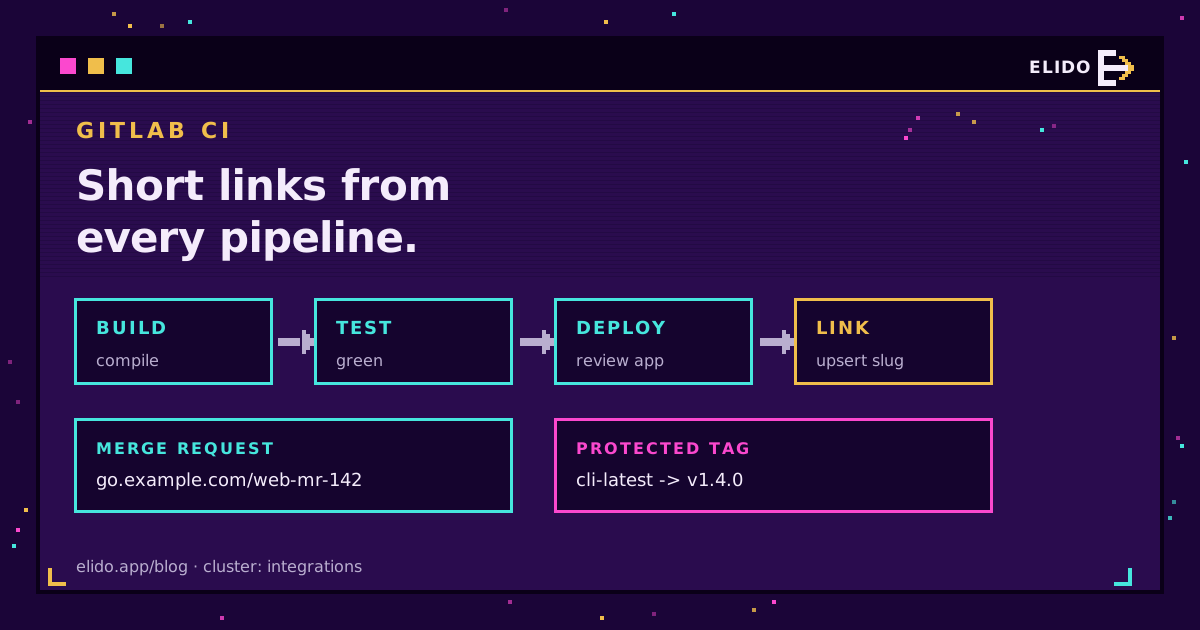
Yes, GitLab CI can act as your URL shortener. A job with curl and one API key can create a short link on every merge request, point it at the review app, and move a stable latest link to the new release when you push a tag. It's about forty lines of YAML. It works today.
The part people get wrong isn't the HTTP call. It's the key: where it lives, which pipelines can read it, and how much damage it could do if a branch job leaked it. So this guide spends as much time on variables and scoping as on the .gitlab-ci.yml itself. If you'd rather manage long-lived links declaratively, the Terraform approach to short links is the better fit; pipelines suit links that are born and retired with the code.
One status note up front. Elido's native GitLab integration is coming, not live, and nothing below depends on it. Want the managed version? The GitLab integration page has the waitlist.
What a GitLab CI URL Shortener Job Does
A pipeline shortener does three things and only three. It creates a link when a slug doesn't exist, updates the destination when it does, and disables the link when the thing it pointed at goes away. Analytics and QR codes stay on the Elido side.
The API surface is small. Links live under /v1/workspaces/{workspace_id}/links: POST creates one and needs a domain_id plus a destination_url, PATCH /links/{link_id} changes fields on an existing one, and GET /links?q= searches by slug, destination or title. Auth is one header: Authorization: Bearer elido_.... The key comes from the dashboard's API keys page.
That's the whole contract. The API and SDK overview lists the rest of the endpoints, but a pipeline rarely needs more than these three.
Storing the Key as a Masked, Protected Variable
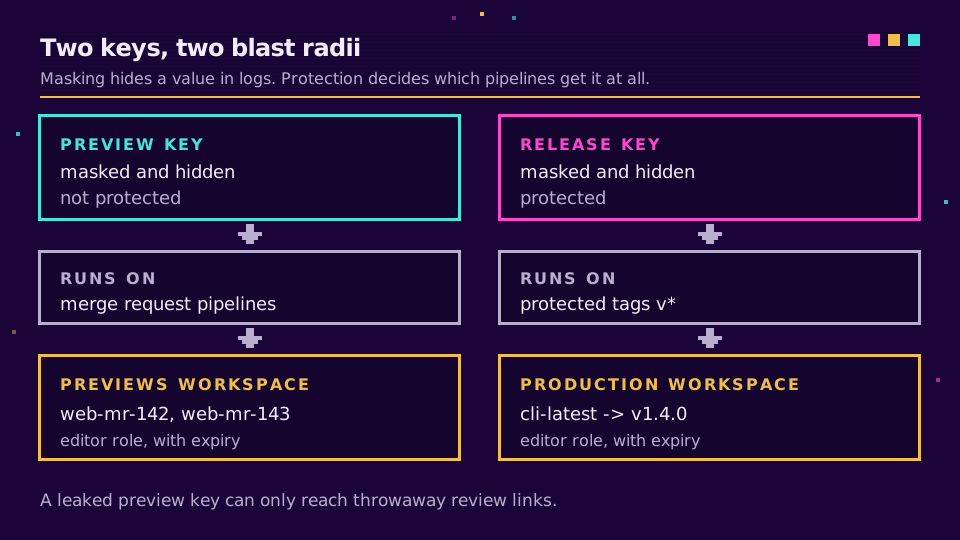
GitLab gives you two switches that matter here, and they do different jobs. Masking hides a value in job logs. Protection controls which pipelines receive the value at all.
In Settings, CI/CD, Variables, choose Masked and hidden when you create the variable. Hidden (generally available since GitLab 17.6) means nobody can reveal the value in the settings page later, which is what you want for a credential. The GitLab CI/CD variables docs list the requirements for a masked value: a single line, no spaces, at least 8 characters. Elido keys are elido_ followed by base32, so they qualify.
The same page is blunt about the limit: masking "is not a guaranteed way to prevent malicious users from accessing variable values." A job that base64-encodes the variable and prints it walks straight past the mask. Treat masking as log hygiene, not access control.
Protection is the access control. A protected variable only reaches pipelines on protected branches or protected tags, which creates the one problem every team hits in their first week: your merge request pipeline runs on a feature branch, so the protected key arrives as an empty string and the job fails with a 401 that looks like a typo.
I'd solve that with two keys instead of weakening the one. Here's the setup I'd use:
| Variable | Visibility | Protected | Read by |
|---|---|---|---|
ELIDO_PREVIEW_KEY | Masked and hidden | No | Merge request pipelines |
ELIDO_RELEASE_KEY | Masked and hidden | Yes | Tag pipelines on protected tags |
ELIDO_PREVIEW_WS, ELIDO_RELEASE_WS | Visible | No | Any job (IDs are not secrets) |
ELIDO_DOMAIN_ID, SHORT_HOST | Visible | No | Any job |
The preview key belongs to a separate workspace that holds nothing but review links. Anyone who can push a branch can, in principle, exfiltrate an unprotected variable, so make sure the worst they can reach is a pile of throwaway mr-142 links, while the release key lives in your real workspace and only runs on tags you've protected.
Give both keys the Editor role and an expiry; 90 days suits the preview one. Editor is the lowest preset that can write links, and it can also delete them; API keys take one of the preset roles, and I'd like a create-and-update-only preset for exactly this case; there isn't one yet. Workspace separation is what actually limits the blast radius.
A Working .gitlab-ci.yml Job to Create a Short Link
Here's the shared piece: an upsert that looks the slug up, creates the link if it's missing, and patches it otherwise. Put it in a hidden job and extend it.
.elido_upsert:
  image: alpine:3.20
  before_script:
    - apk add --no-cache curl jq
  script:
    - API="https://api.elido.app/v1/workspaces/${ELIDO_WS}"
    - AUTH="Authorization: Bearer ${ELIDO_KEY}"
    - |
      find_id() {
        curl -sS --fail-with-body -H "$AUTH" "$API/links?q=${SLUG}&limit=50" |
          jq -r --arg s "$SLUG" --argjson d "$ELIDO_DOMAIN_ID" \
            '.items[] | select(.slug == $s and .domain_id == $d) | .id' | head -n1
      }
      ID="$(find_id)"
      if [ -z "$ID" ]; then
        CODE=$(curl -sS -o resp.json -w '%{http_code}' -X POST "$API/links" \
          -H "$AUTH" -H "Content-Type: application/json" \
          -H "Idempotency-Key: ${CI_PIPELINE_ID}-${SLUG}" \
          -d "$(jq -n --arg s "$SLUG" --arg u "$TARGET" --argjson d "$ELIDO_DOMAIN_ID" \
                '{domain_id: $d, slug: $s, destination_url: $u, tags: ["ci"]}')")
        case "$CODE" in
          201) ;;
          409) ID="$(find_id)" ;;   # another pipeline created it first
          *) cat resp.json; exit 1 ;;
        esac
      fi
      if [ -n "$ID" ]; then
        curl -sS --fail-with-body -X PATCH "$API/links/$ID" \
          -H "$AUTH" -H "Content-Type: application/json" \
          -d "$(jq -n --arg u "$TARGET" '{destination_url: $u, status: "active"}')"
      fi
    - echo "SHORT_URL=https://${SHORT_HOST}/${SLUG}" >> link.env
  artifacts:
    reports:
      dotenv: link.env
The q search is a substring match, so the jq filter narrows it to the exact slug on the exact domain. Without that, a search for web-mr-14 would happily return web-mr-142. Get your domain_id once with GET /v1/workspaces/{id}/domains and store it as a plain variable; a branded host set up through custom domains reads better in a merge request than a generic one.
Review App Short Links per Merge Request
Review apps are GitLab's name for a temporary environment per branch or merge request, and the review apps docs build them on dynamic environments. Their URLs tend to be ugly: a hash, a namespace, a cloud provider's hostname. A short link like go.example.com/web-mr-142 is something you can say out loud in a standup.
review_link:
  extends: .elido_upsert
  stage: deploy
  needs: [deploy_review]
  variables:
    ELIDO_KEY: $ELIDO_PREVIEW_KEY
    ELIDO_WS: $ELIDO_PREVIEW_WS
    SLUG: "${CI_PROJECT_NAME}-mr-${CI_MERGE_REQUEST_IID}"
    TARGET: "https://${CI_ENVIRONMENT_SLUG}.review.example.com"
  environment:
    name: review/$CI_COMMIT_REF_SLUG
    url: $SHORT_URL
    on_stop: stop_review_link
    auto_stop_in: 1 week
  rules:
    - if: $CI_PIPELINE_SOURCE == "merge_request_event"
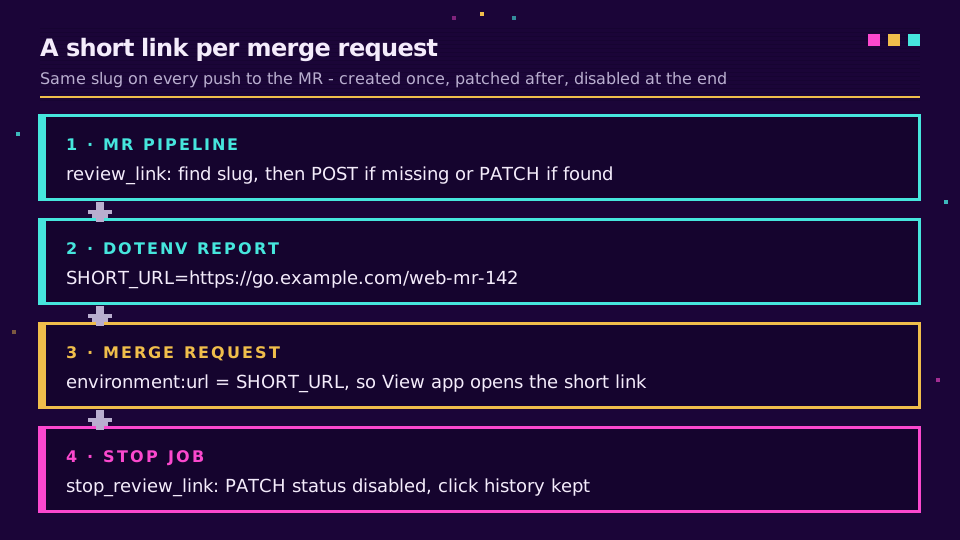
The trick is the dotenv report. The upsert writes SHORT_URL into link.env, GitLab reads it back, and environment:url becomes the short link, so the View app button on the merge request opens web-mr-142 instead of the raw hostname. The environments docs describe this dynamic-URL pattern.
CI_MERGE_REQUEST_IID is unique per project and never changes for the life of the merge request, which is why every push to the same MR lands on the same slug and the upsert patches rather than duplicates. The predefined variables reference has the full list if you want a different key.
Cleanup is a job with action: stop. It has to share the start job's rules, or GitLab can't trigger it automatically:
stop_review_link:
  image: alpine:3.20
  stage: deploy
  variables:
    GIT_STRATEGY: none
    SLUG: "${CI_PROJECT_NAME}-mr-${CI_MERGE_REQUEST_IID}"
  script:
    - apk add --no-cache curl jq
    - API="https://api.elido.app/v1/workspaces/${ELIDO_PREVIEW_WS}"
    - ID=$(curl -sS -H "Authorization:
        Bearer ${ELIDO_PREVIEW_KEY}" "$API/links?q=${SLUG}" |
        jq -r --arg s "$SLUG" --argjson d "$ELIDO_DOMAIN_ID" '.items[] | select(.slug == $s and .domain_id == $d) | .id' | head -n1)
    - '[ -z "$ID" ] || curl -sS --fail-with-body -X PATCH "$API/links/$ID" -H "Authorization: Bearer ${ELIDO_PREVIEW_KEY}" -H "Content-Type: application/json" -d "{\"status\":\"disabled\"}"'
  environment:
    name: review/$CI_COMMIT_REF_SLUG
    action: stop
  when: manual
  rules:
    - if: $CI_PIPELINE_SOURCE == "merge_request_event"
I disable rather than delete. A disabled link keeps its click history, and if someone reopens the MR the next pipeline flips it back to active through the same upsert. GIT_STRATEGY: none is there because the branch may be gone by then.
If your review apps outnumber your releases ten to one, that's where the plan limits start to bite. Check the link allowance on the pricing page before you wire this into a busy monorepo, and start a free workspace for the previews while you test it.
Repointing a Stable Latest Link on Tag Pipelines
The second pattern runs on tags and does the opposite of the review link: one slug that never changes, whose destination moves forward with every release. Your README can point at go.example.com/cli-latest forever.
latest_link:
  extends: .elido_upsert
  stage: release
  variables:
    ELIDO_KEY: $ELIDO_RELEASE_KEY
    ELIDO_WS: $ELIDO_RELEASE_WS
    SLUG: "cli-latest"
    TARGET: "${CI_PROJECT_URL}/-/releases/${CI_COMMIT_TAG}"
  rules:
    - if: $CI_COMMIT_TAG =~ /^v\d+\.\d+\.\d+$/
Pair the rule with a protected tag pattern like v* so only maintainers can create the tags that trigger it; otherwise the protected key simply won't be there and the job fails closed, which is the behaviour you want. If you also want a permanent per-version link, run the same job a second time with SLUG: "cli-${CI_COMMIT_REF_SLUG}", which turns v1.4.0 into cli-v1-4-0.
Don't set redirect_status to 301 on a latest link. A 301 is a permanent promise that browsers are allowed to cache, and a latest link breaks that promise every release. Elido defaults to 302 when you leave the field out, and our write-up on 301 vs 302 redirects goes through the cases where the choice actually bites.
One honest caveat: a changed destination can take a few minutes to reach every edge location, so a smoke test that curls the short link in the very next second may still see the previous release. Assert on the API response instead, or sleep before checking the Location header.
Idempotency, Retries and Rate Limits
Pipelines retry. Runners die mid-job, someone clicks Retry on a red job, and two pushes land thirty seconds apart and race each other. The upsert above survives all three, and it's worth knowing why.
The Idempotency-Key header makes a retried POST safe: the API caches a successful response for 24 hours and replays it for the same key, so a retry of the same pipeline gets the original link back instead of an error. Building the key from CI_PIPELINE_ID and the slug means retries within a pipeline replay while a new pipeline gets a fresh attempt. The 409 branch handles the race between two different pipelines, and the lookup-then-patch path makes a second run a no-op in effect.
Rate limits are per key, on top of a per-workspace limit, and brand-new workspaces also have a lower daily link-creation cap while they build reputation. A handful of merge requests won't notice. A monorepo that spins up forty review apps at once might, so treat a 429 as retryable with GitLab's retry keyword and fail loudly on a 402, which means a plan limit rather than a transient error. Our deeper piece on rate limits and idempotency for shortener APIs covers backoff in more detail than a CI job needs.
Skip the exact-match jq filter and MR 14's pipeline will quietly patch MR 142's link. The first symptom is usually a confused designer. Keep the filter.
If shell in YAML gets unwieldy, the same calls wrap neatly into a script you commit to the repo, and the URL shortener CLI guide shows that shape.
Read the cornerstone → Short links as Terraform: managing links as code
Related on the Blog
- URL shortener API quickstart - the REST surface every job above calls.
- Rate limits and idempotency for shortener APIs - why the retry logic looks the way it does.
- A URL shortener from the command line - the same calls as a reusable script.
- 301 vs 302 redirects - why a moving link needs a temporary redirect.
- Monitoring link redirects with Sentry and Datadog - catching a broken destination after the pipeline goes green.
- Short links from GitHub Actions - the GitHub equivalent, with secrets and concurrency.
Veelgestelde vragen
Can GitLab CI create short links?
Yes. Any job that can run curl can call a URL shortener's REST API, so a GitLab CI job can create a short link, update its destination, or disable it. The API key lives in a masked CI/CD variable and the job sends it as a Bearer token. No native GitLab integration is needed for this.
How do I store an API key in GitLab CI securely?
Add it under Settings, CI/CD, Variables with the visibility set to Masked and hidden, and tick Protect variable if only protected branches or tags should read it. Masking keeps the value out of job logs, but GitLab's own docs say it is not a guaranteed defence, so scope the key itself to the least it needs.
Why is my protected variable empty in a merge request pipeline?
Protected variables are only passed to pipelines that run on protected branches or protected tags. A merge request pipeline from a feature branch does not qualify by default, so the variable arrives empty. Either use a separate, lower-privilege unprotected key for review jobs or keep the protected key for tag pipelines only.
How do I give each GitLab review app a short link?
Run a job on merge request pipelines that upserts a slug built from the project name and CI_MERGE_REQUEST_IID, pointing at the review app URL. Write the resulting short URL into a dotenv report and use it as environment:url, so the merge request widget links straight to it. A stop job disables the link when the environment stops.
Should a latest release short link use a 301 or 302 redirect?
Use a 302. A latest link changes destination on every release, and a 301 tells browsers and caches the move is permanent, so some clients will keep sending people to the old version. Elido defaults new links to 302 when you do not set redirect_status, which is the right choice here.
Is there a native GitLab integration for Elido?
Not yet. A native GitLab integration is on the way and you can join the waitlist on the GitLab integration page. Everything in this guide works today through the public REST API from a pipeline job, with nothing to install on the GitLab side beyond a CI/CD variable.
Probeer Elido
Plak een URL, krijg een werkende korte link
Geen aanmelding nodig. Link blijft 30 dagen actief. Meld je aan om hem voor altijd te bewaren.
Gratis, geen aanmelding nodig · 2 per dag