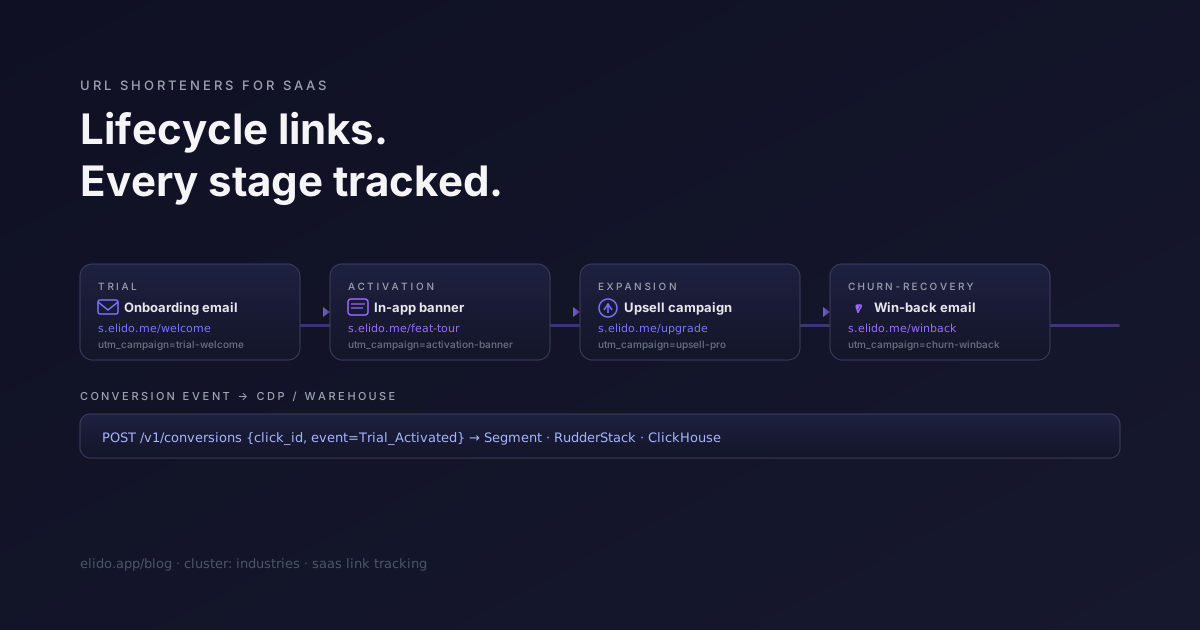
Ein B2B-SaaS-Produkt berührt seine Nutzer an Dutzenden von Momenten: die Willkommens-E-Mail, der Nudge am dritten Tag, das Upsell-Banner bei Nutzungsspitzen, das Win-Back bei drohender Kündigung. Jeder dieser Momente feuert eine URL ab. Die meisten Teams behandeln die URL als Verrohrung - Ziel einfügen, Vorlage ausliefern, nie wieder ansehen.
Das ist ein Fehler. Die URL ist der Messpunkt. Wenn sie keinen Attributionskontext trägt, verlieren Sie das Signal, das Ihnen sagt, welche Lifecycle-Vorlage das Upgrade ausgelöst hat und welche nichts bewirkt hat. Wenn sie nicht getrackt wird, ist Ihre Klickrate das, was Ihr ESP berichtet - und das misst Zustellungsereignisse, nicht das, was nach dem Klick geschah.
Dieser Beitrag handelt von der spezifischen Form, die URL-Shortener-Infrastruktur für SaaS-Lifecycle-Arbeit annehmen muss. Sie unterscheidet sich vom Linktracking im E-Commerce, wo die Aufgabe darin besteht, eine click_id durch einen Checkout-Funnel zu erhalten. Hier besteht die Aufgabe darin, Lifecycle-Ereignisse zu verdrahten: getrackte CTAs auf Produktergebnisse über eine längere, weniger lineare Customer Journey hinweg abzubilden.
TL;DR
- Ordnen Sie jede Lifecycle-E-Mail-Vorlage einer Kampagne in Ihrem Shortener zu. Die Kampagne besitzt die UTM-Vorlage; der ESP erzeugt zum Sendezeitpunkt Links pro Empfänger. Die Analytik wird nach Vorlage aufsummiert, nicht nach URL.
- Ein getrackter Kurzlink gibt Ihnen Click-to-Conversion-Attribution pro E-Mail-Versand. Ein ESP-Tracking-Pixel gibt Ihnen die Öffnungsrate. Diese messen unterschiedliche Dinge.
- Magic Links (Auth-Tokens) und Kurzlinks (getrackte Weiterleitungen) überschneiden sich konzeptionell, lösen aber unterschiedliche Probleme. Verwenden Sie keinen URL-Shortener, um Magic-Link-Traffic zu routen - Sie werden den Token beschädigen.
- Enterprise-Käufer fragen, wo die Tracking-Daten leben. Die saubere Antwort ist EU-gehostet, Unterauftragsverarbeiter-Liste veröffentlicht, Artikel-28-AVV im Standardvertrag vorunterzeichnet.
Die vier Lifecycle-Phasen und die Links, die sie antreiben
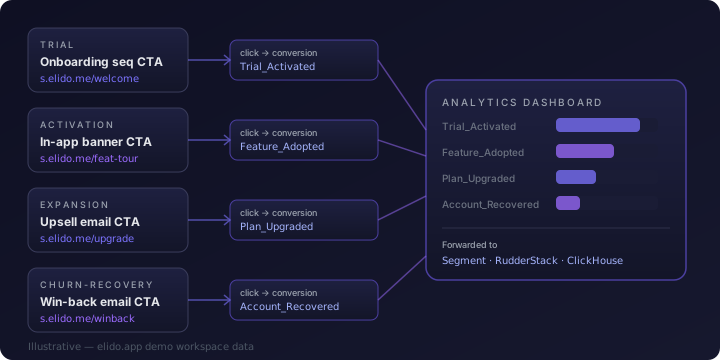
Trial-Anmeldung → Onboarding-E-Mail-Sequenz. Der Nutzer meldet sich an. Ihr transaktionales E-Mail-System feuert eine Willkommens-E-Mail, dann eine Tipps-E-Mail am zweiten Tag, dann am fünften Tag eine "Haben Sie das Setup abgeschlossen?"-E-Mail. Jeder CTA in jeder E-Mail ist ein getrackter Kurzlink. Der für die Willkommens-CTA erzeugte Link ist mit utm_campaign=onboarding-welcome getaggt; die Tag-5-CTA ist mit utm_campaign=onboarding-day5 getaggt. Wenn ein Nutzer aufrüstet, gruppiert Ihre Analytics-Abfrage Upgrades nach dem zuletzt angeklickten Kampagnen-Tag. Sie erfahren, dass die Tag-5-E-Mail 40 % der Upgrades antreibt und die Willkommens-E-Mail fast keine - also investieren Sie in erstere und strukturieren letztere um.
Aktivierung → In-App-Banner-Deeplinks. Der Nutzer ist im Produkt, hat aber ein Schlüssel-Feature noch nicht übernommen. Sie zeigen ein In-Product-Banner an. Die CTA des Banners ist ein Deeplink (eine URL, die das Feature direkt öffnet), und dieser Deeplink ist in einen Kurzlink gewickelt, damit Sie die Klickrate pro Banner-Variante messen können. Hier weicht SaaS-Lifecycle-Tracking am stärksten vom E-Mail-Marketing ab: Der Link lebt innerhalb der Produkt-UI, nicht in einem E-Mail-Client. Die Klick-Ereignisse werden weiterhin durch dieselbe Tracking-Infrastruktur geroutet; die Analytik beantwortet weiterhin dieselbe Frage (hat diese CTA die Adoption vorangetrieben?).
Expansion → Upsell-Kampagnen-Links. Nutzungsspitzen drücken den Nutzer in Richtung der Plan-Obergrenze. Ihr Abrechnungssystem oder CRM löst eine Upsell-E-Mail-Sequenz aus. Die Links in diesen E-Mails tragen utm_campaign=upsell-pro oder utm_campaign=upsell-business. Wenn ein Plan-Upgrade konvertiert, bindet die click_id auf der Conversion an die spezifische Upsell-Vorlage zurück, die gefeuert hat. Customer.ios Benchmark-Bericht zu Lifecycle-E-Mails (abgerufen am 12.05.2026) gibt durchschnittliche Click-to-Open-Raten für ausgelöste Lifecycle-E-Mails mit 10–14 % an, etwa 3-mal höher als bei Batch-Newsletter-Versendungen. Die Conversion-Attribution ist wichtig, weil die Vorlagen-Performance innerhalb dieser Spanne deutlich variiert.
Churn-Recovery → Win-Back-E-Mail-Links. Das Abonnement läuft aus oder eine Kündigungsabsicht wird gefeuert. Win-Back-Kampagnen haben notorisch niedrige Conversion-Raten - SaaS Capitals Retention-Benchmark 2024 (abgerufen am 12.05.2026) gibt die mediane Net-Revenue-Retention bei Top-Quartil-SaaS mit 102 % an, was impliziert, dass die meisten Teams Churn nicht effizient zurückgewinnen. Getrackte Links auf Win-Back-CTAs sagen Ihnen, ob die E-Mail der Recovery-Vektor war oder ob der Nutzer unabhängig von der Kampagne abgewandert ist.
Warum ESP-Tracking nicht ausreicht
Ihr E-Mail-Service-Provider misst Öffnungen und Klicks. Öffnungen sind zunehmend unzuverlässig - Apple Mail Privacy Protection prefetcht Bilder unabhängig davon, ob der Nutzer die E-Mail geöffnet hat, und Iterables Benchmark-Daten (abgerufen am 12.05.2026) zeigen, dass MPP 2024 46 % der B2B-E-Mail-"Öffnungen" ausmachte. Klicks sind zuverlässiger, aber das Klick-Tracking Ihres ESPs sagt Ihnen, dass der Nutzer einen Link in Ihrer E-Mail angeklickt hat. Es sagt Ihnen nicht, was danach passiert ist.
Ein getrackter Kurzlink fügt zwei Dinge hinzu, die der ESP nicht bietet. Erstens wird das Klick-Ereignis von der Redirect-Infrastruktur generiert, nicht vom E-Mail-Client - es feuert beim tatsächlichen HTTP-Request, nicht bei einem Prefetch oder einem Tracking-Pixel-Laden. Zweitens trägt der Klick eine click_id, die mit nachgelagerten Ereignissen verknüpft werden kann. Wenn der Nutzer die Upgrade-CTA klickt und dann den Upgrade-Flow abschließt, bindet die click_id auf dem Conversion-Ereignis an die Vorlage zurück, die den Klick ausgelöst hat. Das ist Click-to-Conversion-Attribution pro E-Mail-Versand.
Die meisten ESP-Plattformen leiten entweder Conversion-Ereignisse überhaupt nicht weiter oder leiten sie an eine proprietäre Analytics-Oberfläche weiter, die sich nicht mit Ihrer Produkt-Analytik verbindet. Wenn Ihr Produkt auf Mixpanel, Amplitude oder einem Data Warehouse läuft, sitzen die Conversion-Daten des ESPs in einem Silo. Ein Kurzlink, der ein Conversion-Ereignis an Ihre CDP oder Ihr Warehouse weiterleitet, schließt die Lücke. Der Beitrag zum serverseitigen Conversion-Tracking behandelt die Weiterleitungsmechanik; die Feature-Seite zum Conversion-Tracking behandelt das Elido-spezifische Setup.
UTM-Disziplin pro Vorlage
Die Namenskonvention, die skaliert: Jede Lifecycle-Vorlage erhält einen eindeutigen utm_campaign-Wert. Der Kampagnen-Tag wird auf Kampagnenebene im Shortener gesetzt - nicht im ESP und nicht pro Link - sodass jeder unter dieser Kampagne erzeugte Link den Tag automatisch erbt.
utm_source=lifecycle_email
utm_medium=email
utm_campaign={template_id}
Wobei {template_id} ein stabiler String ist, der an die Vorlage in Ihrem transaktionalen E-Mail-System gebunden ist: onboarding-welcome, onboarding-day5, activation-feature-a, upsell-pro, winback-30d. Die Konvention funktioniert, wenn sie auf Kampagnenebene im Shortener durchgesetzt wird, statt es demjenigen zu überlassen, der die E-Mail-Vorlage schreibt, sie manuell einzutragen.
Manuelle UTM-Eingabe ist der Ort, an dem Drift entsteht. Ein Entwickler schreibt im Juli utm_campaign=upsell; ein anderer schreibt im September utm_campaign=upsellPro; ein dritter schreibt utm_campaign=Upsell-Pro-Q4. Im November ist Ihre Analytics-Abfrage für Upsell-Performance ein LIKE '%upsell%'-Hack, und Sie haben das Vertrauen in die Daten verloren. Der End-to-End-UTM-Tracking-Leitfaden behandelt die Disziplin im Detail, einschließlich dessen, wie UTM-Vorlagen auf Workspace-Ebene die Namenskonvention im gesamten Team durchsetzen.
Die Magic-Link-Nachbarschaft
Lifecycle-E-Mails beinhalten oft Magic Links - Einmal-Authentifizierungstokens, die in einer E-Mail geliefert werden und den Nutzer beim Klick anmelden. Die konzeptionelle Überschneidung mit einem Kurzlink ist real: Beides sind URLs in E-Mails, beide leiten irgendwohin um, beide werden in einem E-Mail-Client angeklickt. Die Implementierung unterscheidet sich auf eine Weise, die wichtig ist.
Ein Magic Link ist ein Auth-Token. Die Ziel-URL enthält oder kodiert eine Anmeldedaten-Information: https://app.example.com/auth/magic?token=eyJ.... Wenn Sie diese URL durch einen URL-Shortener routen, protokolliert der Shortener die ursprüngliche Ziel-URL (einschließlich des Tokens) in seiner Klick-Datenbank. Das ist eine Anmeldedateninformation in Ihrer Analytics-Infrastruktur, was nicht der richtige Ort für Anmeldedaten ist. Praktischer noch: Einige Magic-Link-Implementierungen validieren, dass der Token noch nicht gesehen wurde (Einmal-Durchsetzung). Ein URL-Shortener, der Link-Ziele für Metadaten crawlt, würde den Token verbrauchen, bevor der Nutzer klickt.
Routen Sie Magic Links nicht durch einen URL-Shortener. Halten Sie sie auf Ihrer Auth-Domain. Kurzlinks sind für getrackte Weiterleitungen zu öffentlichen Zielen. Magic Links sind für Auth-Flows. Die Oberflächen überlappen sich in E-Mails, aber die Aufgaben sind verschieden: Sie zu vermischen, erzeugt ein Sicherheitsproblem, kein Tracking-Problem.
In-Product-Banner und Feature-Flag-A/B-Tests
Eine In-Product-Banner-CTA ist funktional ein Kurzlink innerhalb der Anwendungs-UI. Der Nutzer sieht ein Banner, das ein Feature bewirbt, klickt auf "Mehr erfahren" oder "Ausprobieren" und landet auf einer Feature-Tour oder einer Upgrade-Seite. Wenn diese CTA ein getrackter Kurzlink ist, erhalten Sie die Klickrate pro Banner-Variante.
Die nützliche Erweiterung: Kombinieren Sie den getrackten Link mit einem Feature-Flag-Rollout. Rollout-Gruppe A sieht den Banner-Text "Automatisieren Sie Ihre Berichte". Rollout-Gruppe B sieht "Sparen Sie 4 Stunden pro Woche". Beide CTAs zeigen auf getrackte Kurzlinks unter verschiedenen Kampagnen-Tags. Die Conversion-Rate pro Variante ist in der Shortener-Analytik beobachtbar und lässt sich mit Produkt-Aktivierungs-Ereignissen in Ihrem Warehouse verknüpfen. Das ist ein leichtgewichtiger A/B-Test für In-Product-Texte ohne das Hinzufügen einer dedizierten Experimentier-Plattform.
Der getrackte Link sitzt zwischen dem Banner und dem Ziel; er fügt ungefähr 5 ms zur Redirect-Latenz bei Cache-Hit hinzu (Elidos p95 in der Region liegt unter 15 ms). Für In-Product-Banner, bei denen der Nutzer bereits authentifiziert und in der App ist, ist diese Latenz nicht wahrnehmbar. Das Analyse-Signal, das er liefert - "diese Textvariante hat 2,3x mehr Feature-Adoption ausgelöst als die Kontrolle" - rechtfertigt den Hop.
Der Audit-Aspekt für B2B-Einkauf
Enterprise-Käufer, die die Linktracking-Infrastruktur eines SaaS-Anbieters prüfen, stellen einen vorhersagbaren Satz von Fragen. Wo gehen die Klick-Daten hin? Wer hat Zugriff darauf? Unterliegt die Tracking-Infrastruktur der DSGVO? Nutzt Ihr Link-Shortener einen Unterauftragsverarbeiter, der EU-Personendaten berührt?
Die saubere Antwort: standardmäßig EU-gehostet (EU-Region), fünf Unterauftragsverarbeiter auf der Trust-Seite veröffentlicht, Artikel-28-Datenverarbeitungsvereinbarung im Standard-Kundenvertrag vorunterzeichnet. Kein TIA erforderlich für EU-Käufer, weil die Datenebene den EWR nicht verlässt, es sei denn, der Workspace ist explizit auf US East oder Asien-Pazifik gepinnt - ein Business-Tier-Opt-in.
Das ist dieselbe Compliance-Story, die auf der Solutions/Marketers-Seite beschrieben wird, jedoch für einen Einkaufskontext statt für einen Marketingkontext formuliert. Das Publikum ist das Rechts- oder Sicherheitsteam des Enterprise-Käufers, nicht ein Growth Marketer. Für B2B-SaaS umfasst der Einkaufszyklus für einen neuen Anbieter, der Kundendaten berührt, oft eine Überprüfung der Unterauftragsverarbeiter. Eine veröffentlichte Liste und eine vorunterzeichnete Artikel-28-AVV sind die Tischeinsätze, die das Gespräch ohne individuelle Verhandlung voranbringen. ISO 27001 ist erreicht; SOC 2 Type II ist in Arbeit mit einem Ziel von H2 2026.
Werkzeug-Minimum für ein SaaS-Team
Drei Dinge, die Sie brauchen, damit Lifecycle-Linktracking im Maßstab funktioniert.
Bulk-Import aus Ihrem E-Mail-Vorlagen-Export. Ihr transaktionales E-Mail-System hat eine Vorlagenbibliothek, exportiert als CSV oder erreichbar über API. Der Import-Workflow lautet: Vorlagenliste exportieren, jede Vorlage einem Kampagnen-Tag gemäß der obigen UTM-Konvention zuordnen, die Ziel-URLs mit Kampagnenzuweisungen per Bulk in den Shortener importieren. Elidos POST /v1/links/bulk verarbeitet bis zu 1.000 Links pro Anfrage mit atomarer Validierung; eine fehlgeschlagene Zeile committet die Batch nicht, sodass Sie nicht mit einem halb importierten Vorlagensatz enden.
Kampagnen-Tags pro Vorlage. Kampagnen-Tags sind keine Per-Link-Metadaten. Sie leben auf Kampagnenebene im Shortener und propagieren zu jedem Link, der unter dieser Kampagne erzeugt wird. Wenn Ihr transaktionales E-Mail-System einen eindeutigen Link pro Empfänger erzeugt (was es für die Per-Nutzer-Attribution tun sollte), erbt jede Erzeugung den Kampagnen-Tag. Die Tag-Struktur ist der Anker; der Per-Empfänger-Link ist das Blatt.
Conversion-Weiterleitung an Ihre CDP oder Ihr Warehouse. Wenn ein Klick zu einem Produktereignis führt (Upgrade abgeschlossen, Feature aktiviert, Zahlung verarbeitet), POSTen Sie die Conversion an den Conversions-Endpoint des Shorteners mit der click_id und dem Ereignisnamen. Der Shortener leitet das Ereignis an das nachgelagerte System weiter, für das der Workspace Anmeldedaten hat. Segments Event-Ingestion-Dokumentation (abgerufen am 12.05.2026) deckt die HTTP-API-Form für serverseitige Event-Ingestion ab; RudderStacks HTTP-Source-Docs (abgerufen am 12.05.2026) decken das Äquivalent für Teams auf RudderStack ab. Das Ereignis landet in Ihrer CDP oder Ihrem Warehouse mit der click_id als Eigenschaft, und Sie können es mit dem ursprünglichen Klick verknüpfen, um die Attributionsschleife zu schließen.
Ein SaaS-Team, das Customer.io oder Iterable betreibt, benötigt keinen benutzerdefinierten Server, um diese Weiterleitung durchzuführen; der Shortener übernimmt die Fan-out-Aufgabe. Ein Team, das Segment oder RudderStack betreibt, hat bereits die Event-Ingestion-Infrastruktur, und das Conversion-Ereignis des Shorteners ist eine weitere Quelle, die in dieselbe Pipeline einfließt.
Lesen Sie den Cluster
Dieser Beitrag ist Teil des Industries-Clusters. Der E-Commerce-Eckpfeiler behandelt die äquivalenten Muster für transaktionalen Einzelhandel - click_id durch Checkout, serverseitige Conversions zu Meta CAPI, QR auf Verpackungen. Die SaaS-Lifecycle-Aufgabe ist anders: längere Time-to-Conversion, mehr Lifecycle-Phasen, In-Product-Oberflächen neben E-Mail. Das Werkzeug-Minimum ist dasselbe; das Attributionsmodell hat einen längeren Horizont.
Für die Mechanik der UTM-Disziplin in einem Team ist der End-to-End-UTM-Tracking-Leitfaden die Referenz. Für das Conversion-Weiterleitungs-Setup im Speziellen geht der Beitrag zum serverseitigen Conversion-Tracking tiefer auf Deduplizierung und das Anmeldedaten-Setup pro Plattform ein. Die Solutions/Marketers-Seite ist die personenorientierte Zusammenfassung dessen, was Elido für Growth- und Lifecycle-Teams liefert.
Elido testen
URL einfügen, kurzer Link in Sekunden
Kein Konto nötig. Link bleibt 30 Tage aktiv. Konto erstellen, um ihn dauerhaft zu behalten.
Kostenlos, keine Anmeldung erforderlich · 2 pro Tag