Ana Kowalska ist Solutions Engineer bei Elido und hat ein Dutzend Migrationsprojekte durch den Bitly-Cutover begleitet. Sie ist der Meinung, dass der größte Teil des Schmerzes vermeidbar ist, wenn man vor dem Umzug auditiert statt danach.
Das migrate-from-bitly-playbook deckt den strategischen Bogen ab: prüfen, was vorhanden ist, exportieren, importieren, DNS umstellen. Dieser Beitrag ist der richtige Ausgangspunkt, wenn Sie noch nie eine Bitly-Migration durchgeführt haben.
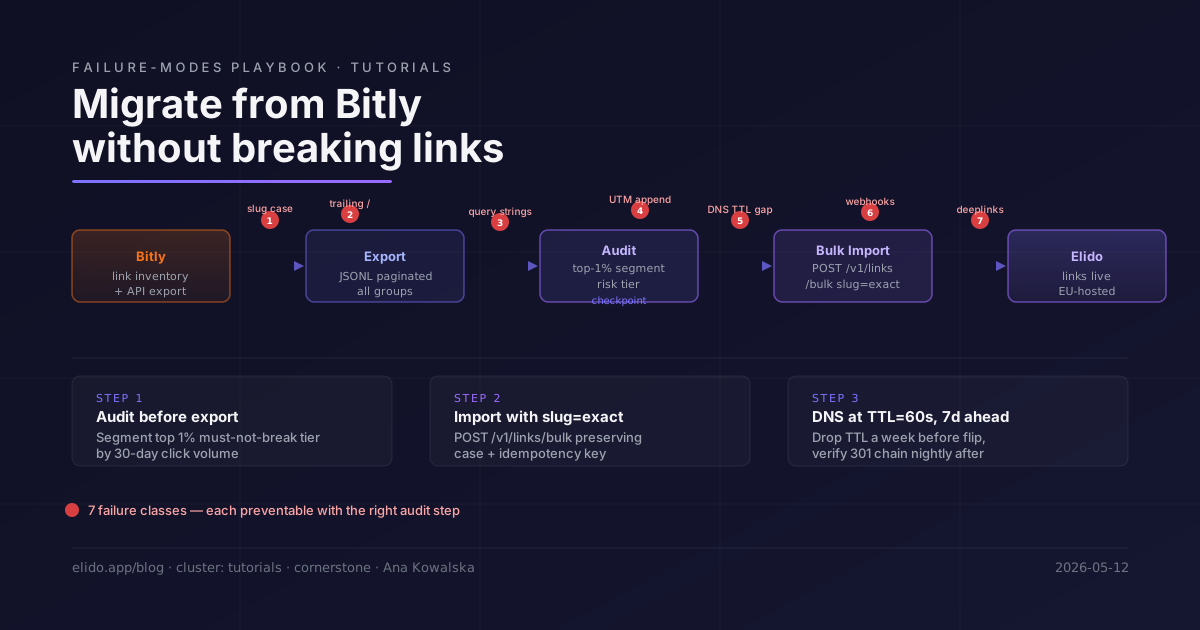
Dieser Beitrag ist anders. Er konzentriert sich darauf, was kaputtgeht - auf die spezifischen Fehlermuster, die auftauchen, nachdem der konzeptionelle Plan steht und Sie die Migration tatsächlich gegen Produktivdaten fahren. Sieben davon treten wiederholt auf, und alle sieben sind vermeidbar, wenn man weiß, worauf zu achten ist.
TL;DR
- Bitly-Slugs sind case-sensitive; viele Redirect-Plattformen sind es nicht.
bit.ly/AbCdundbit.ly/abcdsind in Bitly unterschiedliche Links und verhalten sich unterschiedlich, wenn Ihr Migrationsskript Slugs beim Import in Kleinbuchstaben umwandelt. - DNS-TTL-Lücken verursachen eine Redirect-Lücke, selbst nachdem der CNAME umgeschaltet wurde. Senken Sie die TTL mindestens 24 Stunden vor dem Cutover auf 60 Sekunden, nicht fünf Minuten vorher.
- Webhooks, die auf
api-ssl.bitly.com-Endpunkte zeigen, hören in dem Moment auf zu feuern, in dem Sie das Bitly-Konto kündigen oder deaktivieren. Verkabeln Sie jeden nachgelagerten Konsumenten neu, bevor Sie den Kontostatus anrühren. - Deeplinks mit Pfadsegmenten (
bit.ly/app/account/settings) kollidieren mit allen Elido-Routing-Regeln, die ebenfalls auf Pfadpräfixe matchen. Auditieren Sie Deeplink-Slugs getrennt von normalen Redirect-Slugs.
Die sieben Dinge, die tatsächlich kaputtgehen
Vor jeder Werkzeugdiskussion hilft es, die Fehler-Taxonomie vor sich zu haben. Die meisten Migrations-Post-Mortems verweisen auf eines davon:
1. Slug-Groß-/Kleinschreibung. Bitly bewahrt die Groß-/Kleinschreibung in Slugs - bit.ly/SummerSale und bit.ly/summersale sind unterschiedliche Links. Wenn Ihr Import-Skript Slugs auf Kleinbuchstaben normalisiert (eine gängige Voreinstellung in URL-Handling-Bibliotheken), erzeugen Sie stillschweigend den falschen Slug und die Variante mit Großbuchstaben liefert 404. Davon sind E-Mail-Kampagnen betroffen, in denen der Slug in gemischter Groß-/Kleinschreibung eingebettet wurde.
2. Verhalten beim abschließenden Schrägstrich. bit.ly/campaign/ und bit.ly/campaign werden im Bitly-Router als derselbe Link behandelt. Manche Plattformen behandeln die Variante mit abschließendem Schrägstrich als eigenen Pfad. Wenn Ihr Elido-Workspace hinter einem Reverse-Proxy mit strikter URL-Normalisierung sitzt, kann eine Anfrage mit abschließendem Schrägstrich anders aufgelöst werden als der kanonische Slug.
3. Erhaltung des Query-Strings. Wenn die Ziel-URL eines Bitly-Links bereits Query-Parameter enthält - https://acme.example/landing?source=bitly - und der Klick zusätzlich UTM-Parameter mitbringt, die zum Zeitpunkt des Teilens angehängt wurden, müssen Sie prüfen, ob das Zusammenführen am Ziel in Elido identisch funktioniert. Das Standardverhalten von Bitly für angehängte UTMs ist, sie in den bestehenden Query-String zu mergen. Testen Sie dies explizit für jeden Link, dessen Ziel-URL bereits Parameter trägt.
4. UTM-Anhängen auf Plattformebene. Der Enterprise-Tarif von Bitly unterstützt UTM-Anhängen auf Workspace-Ebene: jedem ausgehenden Redirect wird unabhängig vom Inhalt der ursprünglichen Ziel-URL ein UTM angehängt. Wenn Sie dies in Bitly aktiviert hatten und nicht dokumentierten, können Analytics-Reports von UTMs abhängen, die Elido noch nicht anhängt. Prüfen Sie vor dem Export Ihre Workspace-Einstellungen in Bitly auf Auto-Append-Regeln. Das Pendant in Elido sind UTM-Templates auf Workspace- oder Kampagnenebene - die Seite zum Custom-Domains-Feature zeigt, wo diese Konfiguration sitzt.
5. DNS-TTL-Lücke. Das ist die häufigste Ursache für eine Redirect-Lücke beim Cutover. DNS-Resolver cachen den alten CNAME für die Dauer der aktuellen TTL. Wenn Ihre TTL seit zwei Jahren bei 86400 Sekunden steht und Sie sie fünf Minuten vor dem Umlegen des A-Records auf 300 Sekunden ändern, halten die meisten Resolver den alten Record immer noch für weitere 23 Stunden und 55 Minuten. Der Cutover ist nicht sofortig; er propagiert.
6. Webhook-Neuverkabelung. Jedes System, das Bitly-Webhook-Events konsumiert - Analytics-Pipelines, CRM-Anreicherungsjobs, Shopify-Bestellzuordnung - feuert gegen die Bitly-Endpunkt-URL. Dieser Endpunkt wird dunkel, wenn Sie das Bitly-Konto kündigen oder unter die Stufe herabstufen, die Webhooks unterstützt. Die Webhook-Konfiguration von Bitly liegt auf Kontoebene und wird nicht mit den Linkdaten exportiert. Jeder Konsument muss manuell inventarisiert und neu ausgerichtet werden.
7. Pfadkollisionen bei Deeplinks. Mobile Deeplinks nutzen oft den Short-URL-Pfad, um den Navigationszustand der App zu kodieren - bit.ly/app/profile/edit könnte auf ein Ziel wie yourapp://profile/edit abbilden. Wenn Sie diese Slugs zu Elido migrieren, enthält der Slug app/profile/edit Schrägstriche. Der Router von Elido kann durch Schrägstriche getrennte Pfade anders behandeln als die opake Slug-Behandlung von Bitly. Stellen Sie sicher, dass Deeplink-Slugs mit Pfadsegmenten mit der exakten Slug-Zeichenkette angelegt werden und nicht als verschachtelte Pfade neu interpretiert werden.
Pre-Migration-Audit: nach Risikostufen segmentieren
Die Bitly API (abgerufen am 2026-05-12) liefert Klickzahlen pro Link über GET /v4/bitlink/{bitlink}/clicks/summary. Bevor Sie irgendetwas exportieren und importieren, nutzen Sie das, um Ihren Bestand zu segmentieren.
Die praktische Segmentierung:
- Must-not-break-Stufe (oberstes 1 %): Links mit >=10x dem Median der Klicks in den letzten 30 Tagen. Diese sind in E-Mails, Druckerzeugnissen und bezahlten Anzeigen-Landingpages live. Sie brauchen nach dem Cutover manuelle Verifikation, nicht nur automatisierte Prüfungen.
- Monitor-Stufe (die nächsten 9 %): Links mit Klickvolumen über dem Median. Automatisierte 301-Verifikation reicht aus, aber markieren Sie alles, was sich unerwartet auflöst.
- Bulk-Stufe (verbleibende 90 %): Slugs mit wenig oder gar keinem Traffic. Programmgesteuert verifizieren; eine kleine Fehlerquote akzeptieren und bei Meldung korrigieren.
Exportieren Sie während des Inventarisierungsschritts eine 30-Tage-Klickzusammenfassung pro Link. Eine einfache Paginierungsschleife gegen die Bitly API-Referenz (abgerufen am 2026-05-12) liefert diese Daten; das Feld link_clicks im Group-Bitlinks-Endpunkt ist der Lebenszeit-Zähler, der gröber, aber für die Triage ausreichend ist:
# Paginate all links in a Bitly group and write to JSONL
NEXT_URL="https://api-ssl.bitly.com/v4/groups/${GROUP_GUID}/bitlinks?size=100"
while [ -n "$NEXT_URL" ]; do
  RESP=$(curl -s -H "Authorization: Bearer ${BITLY_TOKEN}" "$NEXT_URL")
  echo "$RESP" | jq -c '.links[]' >> bitly-links.jsonl
  NEXT_URL=$(echo "$RESP" | jq -r '.pagination.next // empty')
done
Sortieren Sie die Ausgabe absteigend nach link_clicks. Das oberste 1 % ist Ihre Must-not-break-Stufe. Exportieren Sie deren Slugs in eine separate Datei, bevor Sie den Bulk-Import starten.
Slug-Erhaltung: der Import-Call, auf den es ankommt
Der Bulk-Import-Endpunkt von Elido unter POST /v1/links/bulk akzeptiert ein slug-Feld pro Link. Wenn Sie es nicht explizit setzen, generiert Elido einen neuen zufälligen Slug - das ist das falsche Verhalten für eine Migration. Übergeben Sie immer den Quell-Slug.
# Bulk import with slug preservation - 100 links per call
curl -s -X POST "https://api.elido.app/v1/links/bulk" \
  -H "Authorization: Bearer ${ELIDO_API_KEY}" \
  -H "Content-Type: application/json" \
  -H "Idempotency-Key: mig-batch-$(date +%s)" \
  -d '{
    "workspace_id": "'"${WORKSPACE_ID}"'",
    "domain_id": "'"${DOMAIN_ID}"'",
    "links": [
      {
        "slug": "SummerSale",
        "destination_url": "https://acme.example/summer",
        "tags": ["bitly-migrated", "campaign-summer"]
      },
      {
        "slug": "AbCd",
        "destination_url": "https://acme.example/landing",
        "tags": ["bitly-migrated"]
      }
    ]
  }'
Zwei Dinge sind in diesem Call zu beachten. Erstens: Die Slug-Werte sind "SummerSale" und "AbCd" - gemischte Groß-/Kleinschreibung exakt so erhalten wie in Bitly. Wandeln Sie sie nicht in Kleinbuchstaben um. Zweitens bedeutet der Idempotency-Key-Header, dass Sie einen teilweisen Batch sicher erneut ausführen können; Elido gibt den existierenden Link zurück, statt ein Duplikat anzulegen. Das ist das korrekte Muster für eine Migration, die möglicherweise fortgesetzt werden muss.
Führen Sie für die Must-not-break-Stufe den Import interaktiv pro Link statt im Batch aus und verifizieren Sie jeden Link, bevor Sie weitermachen. Für die Bulk-Stufe batchen Sie 100 pro Call und verarbeiten das Error-Array in der Antwort, um Slugs zu erkennen, die kollidiert sind oder fehlgeschlagen sind.
DNS-Cutover ohne Lücke
Der DNS-Cutover ist der Moment, in dem der Live-Traffic umschwenkt. Korrekt ausgeführt erleben die Nutzer keine Unterbrechung. Mit einer veralteten TTL gibt es eine Lücke, die in Stunden gemessen wird, nicht in Minuten.
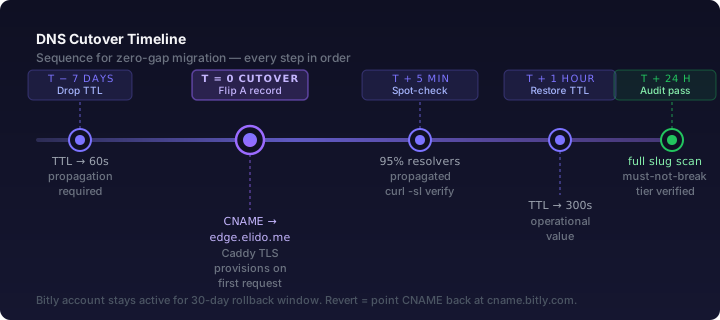
Die Reihenfolge ist entscheidend. Siehe das Zeitlinien-Diagramm unten.
Die Zeitlinie im Detail:
T-7 Tage: Senken Sie die TTL auf dem CNAME- oder A-Record auf 60 Sekunden. Das ist der kritische Schritt, den die meisten Teams übersehen. RFC 1034 §3.6 (IETF datatracker, Abschnitt zum Caching von Resource Records) definiert TTL als maximale Cache-Dauer, die ein Resolver den Record halten darf. Wenn Ihre aktuelle TTL 86400 (ein Tag) beträgt, wird die Änderung erst wirksam, nachdem die aktuell gecachte Version abgelaufen ist. Sie müssen die TTL mindestens eine volle aktuelle TTL-Periode vor dem Cutover senken. Eine Woche ist sicher; 24 Stunden sind das Minimum.
T-1 Stunde: Prüfen Sie, dass die niedrige TTL propagiert ist. Nutzen Sie ein Tool wie dig @8.8.8.8 links.yourbrand.com +ttl von mindestens drei verschiedenen Resolver-Endpunkten. Die gemeldete TTL sollte nahe 60 Sekunden liegen.
T-0: Tauschen Sie das CNAME-Ziel von Bitlys Edge auf Elidos Edge. Auf Elidos Seite sollte die Domain bereits in Ihrem Workspace registriert und verifiziert sein - schalten Sie DNS nicht um, bevor Elidos Edge bereit ist, den Traffic anzunehmen. Die erste Anfrage nach der Propagation löst die automatische On-Demand-TLS-Zertifikatsausstellung aus, die für diese eine Anfrage etwa 2-3 Sekunden dauert. Nachfolgende Anfragen treffen den Cache und werden am EU-Region-Edge in einstelligen Millisekunden aufgelöst.
T+5 Minuten: Führen Sie einen Stichproben-Check von einem zweiten Netzwerk aus durch (nutzen Sie einen Mobile-Hotspot, um den Cache des Büro-Resolvers zu umgehen). curl -sI https://links.yourbrand.com/any-known-slug sollte ein 301 Moved Permanently zurückgeben, das auf das erwartete Ziel zeigt und aus Elidos Edge-Headern stammt.
T+1 Stunde: Stellen Sie die TTL auf ihren normalen Betriebswert (300 oder 3600 Sekunden) zurück. Die TTL dauerhaft bei 60 Sekunden zu halten, belastet Ihren DNS-Provider und die Resolver-Infrastruktur.
T+24 Stunden: Führen Sie das vollständige Slug-Audit aus (siehe nächster Abschnitt).
Gemäß RFC 7231 §6.4.2 darf eine 301 Moved Permanently-Antwort von Zwischenstationen unbegrenzt gecacht werden, sofern kein expliziter Cache-Control-Header dies überschreibt. Das bedeutet: Jeder Client, der während der TTL-Lücke das alte Bitly-Ziel getroffen hat, kann einen 301 gecacht haben, der auf Bitlys Infrastruktur zeigt. Diese gecachten Redirects funktionieren korrekt, solange Bitlys Infrastruktur lebt - deshalb ist das 30-tägige Bitly-Konto-Überlappungsfenster wichtig.
Das 301-Chain-Audit: skriptgesteuerte nächtliche Verifikation
Fahren Sie nach dem Cutover eine nächtliche Verifikationsschleife über Ihre Must-not-break-Stufe. Ziel ist es, jeden Slug zu erwischen, dessen Verhalten sich geändert hat - sei es, dass er ein unerwartetes Ziel zurückgibt, einen 404 liefert oder eine Redirect-Kette länger als zwei Hops aufbaut.
# Verify top slugs resolve correctly via Elido
# top-slugs.txt: one slug per line, no protocol prefix
DOMAIN="links.yourbrand.com"
FAIL=0

while IFS= read -r slug; do
  STATUS=$(curl -s -o /dev/null -w "%{http_code}" \
    --max-redirs 0 \
    "https://${DOMAIN}/${slug}")
  LOCATION=$(curl -s -I --max-redirs 0 \
    "https://${DOMAIN}/${slug}" \
    | grep -i '^location:' | tr -d '\r' | cut -d' ' -f2)

  if [ "$STATUS" != "301" ]; then
    echo "FAIL [$STATUS] $slug → expected 301"
    FAIL=$((FAIL + 1))
  else
    echo "OK  [301] $slug → $LOCATION"
  fi
done < top-slugs.txt

echo "---"
echo "Failures: $FAIL"
exit $FAIL
Fahren Sie dies gegen die Must-not-break-Stufe (typischerweise 50-200 Slugs für die meisten Teams) jede Nacht während der ersten zwei Wochen nach dem Cutover. Leiten Sie die Ausgabe in Ihren Alerting-Kanal. Wenn FAIL ungleich Null ist, soll sich ein Mensch das ansehen, bevor der Morgen-Traffic Spitzen erreicht.
Das Flag --max-redirs 0 ist Absicht: Sie wollen Elidos Redirect, nicht das Endziel. Wenn der Status 200 statt 301 lautet, liefert etwas auf Elidos Seite das Ziel direkt aus, statt umzuleiten - das bedeutet, dass der Slug auf einen Link aufgelöst wurde, der als direkter Pass-Through konfiguriert ist. Das ist eine Untersuchung wert.
Führen Sie für die Monitor-Stufe einen leichteren wöchentlichen Scan aus. Verlassen Sie sich für die Bulk-Stufe auf Fehlermeldungen aus nachgelagerten Systemen - kaputte Links in E-Mails erzeugen Änderungen bei der Bounce-Rate, die Ihre E-Mail-Plattform an die Oberfläche bringt.
Webhook-Neuverkabelung
Bitly-Webhooks sind unter der Bitly API-Referenz (abgerufen am 2026-05-12) im Webhooks-Abschnitt dokumentiert. Jeder Webhook feuert bei Click-Events und enthält die Felder bitlink, referrer und user-agent. Gängige Konsumenten:
- Shopify: Attributions-Apps, die nachverfolgen, welcher Short-Link eine Conversion verursacht hat. Konfiguriert im Admin-Panel der Shopify-App, mit Verweis auf einen Drittanbieter-Endpunkt, der Bitlys Webhook-Verifikation aufruft.
- Stripe: Manche Billing-Attributions-Pipelines markieren eingehende Trial-Anmeldungen mit den UTM-Daten des ursprünglichen Short-Links, bezogen über den Bitly-Webhook.
- Slack: Link-Performance-Bots, die Klickzusammenfassungen in einen
#marketing-Kanal posten. - Eigene ETL-Pipelines: jede Data-Warehouse-Pipeline, die Bitly-Click-Events für Anreicherung oder Attributions-Joins aufnimmt.
Die Migrations-Checkliste für Webhooks:
- Exportieren Sie Ihre Bitly-Webhook-Konfiguration, bevor Sie irgendwelche Kontoänderungen vornehmen. Die Bitly-API
GET /v4/workspaces/{workspace_guid}/webhooksliefert die Liste. Speichern Sie sie in einer Datei. - Identifizieren Sie pro Konsumenten die Endpunkt-URL, die Bitly-Events empfängt, sowie das Secret für die HMAC-Verifikation.
- Richten Sie den entsprechenden Elido-Webhook-Endpunkt ein. Elidos Webhook-Payloads haben ein anderes Schema als die von Bitly - die Felder sind ähnlich, aber nicht identisch. Passen Sie den Handler des Konsumenten an das neue Schema an.
- Lassen Sie beide Webhooks während des Überlappungsfensters parallel laufen. Konfigurieren Sie Elido so, dass es ab dem Cutover-Tag Webhooks feuert, und halten Sie gleichzeitig den Bitly-Webhook aktiv. Ihr Konsument erhält während der Überlappung zwei Events pro Klick - dedup-en Sie über Short-URL + Zeitstempel oder akzeptieren Sie Doppelzählung während des Überlappungsfensters als bekanntes Artefakt.
- Entfernen Sie nach 72 Stunden bestätigter Elido-Webhook-Zustellung die Bitly-Webhook-Konfiguration aus jedem Konsumenten.
Das Karenzfenster für die Secret-Rotation ist der Überlappungszeitraum. Rotieren Sie das Elido-Webhook-Secret erst, wenn jeder Konsument verifiziert wurde. Das Secret zu rotieren, bevor ein Konsument aktualisiert ist, führt dazu, dass dieser Konsument Events stillschweigend verwirft, ohne einen Fehler - die HMAC-Prüfung schlägt fehl, und die meisten Webhook-Handler verwerfen Payloads mit ungültiger Signatur, ohne zu alarmieren.
Rollback-Plan: Bitly 30 Tage am Leben halten
Die Rollback-Prozedur ist einfach: setzen Sie den DNS-CNAME auf das Bitly-Ziel zurück. Da Sie die TTL-Absenkung vorbereitet haben und der DNS-Record noch bei 60 Sekunden steht (bis Sie ihn wiederherstellen), propagiert ein DNS-Rollback in unter zwei Minuten.
Halten Sie den Rollback-Befehl bereit, bevor Sie starten:
# Rollback script - run this to revert DNS to Bitly (adapt for your DNS provider)
# Route 53 example using AWS CLI
aws route53 change-resource-record-sets \
  --hosted-zone-id "${HOSTED_ZONE_ID}" \
  --change-batch '{
    "Changes": [{
      "Action": "UPSERT",
      "ResourceRecordSet": {
        "Name": "links.yourbrand.com",
        "Type": "CNAME",
        "TTL": 60,
        "ResourceRecords": [{"Value": "cname.bitly.com"}]
      }
    }]
  }'
Halten Sie dies in einer Datei auf Ihrem Laptop und an einem gemeinsam genutzten Runbook-Ort vor dem Cutover bereit. Der schlechteste Moment, um Infrastrukturbefehle zu schreiben, ist während eines aktiven Vorfalls.
Halten Sie das Bitly-Konto aktiv und auf einem kostenpflichtigen Plan, der die Linkauflösung 30 Tage nach dem Cutover sicherstellt. Das migrate-from-bitly-playbook empfiehlt 90 Tage; 30 sind das praktische Minimum für Teams, die Kosten kontrollieren müssen. Während des 30-Tage-Fensters funktioniert jeglicher Traffic, der noch über Bitly aufgelöst wird (gecachte Redirects, alte bit.ly-Links in Druckerzeugnissen), weiterhin. Werten Sie nach 30 Tagen den verbleibenden Bitly-Traffic in Ihrer Analyse aus und entscheiden Sie, ob verlängert werden soll.
Was während des 30-Tage-Fensters zu überwachen ist:
- Elidos Fehlerrate auf Ihrer Custom-Domain (achten Sie auf unerwartete 404s im Access-Log).
- Spitzen im Traffic zu Bitly (das Bitly-Dashboard zeigt Traffic an; eine Spitze kann bedeuten, dass ein gecachter Redirect noch immer über Bitly für einen High-Volume-Slug aufgelöst wird).
- Fehlerraten der Webhook-Konsumenten für alle Konsumenten, die Sie neu verkabelt haben.
Post-Migration-Audit: was zu protokollieren ist
Führen Sie nach dem 30-Tage-Fenster einen finalen Audit-Durchlauf durch. Was ins Audit-Log gehört:
| Prüfung | Methode | Bestehenskriterium |
|---|---|---|
| Slug-Anzahl stimmt überein | wc -l bitly-export.jsonl vs. Elido-API-Zählung | innerhalb von 1 % (bewusst entfernte archivierte Links berücksichtigt) |
| Must-not-break-Stufe 301-Check | Nächtliches Audit-Skript | Null Fehlschläge über 7 aufeinanderfolgende Tage |
| Klickvolumen-Abgleich | Elido-30-Tage-Klicksumme vs. Bitly-30-Tage-Summe aus gleichem Zeitraum im Vorjahr | innerhalb erwarteter saisonaler Schwankung |
| Webhook-Konsumenten-Bestätigung | Prüfen, dass jeder Konsument Elido-Events empfängt und korrekt verarbeitet | keine stillen Verluste für 7 Tage |
| DNS-TTL wiederhergestellt | dig +ttl links.yourbrand.com | TTL auf Betriebswert (300+ Sekunden) |
Protokollieren Sie dies in der Audit-Tabelle Ihres Teams. Wenn Ihr Workspace auf einem Business- oder Enterprise-Plan liegt, erfasst Elidos Audit-Log alle API-Operationen während des Imports und ist über die API abfragbar. Ziehen Sie die Import-Batch-Datensätze und speichern Sie einen Snapshot neben dieser Tabelle.
Häufige Stolperfallen: drei Muster aus der Praxis
Die DACH-E-Commerce-Marke, die eine Woche E-Mail-Attribution verlor. Ein Händler in Deutschland fuhr eine Newsletter-Kampagne mit Bitly-Slugs und je Abonnent angehängten UTMs zum Versandzeitpunkt. Das Migrationsskript normalisierte alle Slugs auf Kleinbuchstaben, bevor sie in Elido importiert wurden. Nach dem Cutover erzeugte die E-Mail-Plattform Links mit den ursprünglichen, gemischten Slugs. Diese Links lieferten 404 von Elido, weil die Slug-Schreibweise nicht übereinstimmte. Die Lösung war, den Import mit Schreibweisen-erhaltenden Slugs erneut zu fahren, aber bis dahin waren sieben Tage E-Mail-Traffic auf 404s gelandet. Die Attribution war für diese Kohorte nicht mehr rekonstruierbar. Die Lehre: testen Sie einen Live-Link aus jedem aktiven Kanal, bevor Sie die Migration für abgeschlossen erklären.
Das SaaS-Startup, das mobile Nutzer dreifach weiterleitete. Ein Growth-Team hatte eine Bitly-Custom-Domain im Proxy-Modus (orange-cloud) vor Cloudflare. Nach dem Cutover bekamen mobile Nutzer drei Redirects: Cloudflare → Elido Edge → Ziel. Der zusätzliche Hop kam von einer Cloudflare-Page-Rule, die HTTP zu HTTPS umschrieb, bevor sie an Elido übergab, woraufhin Elido seinen eigenen 301 ausstellte. iOS Safari cachte den zwischengeschalteten Cloudflare-Redirect 30 Tage lang als permanenten Redirect. Die Lösung war, den Cloudflare-Record auf grey-cloud (nur DNS) zu setzen und die konfliktierende Page-Rule zu entfernen. Die in Safari gecachten Redirects brauchten 30 Tage, bis sie auf natürlichem Weg abliefen. Prüfen Sie Ihren CDN-Proxy-Modus vor dem Cutover, nicht danach.
Die Agentur, die eine Bitly-Gruppe übersah. Eine Agentur managte drei Kundenmarken unter einem einzigen Bitly-Konto, jede unter einer anderen Bitly-Gruppe mit eigener Custom-Domain. Das Migrationsskript fragte nur die Default-Gruppe ab - diejenige, unter der der API-Benutzer-Token erstellt worden war. Zwei Kundendomains wurden sauber migriert. Die dritte, unter einer Sekundärgruppe, wurde nie exportiert. Nach dem Cutover ging eine Produkteinführungs-E-Mail-Kampagne raus, die auf die nicht migrierte Custom-Domain zeigte. Die Domain hatte den Bitly-CNAME immer noch mit voller TTL, und Bitly lieferte die Links korrekt aus - aber das Cutover-Fenster für diese Domain war für abgeschlossen erklärt worden. Es folgte eine komplette Neumigration unter Termindruck. Die Lehre: zählen Sie vor jedem Exportschritt alle Gruppen über GET /v4/user/groups auf. Prüfen Sie, dass der Token Zugriff auf jede Gruppe hat.
Wie es weitergeht
Das migrate-from-bitly-playbook deckt die vollständige strategische Sequenz für Teams ab, die bei der Migrationsplanung bei Null anfangen. Dieser Beitrag ist der Fehlermodi-Begleiter - verwenden Sie sie zusammen.
Für die Produktseite dessen, wohin Sie migrieren, behandelt die Seite solutions/marketers die Attributions- und Kampagnen-Tracking-Funktionen, auf die die meisten Migrationsprojekte abzielen. Die Seite /compare/vs-bitly ist die Feature-Paritäts-Referenz, falls Sie noch bestätigen, ob der Wechsel sich lohnt.
Wenn Sie Elido neben Rebrandly oder Short.io evaluieren, behandelt der elido-vs-bitly-Vergleich Preis- und Feature-Abwägungen bei vier Traffic-Volumina. Die Custom-Domains-Feature-Seite dokumentiert die Mechanik der DNS-Verifikation und TLS-Bereitstellung im Detail - lesenswert vor Ihrem DNS-Cutover-Fenster.
Migrationsfehler sind fast immer vermeidbar. Das Audit-Skript, die TTL-Disziplin und das Webhook-Inventar erfordern zwei Stunden Arbeit vor dem Cutover. Sie sparen Tage Incident-Response danach.
Quellen und Zitate
- Bitly API Reference - dev.bitly.com/api-reference, abgerufen am 2026-05-12
- RFC 1034 - Domain Names: Concepts and Facilities, §3.6 (resource record caching) - datatracker.ietf.org/doc/html/rfc1034
- RFC 7231 §6.4.2 - HTTP/1.1 Semantics and Content: 301 Moved Permanently - datatracker.ietf.org/doc/html/rfc7231#section-6.4.2
- Bitly API - Groups and Bitlinks endpoints - dev.bitly.com/api-reference, abgerufen am 2026-05-12
Elido testen
URL einfügen, kurzer Link in Sekunden
Kein Konto nötig. Link bleibt 30 Tage aktiv. Konto erstellen, um ihn dauerhaft zu behalten.
Kostenlos, keine Anmeldung erforderlich · 2 pro Tag