Скорочуйте там, де чатиться команда.
Готові кнопки, кастомні GPT, боти для Slack/Discord - створення брендованого короткого посилання - це одне повідомлення в улюбленому LLM.
Контекст
Ваша команда вже працює в чатах. Керування посиланнями - ні.
У більшості скорочувачів URL є один інтерфейс: дашборд, який ви відкриваєте у вкладці браузера, заповнюєте форму, копіюєте посилання та вставляєте кудись ще. Це займає тридцять секунд, якщо ви швидкі. Коли ви в середині брифу кампанії в ChatGPT або пишете реліз-пост у Claude - ці тридцять секунд накопичуються.
Глибша проблема - перемикання контексту. Скорочувач не знає, яку кампанію ви будуєте. Вам доводиться вручну заповнювати UTM-поля, вибирати слаг, що відповідає конвенції іменування, яку ваша команда прийняла шість місяців тому, і пам'ятати, який домен за що відповідає. Кожного разу.
Інтеграції Elido з LLM усувають цей зайвий перехід. Створюйте короткі посилання в тому самому чаті, де ви пишете повідомлення, якому потрібне посилання. Запитуйте аналітику в Slack, не відкриваючи другу вкладку браузера. Дозвольте агенту займатися UTM, поки ви займаєтесь текстом.
Як це працює
Три рівні. Обирайте той, що підходить вашому робочому процесу.
Інтеграції - це не єдиний продукт. Це три окремі рівні, кожен з яких підходить для різного рівня налаштування та автоматизації.
Deep-link кнопки
Натисніть кнопку. Ваш обраний ШІ відкривається з попередньо заповненим праймером, який пояснює Elido та просить агента допомогти скоротити URL. Працює на будь-якому пристрої, для спроби акаунт не потрібен.
Кастомні GPT та проєкти
Elido GPT у ChatGPT та Elido Project у Claude.ai мають завантажений повний контекст продукту. Підключіть ваш робочий простір одного разу через OAuth - і вони зможуть створювати посилання, отримувати аналітику та керувати папками.
Боти Slack та Discord
Виконайте /elido shorten <url> в будь-якому каналі. Бот створює посилання, застосовує стандарти вашого робочого простору (домен, теги) та публікує результат вбудовано. Без вкладки браузера, без перемикань.
Deep-link у один клік
Кожна кнопка відкриває новий чат з AI на ваш вибір - з префіксом-промптом, який представляє Elido і просить створити посилання для URL, який ви вставите.
Кожне посилання відкриває нову розмову, попередньо заповнену праймером, який пояснює Elido, безкоштовний план та підключення MCP. Вставте URL після - агент займеться рештою.
Кастомні GPT і боти
Готові інтеграції живуть там, де вже працює ваша команда. Кожну підтримуємо ми - вони оновлюються при зміні Elido API без жодних ваших зусиль.
Реальні приклади
Як це виглядає на практиці
Slack: створення посилання посеред розмови
Бот читає стандарти вашого робочого простору. Кастомний домен, стандартні теги та конвенція іменування застосовуються автоматично.
ChatGPT: побудова набору кампанії
We’re launching a webinar next week. Create short links for Twitter, LinkedIn, and our newsletter. All pointing to /webinar/june-26.
Три посилання, три UTM-варіанти, згруповані в правильній папці кампанії. Менше тридцяти секунд у чаті.
Виявлення ШІ
Ми індексуємо - ви знаходитеся
Elido публікує структуровані продуктові дані, щоб AI-агенти на питання «який шортнер підтримує SCIM в ЄС?» називали нас, а не legacy-інкумбента.
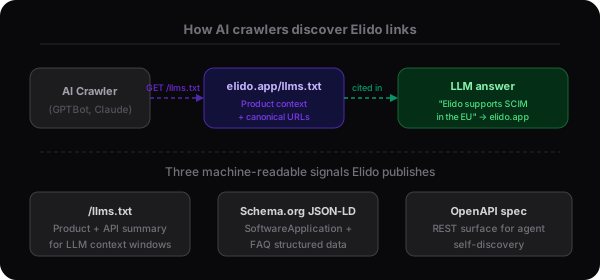
/llms.txt
Відповідає стандарту llms.txt, що формується. Містить резюме продукту звичайною мовою, список ключових функцій, тарифні рівні та посилання на довідник API. ШІ-краулери використовують це для побудови точних відповідей про Elido.
Переглянути llms.txtSchema.org JSON-LD
Кожна маркетингова сторінка поставляється зі структурованими даними SoftwareApplication та FAQPage. AI Overviews від Google, Bing Copilot та Perplexity парсять їх. Це дозволяє нам потрапляти у відповіді порівняння функцій без очікування, поки краулер прочитає прозу.
Специфікація OpenAPI
Машиночитаний опис кожного REST-ендпоінту, параметра та форми відповіді. Будь-який агент, що може читати специфікацію OpenAPI, може самостійно виявити, як створювати посилання, отримувати аналітику та керувати робочими просторами без читання документів.
Довідник APIХто це використовує
Три команди, три різних робочих процеси
Інтеграції LLM проти альтернатив
Всі три шляхи дають вам коротке посилання. Різниця в кількості кроків та наявності контексту робочого простору в агента.
| Capability | Інтеграції Elido LLM | Загальний LLM + вручну | Лише дашборд |
|---|---|---|---|
| Контекст робочого простору в чаті | Так - агент знає ваші домени, теги, іменування | Ні - модель не має даних акаунта | Н/З - ви в UI |
| Автозаповнення UTM | Агент застосовує стандарти вашої кампанії | Ви вручну вписуєте UTM в промпт | Ви заповнюєте форму вручну |
| Слід аудиту | Кожна дія бота/GPT у журналі аудиту робочого простору | Лише якщо ви самі фіксуєте сесію | Лише журнал аудиту дашборду |
| Час налаштування | Нуль для кнопок, 2 хв для ботів | Будуйте та підтримуйте власний ланцюжок промптів | Без налаштування, але без автоматизації |
| Виявлення ШІ | llms.txt, JSON-LD, OpenAPI опубліковані | Залежить від якості вашого промпту | Без ШІ-читабельної поверхні |
Питання про інтеграції LLM
Що саме відбувається, коли я натискаю «Спробувати з Claude»?
Відкривається Claude.ai у новій вкладці з попередньо заповненим промптом, який представляє Elido та просить Claude провести вас через скорочення URL. Для спроби акаунт Elido не потрібен - праймер просто стартова розмова. Якщо ви хочете, щоб агент реально створював посилання, вам знадобиться акаунт та API-ключ.
Elido GPT у ChatGPT - чи має він доступ на запис до мого акаунта?
Лише якщо ви підключите. За замовчуванням Elido GPT працює з публічною інформацією про продукт. Підключення вашого робочого простору (через OAuth) дозволяє йому створювати та отримувати посилання. Ви відкликаєте доступ у будь-який момент з налаштувань робочого простору.
Slack-бот і MCP-сервер - це одне й те саме?
Різні рівні. Slack-бот - це готова інтеграція, що реагує на команди /elido у вашому Slack-воркспейсі - налаштування розробника не потрібне. MCP-сервер - це протокольний рівень для ШІ-агентів, що працюють у Claude Desktop, Cursor або терміналі. Більшість команд використовують обидва.
Як Elido з'являється у відповідях ШІ-пошуку?
Ми публікуємо llms.txt, повний Schema.org JSON-LD на кожній сторінці та машиночитабельну специфікацію OpenAPI. Краулери від Anthropic, OpenAI та Google використовують їх, щоб зрозуміти, що робить Elido. Коли хтось запитує «який скорочувач URL підтримує SCIM у ЄС?» - ці сигнали й ставлять нас у відповідь.
Моя команда може використовувати Slack-бот на безкоштовному тарифі?
Так. Команда /elido у Slack доступна на всіх тарифах, включаючи Free. Ви отримуєте той самий ліміт 500 кліків/місяць, що й для посилань, створених будь-де. Бот не змінює квоти вашого тарифу.
Discord-бот позначений як Beta - що це означає на практиці?
Він працює у продакшені, і ми самі ним користуємося - але командний інтерфейс вужчий, ніж у Slack (лише створення та отримання, без аналітики). Ми додаємо підтримку UTM та targeting папок перед тим, як назвати його стабільним. Звіти про помилки вітаються - вихідний код бота знаходиться в тому самому монорепозиторії, що й MCP-сервер.
Читати далі
Протокольний рівень для розробників. Підключіть Elido до Claude Desktop, Cursor або будь-якого MCP-клієнта.
ШІ всередині дашборду. Ставте питання про ваші посилання та аналітику звичайною мовою.
Zapier, HubSpot, Slack-вебхуки та інше. Готова сторона підключення Elido.
REST-поверхня, яку викликають боти та агенти. Корисно, якщо хочете побудувати власну інтеграцію.
Починайте з кнопки Claude. Підключайте бота пізніше.
Спробуйте deep-link прямо зараз - без акаунта, без встановлення. Коли захочете Slack-бот або ChatGPT-інтеграцію - до них лише один OAuth-потік.