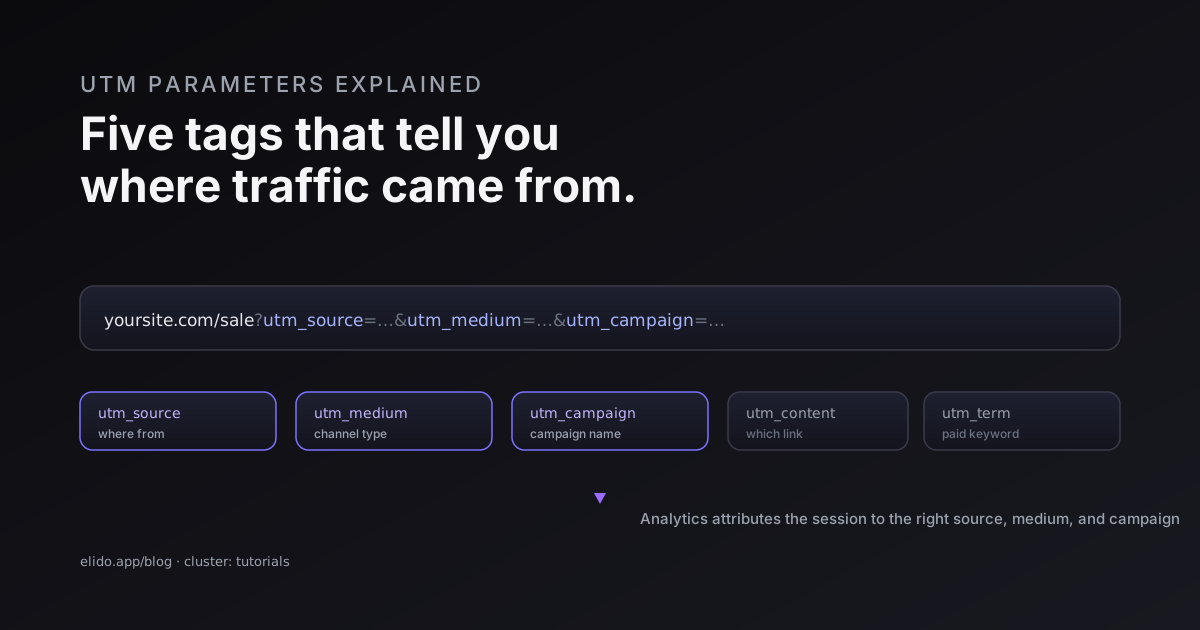
UTM parameters are five short tags you add to the end of a link so your analytics tool can tell you exactly where a visitor came from. A URL like yoursite.com/sale?utm_source=newsletter&utm_medium=email&utm_campaign=spring still opens your sale page normally, but it also carries a label that says "this click came from the spring email." When the visitor lands, Google Analytics reads that label and files the session under the right source, medium, and campaign.
That is the whole idea. UTM stands for Urchin Tracking Module, the parameters are case-sensitive text you control, and the five of them - source, medium, campaign, content, and term - turn a wall of anonymous traffic into a report you can actually act on. On social specifically, where the tags often get stripped, how to track social media links covers the short-link layer that keeps the count. Only utm_source is strictly required; the rest add precision. Below is what each tag does, how the tracking works once someone clicks, and the handful of conventions that keep your reports from turning into a mess of near-duplicate rows.
If your end goal is full campaign attribution, this is the foundation. The complete flow from tagged link to dashboard lives in track UTM campaigns end to end; this guide is the layer underneath it.
What UTM Stands For and Why It Exists
UTM stands for Urchin Tracking Module. The name is a fossil. Urchin was a web analytics company, and when Google bought it in 2005, the product became the first version of Google Analytics. The tracking tags Urchin used kept their utm_ prefix, and because Google Analytics became the default analytics tool for most of the web, that naming convention stuck everywhere. Wikipedia's entry on UTM parameters traces the lineage if you want the full history.
The problem they solve has not changed since 2005. Without a tag, a visit from your newsletter, your paid ad, and a partner's blog post can all look identical in analytics - they are just "traffic." UTM parameters attach a small, structured note to each link so the analytics tool can separate those visits and credit the right channel. They are not a tracking pixel and they do not follow people around the web. They are just labels on a URL, read once when the page loads.
The Five UTM Parameters, One by One
There are five standard parameters, and each answers a different question about where a click came from. You will use the first three constantly and the last two occasionally.
| Parameter | What it answers | Example value |
|---|---|---|
utm_source | Which site or platform sent it | newsletter, google |
utm_medium | What kind of channel it was | email, cpc, social |
utm_campaign | Which campaign it belongs to | spring-sale-2026 |
utm_content | Which link or creative was clicked | hero-cta, footer-link |
utm_term | Which paid keyword triggered it | running+shoes |
utm_source is the only one analytics strictly needs to register a campaign, but the useful minimum is source plus medium plus campaign. Google's own campaign URL guidance for GA4 treats that trio as the core set, and leaving one out produces the vague "(not set)" rows that make reports useless. The distinction people trip over most is source versus medium: source is the specific origin (facebook), medium is the category (social). One is the name, the other is the type. When the trio is present on the link and the report still says "(not set)", the cause is usually further down the chain: UTM parameters not showing in GA4 walks the four reasons in order.
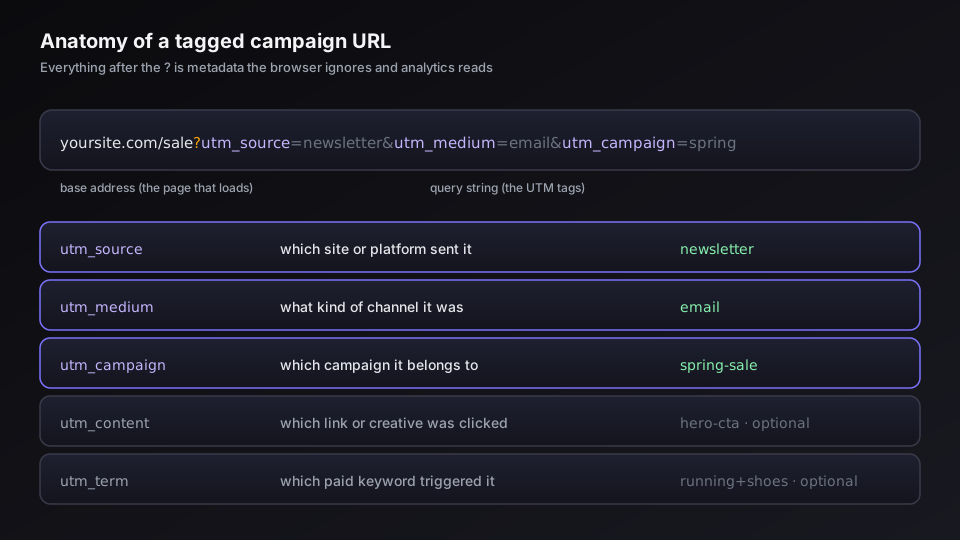
Use utm_content when two links point at the same place and you want to know which one earned the click - the hero button versus the footer link, version A versus version B of an email. Use utm_term mostly for paid search, where it captures the keyword. For the rest of your marketing you can leave utm_term empty without losing anything.
How UTM Tracking Actually Works After the Click
The mechanics are simpler than the reputation suggests. A tagged URL is an ordinary link with extra key-value pairs after a ? in the query string. The browser ignores them when loading the page - your sale page does not care that utm_source=newsletter is attached. The work happens in analytics.
When the page loads, the Google Analytics tag on your site reads the query string, pulls out the utm_ values, and stores them as the session's source, medium, and campaign. From then on, anything that visitor does - a signup, a purchase, three pages of browsing - is attributed to that campaign in the traffic acquisition report. That is the entire loop: tag the link, the visitor clicks, analytics records the labels, the report fills in. Nothing redirects, and the parameters never touch the user experience.
Because hand-typing five parameters invites typos, build the links with a tool. Google's free Campaign URL Builder generates a correct tagged URL from a short form, and most link platforms - including ours - can attach a saved UTM template automatically so the tags are consistent every time. We cover that approach in the UTM builder guide.
The payoff is comparability. Once every campaign link is tagged the same way, you can sit one channel next to another on the same dashboard and ask real questions - did the email outperform the ad, which social network sends buyers rather than browsers, is this campaign worth repeating. Start a free Elido workspace if you want tagged short links and the click data in one place rather than stitched across tools.
UTM Best Practices That Keep Reports Clean
UTM data goes bad in predictable ways, and almost all of them come from inconsistency rather than anything technical. A few rules prevent the mess.
- Lowercase everything, always. Analytics treats
Emailandemailas different mediums, so mixed casing splits one campaign across two rows. Pick lowercase and never break it. - Use one fixed vocabulary. Decide that paid social is
cpcand not sometimespaidand sometimesppc, then write it down. A shared spreadsheet of approved values stops five people inventing five conventions. - No spaces. Replace them with hyphens or underscores. A raw space becomes
%20in the URL and reads badly in reports. - Never tag internal links. A UTM on a link between your own pages overwrites the original source, so a visitor who arrived from Google but clicked an internal tagged button suddenly looks like they came from your own campaign. Tag inbound links only.
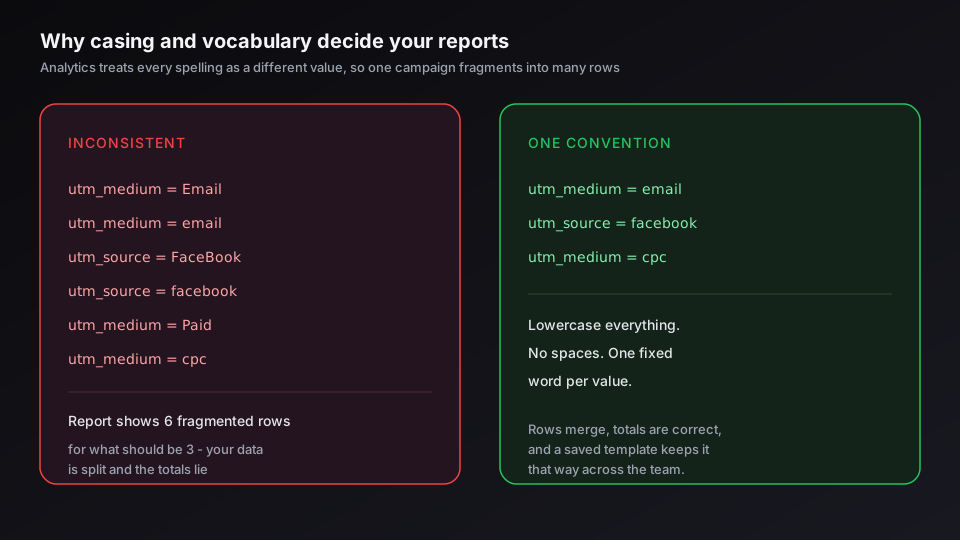
The thread tying these together is a naming convention you commit to once and enforce with templates. I have watched a quarter of campaign data get written off because two teammates spelled the same campaign three ways, and no amount of analytics skill recovers that after the fact. The full system - structure, separators, a reusable template - is in UTM naming conventions.
UTMs, Short Links, and SEO
A fully tagged URL is long and ugly. yoursite.com/sale?utm_source=newsletter&utm_medium=email&utm_campaign=spring-sale-2026&utm_content=hero is fine in an email where the link text hides it, but it is unusable in a text message, a printed QR code, or a social bio. This is where short links and UTMs work together: the short link carries the full tagged URL underneath a clean, branded face, so the redirect preserves every parameter while the visible link stays tidy. The mechanics of that pairing are in link shortener with UTM builder.
The SEO question comes up a lot, and the answer is reassuring. UTM parameters do not affect your rankings. Google does not use them as a ranking signal, and a well-built page declares its own canonical URL, so the tagged version is not indexed as a duplicate. The single real risk is the internal-link mistake above - and there is a related worry about whether the short link itself costs you rank, which we put to rest in do URL shorteners hurt SEO. Tag your inbound links, keep internal links clean, and UTMs stay invisible to search while staying fully visible to your analytics.
That is the complete picture: five tags, three you use every time, read once on click, kept consistent by a convention. Get those habits right and your reports stop being a guess.
Read the cornerstone next - track UTM campaigns end to end without a CDP - for the full pipeline from a tagged link to a conversion you can prove.
Related on the Blog
- Track UTM campaigns end to end without a CDP
- UTM naming conventions that scale across a team
- Build tagged links with a link shortener UTM builder
- A URL shortener for SMS marketing that carriers trust
- Do URL shorteners hurt SEO? The mechanics that matter
- UTM parameters for Google and Meta ads
- How to track social media links: clicks by channel
- Firefox and Brave are breaking your UTM attribution
- UTM parameters not showing in GA4: causes and fixes
- UTM parameters for TikTok and LinkedIn ads
Sıkça sorulan sorular
What does UTM stand for?
UTM stands for Urchin Tracking Module. The name comes from Urchin, the web analytics company Google acquired in 2005 and built Google Analytics on top of. The tracking tags Urchin used kept their utm_ prefix, which is why every analytics tool still reads parameters named utm_source, utm_medium, and so on.
What are the five UTM parameters?
The five standard UTM parameters are utm_source (where the traffic came from, like newsletter or google), utm_medium (the channel type, like email or cpc), utm_campaign (the campaign name, like spring-sale), utm_content (which creative or link was clicked, used for A/B tests), and utm_term (the paid keyword, used mainly in search ads). Source, medium, and campaign do the heavy lifting; content and term add detail when you need it.
Which UTM parameters are required?
Technically only utm_source has to be present for analytics to register a campaign. In practice you should always set utm_source, utm_medium, and utm_campaign together - that trio is what Google Analytics 4 uses to populate its traffic acquisition reports, and leaving one out produces vague '(not set)' rows. Treat utm_content and utm_term as optional extras for finer attribution.
Are UTM parameters case-sensitive?
Yes. Analytics tools treat Email and email as two different mediums, so Facebook and facebook split one campaign into two rows in your reports. The fix is a convention: pick lowercase for everything and never deviate. Inconsistent casing is the most common reason UTM reports look fragmented.
Do UTM parameters affect SEO?
UTM parameters do not directly help or hurt your rankings - Google ignores them for ranking and the destination page's own canonical tag prevents the tagged URL from being indexed as a duplicate. The one rule that matters: never put UTM parameters on internal links between your own pages, because that resets the session source in analytics and muddies your data. Use them only on inbound links from outside your site.
Elido'yu deneyin
Bir URL yapıştırın, çalışan bir kısa bağlantı alın
Kayıt gerekmez. Bağlantı 30 gün boyunca yaşar. Sonsuza kadar saklamak için kaydolun.
Ücretsiz, kayıt gerekmez · Günde 2