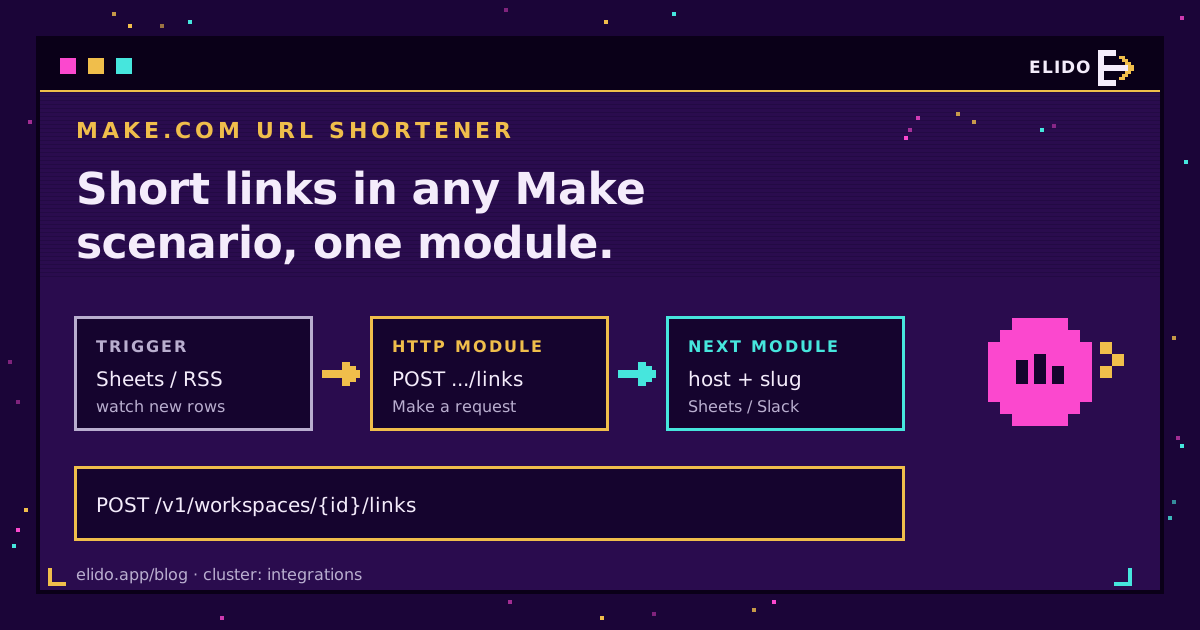
A Make.com URL shortener runs on one module: HTTP, Make a request. It sends a POST to https://api.elido.app/v1/workspaces/{workspace_id}/links with a Bearer API key and a JSON body of domain_id plus destination_url, and Elido answers with the new link's slug. Join that slug to your hostname and you've got a short link. That's the whole trick, and it works on every Make plan.
People searching for a "make short link module" usually expect a branded Elido card in the module picker. There isn't one to install yet. So this guide builds on Make's own HTTP app. Below: the request itself, three scenarios I'd actually run, how to verify signed webhooks inside Make, and what each scenario costs in credits.
New to the Elido REST API? Start with the API and SDKs quickstart. It explains tokens, workspaces and domains, which this post treats as known.
What Make Offers for Elido Short Links Today
Short answer: the HTTP app. Elido's open repository does contain the source for a Make custom app, with a connection, create, update, search and analytics modules, and triggers for link events. But it isn't in Make's public app directory. Loading it would mean pushing it into your own Make developer account and maintaining it there.
So I'd skip it for now. The HTTP module reaches every endpoint, lets you set any header you like, and survives changes on either side because it's just a request. When a listed app ships, the scenarios below move over with the same data shapes, since both paths hit the same endpoints with the same bodies and the same API key.
Everything here uses stock Make apps: HTTP, Webhooks, JSON, Google Sheets, RSS and Slack. If you're comparing platforms, the n8n URL shortener guide covers the same API on n8n. The Zapier walkthrough covers Zapier.
Building the Make Short Link Request
You need three things before the first scenario: an API key, a workspace ID and a domain ID.
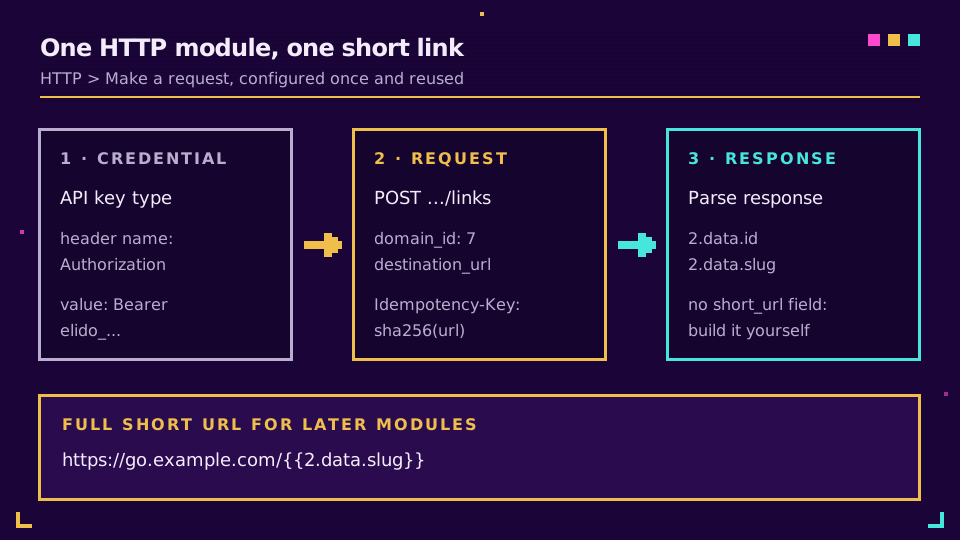
Create the key in the Elido dashboard under API keys. It starts with elido_ and shows once, so paste it straight into Make. In the HTTP module, pick the API key authentication type and create a credential that puts Bearer elido_... into a header named Authorization. Make stores it as a reusable credential. Much better than pasting the header into every module.
Your workspace ID sits in the dashboard URL. For the domain ID, run one throwaway GET against /v1/workspaces/{workspace_id}/domains with Run once: every item has an id and a hostname. Write both down.
Then configure Make a request like this:
Module:             HTTP > Make a request
Authentication:     API key (header Authorization = Bearer elido_...)
URL:                https://api.elido.app/v1/workspaces/1/links
Method:             POST
Headers:            Idempotency-Key = {{sha256(1.url)}}
Body content type:  application/json
Body:               {
                      "domain_id": 7,
                      "destination_url": "{{1.url}}",
                      "title": "{{1.title}}",
                      "tags": ["make"]
                    }
Parse response:     Yes
The response is the link record: id, slug, destination_url, domain_id, tags and timestamps. There's no ready-made full-URL field, so later modules build it as https://go.example.com/{{2.data.slug}} with your own hostname. Leave slug out and Elido generates one; add it for a vanity back-half. Make's HTTP app documentation lists the other options, including timeouts and cursor pagination for list calls.
Scenario One: Shorten URLs in a Google Sheets Row
Most teams start here. It's also the one that surprises them on the bill. A planning sheet has a url column; each new row should get a short link written into column D.
The chain has three modules. Google Sheets, Watch New Rows, fires for each row added since the last check. The HTTP request above maps the row's url cell into destination_url. Then Google Sheets, Update a Row, writes https://go.example.com/{{2.data.slug}} back into the same row, using the row number the trigger passed along.
Two details matter. Put a filter between the trigger and the HTTP module that stops rows with an empty url, because blank rows are the classic source of 400s. And keep the Idempotency-Key: if Make retries a row after a timeout, the same key replays the first link instead of creating a twin. Want UTM parameters on every link? Build them into the destination with a Set variable step first. The UTM tracking guide has a naming convention that holds up.
Pasting 3,000 rows at once? Don't push them through Make one by one. That's a job for bulk import from Google Sheets, which costs no credits at all.
Scenario Two: New Blog Post to a Social Scheduler
The second scenario turns a feed into scheduled posts. RSS, Watch RSS feed items, checks your blog feed on a schedule. The HTTP module shortens the item's link, with the post title mapped into title and a tag like rss. The third module is your scheduler's create-post action (Buffer's, for instance) with the item title plus the short URL as the text.
I like adding a router here. One branch goes to the scheduler, another drops the same short link into a Slack channel so the team sees it before it's published. Both branches reuse the single link from the HTTP module, so you're paying for one create call per item, not two.
One thing I learned the dull way: feeds republish. A CMS that edits an old post's date can push it back into the feed, and without an Idempotency-Key the scenario mints a fresh link for a post you shared months ago. Hashing the item URL, as in the config above, means a repeat within 24 hours replays the original response. Older repeats need a data store check keyed on the URL.
Paying a person to paste links into a scheduler every Tuesday? Create a free Elido workspace and wire this feed scenario in the time it takes to read the next section.
Scenario Three: link.created Webhook to Slack
The first two scenarios push links into Elido. This one listens. Whenever anyone in the workspace creates a link, from the dashboard, the API or another scenario, Make posts it to an audit channel.
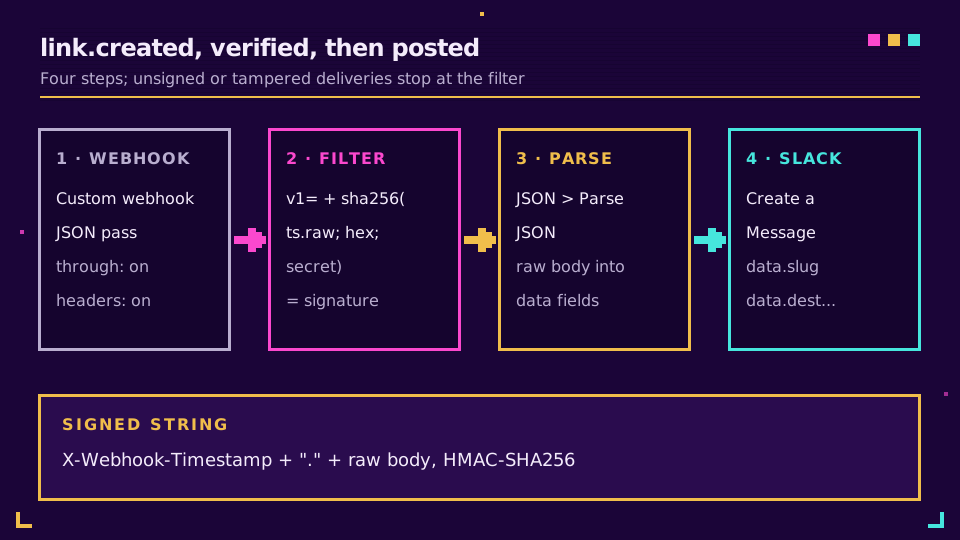
Start with Webhooks, Custom webhook, and copy the URL Make gives you. In Elido, open Webhooks, add an endpoint with that URL, and tick link.created. The secret appears once. Keep it.
In the Custom webhook's advanced settings, turn on JSON pass through and Get request headers. You need the untouched body, because Elido signs timestamp.raw_body with HMAC-SHA256 and sends the result as X-Webhook-Signature: v1=<hex>, with the timestamp in X-Webhook-Timestamp. A re-serialised body won't match. Make's sha256 function takes a key argument and returns an HMAC, so a filter can do the check:
Filter "signature ok" (after the Custom webhook):
  v1={{sha256(TS.RAW; hex; SECRET)}}   Text operators: Equal to   SIG

TS     = {{get(map(1.headers; "value"; "name"; "x-webhook-timestamp"); 1)}}
SIG    = {{get(map(1.headers; "value"; "name"; "x-webhook-signature"); 1)}}
RAW    = {{1.value}}   (the raw body JSON pass through hands you)
SECRET = the whsec_... secret, in a custom variable if your plan has them
After the filter, JSON, Parse JSON turns the raw text into fields, and Slack, Create a Message posts {{3.data.slug}} and {{3.data.destination_url}}. The payload carries type, workspace_id, data (the link record) and timestamp.
There's no click event, and that's deliberate on Elido's side: webhooks cover link and workspace lifecycle, not traffic. For click numbers, a daily scheduled scenario is the honest fit. Make's Webhooks app documentation explains the queue behind the Custom webhook, and our write-up on webhooks for link events goes deeper on payloads and retries.
Error Handling and Credit Costs in Make
Make's HTTP module treats any 4xx or 5xx as an error by default, which is what you want. What happens next depends on the error handler you attach to it.
Map the handler to the status code:
- 429 or 5xx: attach Retry. It parks the failed bundle as an incomplete execution and tries it again later, so enable Store incomplete executions in scenario settings first. Make's Retry error handler guide covers the attempt and interval settings. Elido sends
Retry-Afteron rate limits, and the key-based replay means a retried create never duplicates. - 400, 401, 403, 409: don't retry. A 400 is a missing
domain_idor a form-encoded body, 401 is the key, 403 is the wrong workspace ID, and 409 means a custom slug is taken. Route these to Resume with a fallback value, or to Skip plus an email to whoever owns the sheet.
Credits are the other half. Since Make switched billing units, every module run costs one credit per bundle, and a polling trigger costs one credit per check even when it finds nothing, as Make's operations reference explains. That idle cost is what bites:
| Scenario | Trigger | Credits per new link | Idle cost per month |
|---|---|---|---|
| Sheets row to short link | Watch New Rows, every 15 min | 2 | about 2,880 checks |
| Feed to social scheduler | Watch RSS feed items, hourly | 2, plus 1 per extra branch | about 720 checks |
| link.created to Slack | Custom webhook, instant | 3 | 0 |
Make's free plan gives 1,000 credits a month (checked September 2026). The Sheets watcher at 15 minutes spends almost three times that just looking. Stretch it to hourly. Better still, use a webhook trigger wherever the source app offers one.
Is Make the right home for this at all? For a handful of flows owned by marketers, yes, I think so. Once you're creating thousands of links a day, a short script against the Elido API and SDKs is cheaper and easier to debug, and Elido webhooks cover the push side. The rate limits and idempotency guide explains the 24-hour replay window used throughout.
Read the cornerstone → URL shortener API and SDKs quickstart
Related on the Blog
- n8n URL shortener: HTTP Request node or community node - the same API from n8n, cloud or self-hosted.
- Zapier URL shortener automation - the Zapier route to the same jobs.
- Webhooks for link events - payloads, signatures and retry behaviour.
- Slack link shortening bot and alerts - when the Slack side deserves its own app.
- IFTTT URL shortener applets - the same jobs from phone and feed triggers, on IFTTT webhooks.
Sıkça sorulan sorular
Is there an Elido app in Make's app directory?
Not yet. The source for an Elido custom app is in Elido's open repository, but it isn't listed in Make's public app directory, so the scenario editor has nothing to install. The HTTP app's Make a request module reaches the same API today and is the path this guide uses.
How do I shorten URLs in a Make scenario?
Add HTTP, Make a request, set the method to POST and the URL to https://api.elido.app/v1/workspaces/{workspace_id}/links, and authenticate with an API key credential that sends Authorization: Bearer elido_... Send a JSON body with domain_id and destination_url, turn on Parse response, and join the returned slug to your domain's hostname.
How many Make credits does a URL shortener scenario use?
Each module run costs one credit, so shortening a link and writing it somewhere costs two credits per item. Polling triggers also cost one credit per check even when nothing is new, which is why a 15-minute Google Sheets watcher burns about 2,880 credits a month before it shortens anything.
Can a Make scenario react when a new short link is created?
Yes. Point a Make Custom webhook at Elido's link.created event under Webhooks in the dashboard, enable JSON pass through and Get request headers, and verify the X-Webhook-Signature header with Make's sha256 function using the endpoint secret before parsing the body.
Can Make trigger on every click of a short link?
No. Elido's webhook events cover link and workspace lifecycle changes such as link.created, link.updated and link.deleted, not individual clicks. For click reporting, run a scheduled scenario that pulls numbers once a day, or read them in the analytics dashboard.
Why does the Make HTTP module get a 400 or 401 from Elido?
A 401 means the API key is missing, revoked or not prefixed with Bearer in the header value. A 400 on create almost always means the body lacks domain_id or destination_url, or that the body content type isn't application/json, so Make sent the fields as a form instead.
Elido'yu deneyin
Bir URL yapıştırın, çalışan bir kısa bağlantı alın
Kayıt gerekmez. Bağlantı 30 gün boyunca yaşar. Sonsuza kadar saklamak için kaydolun.
Ücretsiz, kayıt gerekmez · Günde 2