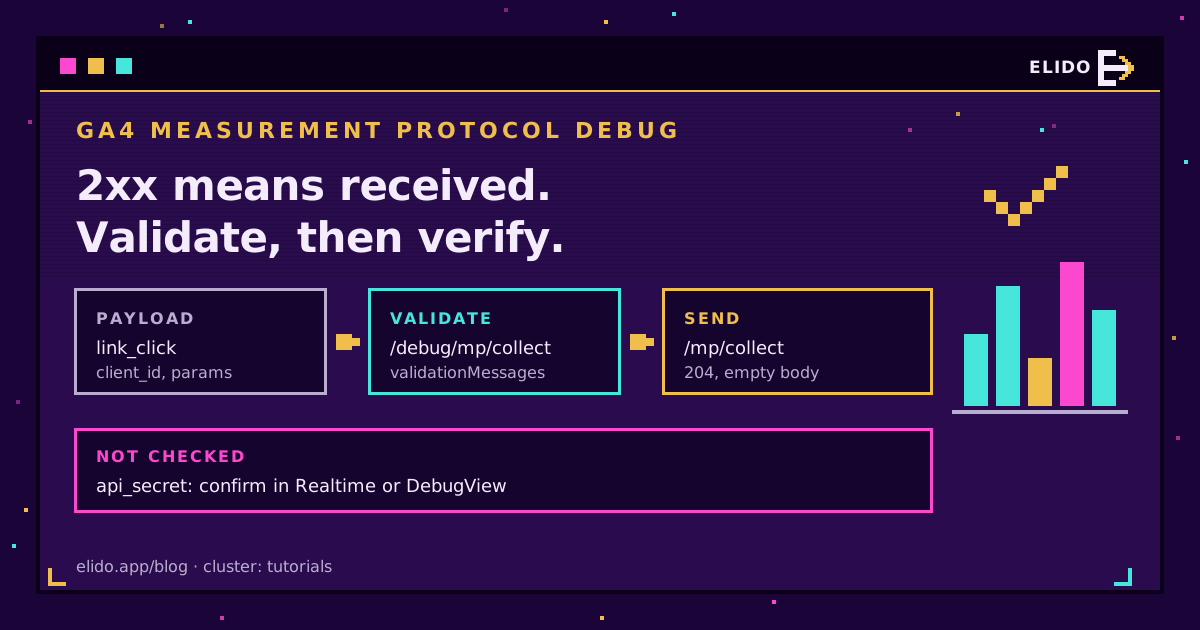
The GA4 Measurement Protocol returns a 2xx status for almost anything you post to it: a valid event, a misspelt event, an event with no client_id, a secret you made up. So the status code is useless for debugging. To debug GA4 Measurement Protocol calls, send the same body to the validation server at /debug/mp/collect, read the validationMessages it returns, fix what it names, and only then confirm arrival in DebugView or Realtime.
That last step matters more than people expect. Why? The validation server doesn't check your API secret, so a payload can pass validation, get a 204 from the real endpoint and still never land in your property, and I've watched a team lose a week to exactly that before anyone thought to copy the secret again.
If you're wiring server-side events to track campaigns, the cornerstone guide on tracking UTMs end to end covers what should be in the link before any of this. This post is about the moment you send the event and nothing shows up.
Why the Measurement Protocol Answers 2xx to Everything
Google's protocol reference is blunt about it: the endpoint returns a 2xx status code if the HTTP request is received, and it doesn't return an error if the payload is malformed or the data isn't processed. Collection is fire-and-forget. Your server never waits on processing.
We checked this ourselves. A POST to /mp/collect with the body {"garbage":true}, a fake measurement ID and a made-up secret came back as HTTP 204 with an empty body. Same as a perfect event.
Retry logic keyed on status codes catches network failures. Nothing else. It can't tell you that GA4 dropped your events. For that you need the second endpoint.
How to Use the Validation Server at /debug/mp/collect
The measurement protocol validation server sits on the same host. Same query string, same body:
curl -s -X POST \
  "https://www.google-analytics.com/debug/mp/collect?measurement_id=G-XXXXXXXXXX&api_secret=YOUR_SECRET" \
  -H "Content-Type: application/json" \
  -d '{"events":[{"name":"session_start","params":{"firebase_x":1}}]}'
It answers 200 with a JSON body instead of an empty one. That test payload has three problems, and the server reports the first one it hits:
{
  "validationMessages": [
    {
      "fieldPath": "client_id",
      "description": "Measurement requires a client_id.",
      "validationCode": "VALUE_REQUIRED"
    }
  ]
}
Add a client_id and it moves on to NAME_RESERVED for session_start; rename the event and the firebase_ prefix is next. Each message carries a fieldPath, a human description and a code. The codes Google documents include VALUE_INVALID, VALUE_REQUIRED, NAME_INVALID, NAME_RESERVED, VALUE_OUT_OF_BOUNDS, EXCEEDED_MAX_ENTITIES and NAME_DUPLICATED.
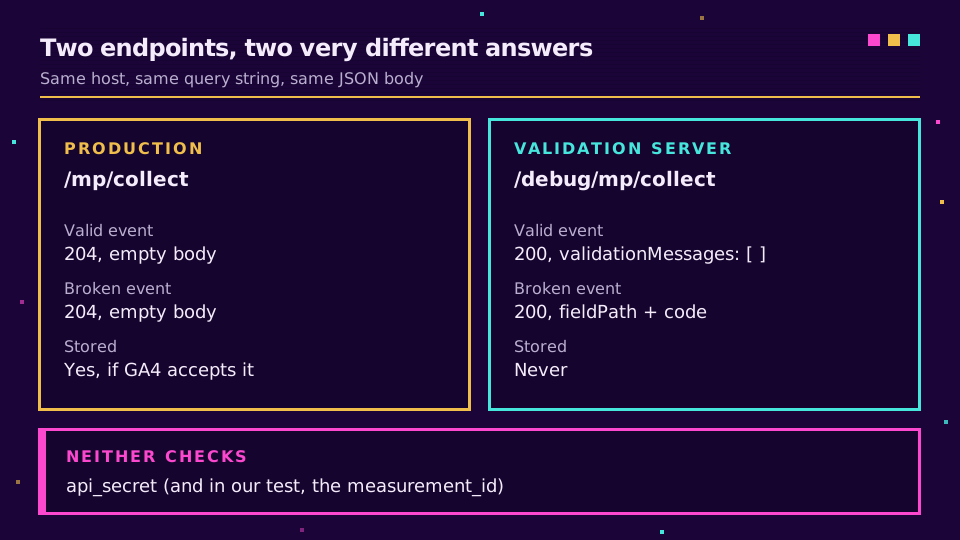
An empty array, "validationMessages": [ ], means the structure is fine. Nothing sent to /debug/mp/collect is stored. Hammer it during development as much as you like; just remember a debug call never proves that data arrived.
What the Validation Server Does Not Check
Most tutorials skip this part. Google's validating events page says outright that the validation server does not validate the api_secret. In our test on 22 September 2026 it didn't check the measurement ID either: G-FAKE123 with the secret nonsense returned an empty validationMessages array.
A wrong secret passes. So does a revoked one, one from another data stream, or a typo in G-. The measurement protocol api_secret is the most common reason I see for "valid payload, no data", and you can only confirm it by seeing an event arrive.
The second gap is the validation mode. By default the server runs in RELAXED mode, and in that mode it let through two things Google's own limits forbid: an event with 26 parameters, and a parameter value of 120 characters. Add "validation_behavior": "ENFORCE_RECOMMENDATIONS" to the debug body and both fail, with EXCEEDED_MAX_ENTITIES and VALUE_TOO_LONG. I'd always validate in the strict mode, even if production stays relaxed. It's the difference between a checker and a rubber stamp.
Seeing Server Events in GA4 DebugView and Realtime
Once the payload validates, send it to the real endpoint and watch it land. Two views work for server events, and standard reports aren't one of them, since they can trail by 24 to 48 hours.
DebugView needs an opt-in per event. Google's verification guide asks for "debug_mode": 1 (or true) in the event's params plus a positive engagement_time_msec. Only events carrying the flag show up, so a batch where one event lacks it looks half-empty. Open Admin, then DebugView, and give it a minute.
Realtime needs nothing extra. Scroll to the "Event count by Event name" card and look for your event. Google notes that session_id and engagement_time_msec matter for user activity showing up in Realtime, so if an event validates but Realtime stays empty, check those two first.
One more caveat from the same guide: for web streams it says a valid event uses a client_id that gtag.js has already used. Synthetic IDs still get counted, each as its own user, but they never join a browser session, and in a report built around sessions that shows up as a long tail of one-event users you can't explain until you know where they came from. More on that in the next section. If what's missing is campaign data rather than events, UTM parameters not showing in GA4 walks the DebugView side of that problem.
Common Payload Errors and What the Validator Says
Most broken events fall into a handful of patterns. Here they are with what the validation server returned when we sent each one on 22 September 2026:
| Mistake | Validator response (default mode) | Fix |
|---|---|---|
No client_id in the body | VALUE_REQUIRED on client_id | Send the _ga value, or a stable ID of your own |
Event named session_start | NAME_RESERVED | Rename; first_visit, user_engagement are reserved |
Param prefixed firebase_ | NAME_RESERVED on events.params | Drop _, firebase_, ga_, google_ prefixes |
Event named Link Click | NAME_INVALID | Letters, digits and _; start with a letter |
| 26 params, or a 120-char value | Empty array (strict mode catches it) | Keep to 25 params and 100-char values |
timestamp_micros older than 72 hours | Empty array (strict mode rejects it) | Relaxed mode rewrites it to 72 hours ago |
engagement_time_msec missing | Empty array | Set a positive number, or Realtime may stay blank |
Two rows deserve a comment. The ga_ prefix is reserved according to the reference, yet the validator accepted ga_session_id in both modes when we tried it, so don't treat an empty array as permission. And the 100-character value limit catches full destination URLs all the time: a landing page with five UTM tags is often longer than that.
The client_id itself is the subtle one. Any string passes relaxed validation, but strict mode rejected both c1 and elido-12-4711 with "It should be in _ga value; the GA4 server-side tracking guide explains that stitching in detail.
How Elido's GA4 Forwarder and Test Connection Use This
Elido forwards short-link clicks to GA4 server-side. You paste a Measurement ID and a Measurement Protocol API secret into the GA4 card under Integrations, and from then on every click in that workspace becomes one link_click event:
{
  "client_id": "elido-12-4711",
  "events": [
    {
      "name": "link_click",
      "params": {
        "workspace_id": 12,
        "link_id": 4711,
        "slug": "spring-26",
        "country": "DE",
        "device": "mobile",
        "destination": "https://shop.example/spring?utm_source=newsletter",
        "engagement_time_msec": 100
      }
    }
  ]
}
The client_id is elido-<workspace>-<link>, so every click on one link reads as the same GA4 user and none of them joins a browser session. That's the honest trade-off of doing this without a cookie: totals, and breakdowns by slug, country and device, work; user counts and session funnels don't. Country and device are plain event parameters. Register them as custom dimensions first. And a destination over 100 characters runs into the limit from the table above, so report on slug or link_id instead.
The Test connection button follows the order this article recommends:
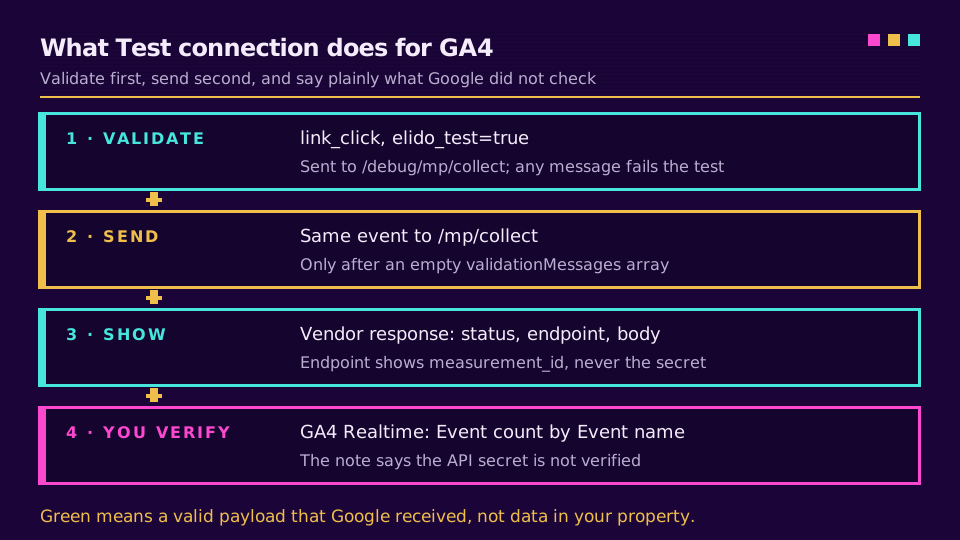
First it sends a synthetic link_click, flagged with elido_test: true, to /debug/mp/collect. If validationMessages isn't empty, the test fails and shows Google's descriptions verbatim. If the array is empty, the same event goes to /mp/collect for real. Under the button you see the vendor response (HTTP status, the debug endpoint with your measurement ID but never the secret, and Google's body) plus a note saying the Measurement Protocol doesn't verify the API secret.
So green means "valid, and Google got it". Not "your property has it". The test event carries debug_mode: 1 and elido_test: true, so it shows up in DebugView as link_click; Realtime works too. If you'd like click events in GA4 without a tag on every landing page, start a workspace and point the GA4 card at a test property first.
A GA4 Measurement Protocol Debug Order That Works
When GA4 events are not showing, work through it in this order and stop at the first failure:
- Send the body to
/debug/mp/collectwithvalidation_behaviorset toENFORCE_RECOMMENDATIONS. Fix every message. - Copy the API secret again from Admin, Data streams, your web stream, Measurement Protocol API secrets. Check it's from the same stream as the
G-ID. - Send one event to
/mp/collectwithdebug_mode: 1and watch DebugView for two minutes. - Remove the flag and check Realtime, then give standard reports a day or two.
Step 2 is where most of my own debugging ends. Google's troubleshooting page opens with the same three questions: right secret, still valid, copied exactly. When the numbers finally flow and still don't match your link counts, short-link clicks versus GA4 sessions explains the gap, and server-side conversion tracking covers the conversion events that usually follow. The same validate-then-verify habit applies to the other destinations on the conversion tracking page.
Related on the Blog
- GA4 server-side tracking via redirects - credentials, payload shape and client_id stitching.
- Mixpanel vs GA4 for link analytics - which tool should hold your click data.
- Mixpanel link tracking - the same forwarder pointed at Mixpanel, with its own 200-for-anything quirk.
- UTM parameters not showing in GA4 - the campaign-data version of this debugging problem.
- Server-side conversion tracking - GA4, Meta CAPI and TikTok side by side.
Întrebări frecvente
How do I debug GA4 Measurement Protocol events?
Send the same payload to https://www.google-analytics.com/debug/mp/collect instead of /mp/collect. The validation server answers with a validationMessages array that names the field, describes the problem and gives a code such as NAME_RESERVED or VALUE_REQUIRED. An empty array means the structure is valid. Then send the real event with debug_mode set to 1 and watch it arrive in DebugView.
Why are my Measurement Protocol events not showing in GA4?
The usual causes are a wrong or revoked API secret, a Measurement ID from another stream, a missing client_id, or looking in standard reports too early. The endpoint returns 2xx for all of these, so the status code tells you nothing. Validate the payload, then check the secret by hand, then look in Realtime or DebugView rather than in reports, which can lag by a day or more.
Does the GA4 validation server check the API secret?
No. Google's documentation says the validation server does not validate the api_secret, and in our own test on 22 September 2026 it also accepted a Measurement ID that belongs to no property. An empty validationMessages array only means the JSON is well formed. Whether the secret matches the stream you can only confirm by seeing the event arrive in GA4.
Do events sent to /debug/mp/collect appear in GA4 reports?
No. The validation server checks the payload and throws it away, so nothing you send there reaches reports, Realtime or DebugView. To see an event in DebugView you send it to the normal /mp/collect endpoint with a debug_mode parameter of 1 and a positive engagement_time_msec, as Google's verification guide describes.
What client_id should I send with the GA4 Measurement Protocol?
For a web stream, Google wants the client_id generated by the GA4 tag on your site, the value stored in the _ga cookie, so server events join the browser session. Any string passes the default validation, but the stricter ENFORCE_RECOMMENDATIONS mode rejects IDs that are not in number.number format. An invented ID still counts events; it simply never joins a browser session.
How many parameters can a Measurement Protocol event have?
Twenty-five parameters per event and 25 events per request, with names up to 40 characters and values up to 100 characters on a standard property, or 500 on GA4 360. The default validation mode did not flag a 26th parameter or a 120-character value when we tested it; setting validation_behavior to ENFORCE_RECOMMENDATIONS on the debug call did.
Încearcă Elido
Lipește un URL, obții un link scurt funcțional
Fără înregistrare. Linkul este activ timp de 30 de zile. Înregistrează-te ca să-l păstrezi pentru totdeauna.
Gratuit, fără înregistrare · 2 pe zi