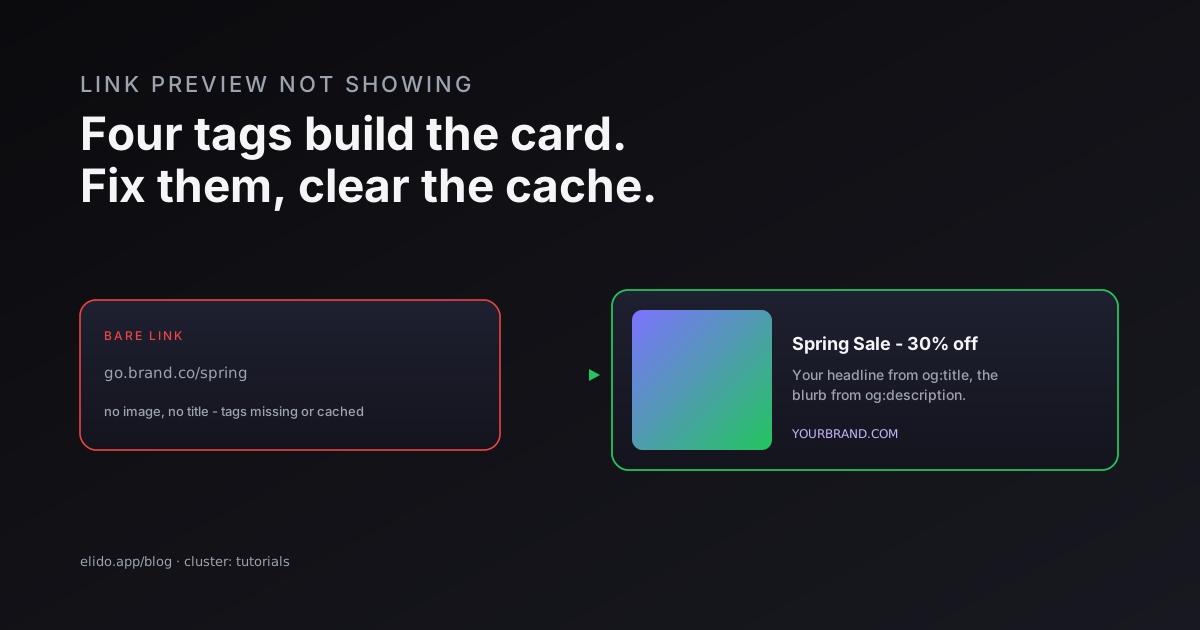
A link preview is built from Open Graph tags in the destination page's HTML - og:title, og:description, og:image, and og:url. When you paste a link into WhatsApp, Facebook, Slack, or X, that platform's crawler fetches the page, reads those tags, and renders the card. If the preview is not showing, it is almost always one of two things: the tags are missing or broken, or the platform cached an empty result and is still serving it.
That single fact - the preview comes from the destination, not the link - is what makes this fixable. You are not debugging the platform; you are debugging the page's tags and then clearing the platform's memory of them. This guide covers why previews break, the handful of tags that matter, whether short links are to blame (usually not), and the exact tool to refresh each platform.
If you are also shortening the link, how to shorten a URL covers that side, and the short-link question gets its own section below because it is the one people get wrong.
Why Link Previews Break
Previews fail for a small, predictable set of reasons, and naming them is half the fix.
- Missing or malformed Open Graph tags. No
og:titleorog:imagemeans the crawler has nothing to build a card from, so you get a bare link. This is the most common cause by far. - An unreachable or oversized image. The
og:imageURL returns a 404, sits behind a login, or is too large for the platform to fetch in time. The card renders without its image, or not at all. - Cached emptiness. The platform crawled the URL once before the tags existed, stored "no preview," and keeps showing that until forced to look again.
- JavaScript-only rendering. Most social crawlers do not run JavaScript; they read the raw HTML. If your tags are injected client-side, the crawler never sees them.
That last one catches modern single-page apps constantly. The crawler asks for the HTML, gets an empty shell, and leaves. The Open Graph protocol spec defines what the tags should look like in the served HTML, and the fix is always to make sure they are in the HTML the crawler receives, not added later by script.
The Open Graph Tags That Power a Preview
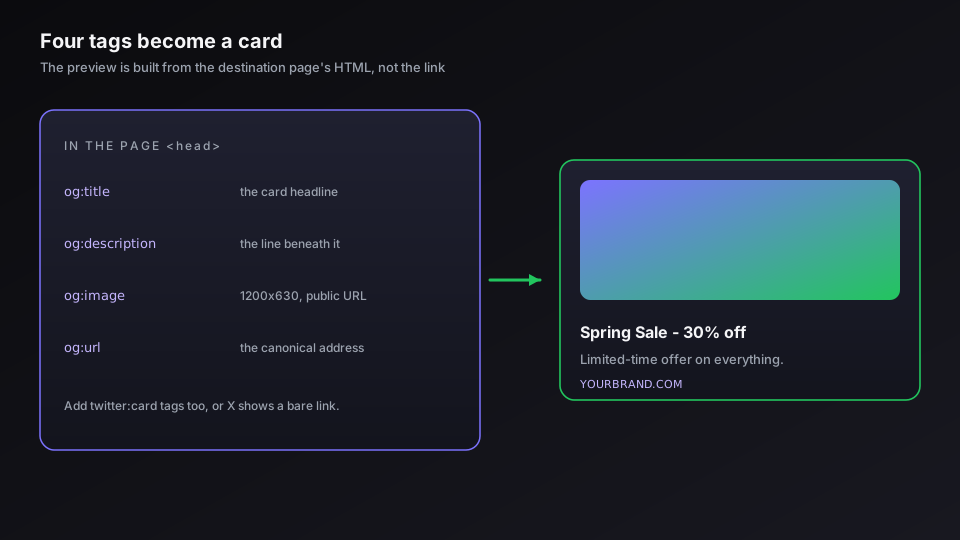
Four tags do almost all the work. Get these right and most platforms render a clean card.
og:title is the headline of the card. og:description is the line of text beneath it. og:image is the picture, and it is the one people most often get wrong - point it at an absolute URL of an image around 1200x630 pixels, publicly reachable, not behind auth. og:url is the canonical address of the page, which keeps the preview stable even when the link carries tracking parameters.
X reads its own twitter:card family of tags and falls back to Open Graph when they are absent, which is why a page can preview perfectly on Facebook and look bare on X. The safe move is to include both: the four Open Graph tags plus twitter:card, twitter:title, twitter:description, and twitter:image. It is a few lines of HTML in the page head, and it is the difference between a card that works everywhere and one that works in one place. Google documents the related crawler and special-tag behavior if you want the search-side view too.
Do Short Links Break Link Previews?
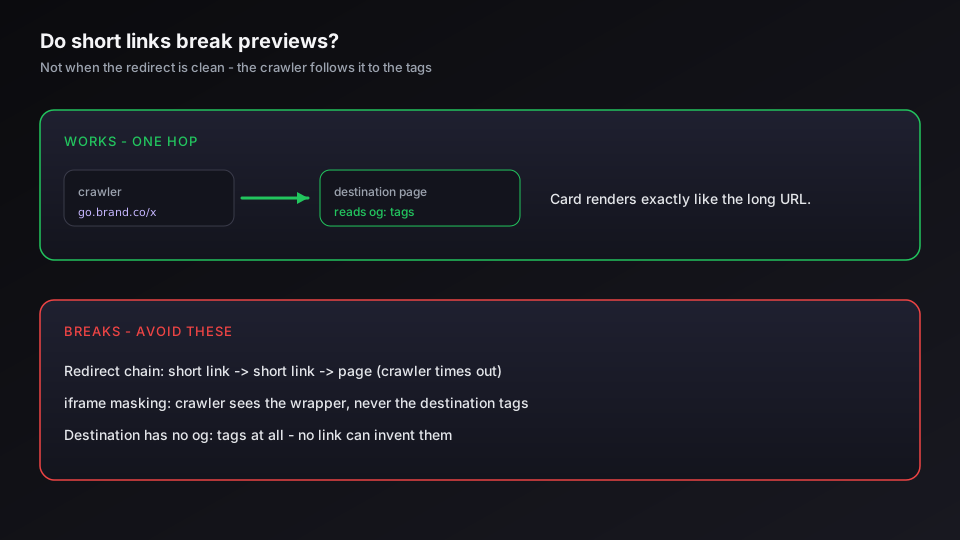
This is the question that brings people to a URL shortener's blog, and the answer is reassuring: a clean short link does not break previews. When you share a short link, the platform's crawler follows the redirect to the destination and reads the Open Graph tags there, so the card shows the destination's preview exactly as the long URL would.
Previews break around short links only in specific cases. A chain of redirects - a short link pointing at another short link pointing at the page - can confuse or time out a crawler, so keep it to one hop, which is the same discipline that keeps redirects fast and SEO-clean. A shortener that uses iframe masking instead of a real redirect will break the preview, because the crawler sees the wrapper, not the destination - one of several reasons that technique is a bad idea, covered in link cloaking and URL masking. And if the destination itself has no Open Graph tags, no short link can invent them. Use a one-hop redirect on a custom domain pointing at a page with good tags, and the preview is identical to the unshortened link.
If you want short links that redirect cleanly in one hop and never sit between your audience and a good preview, start a free Elido workspace and point your first link at a page with proper tags.
How to Fix It, Platform by Platform
Once the tags are right, the remaining job is clearing each platform's cache, and every major platform gives you a tool.
- Facebook and Instagram. Run the URL through the Facebook Sharing Debugger. It shows the tags it found and a "Scrape Again" button that refetches the page and clears the cached card. This also covers Instagram, which shares the same crawler.
- LinkedIn. Use the LinkedIn Post Inspector. LinkedIn caches previews for around a week, and the inspector is the only way to force an early refresh.
- X (Twitter). The Card validator refetches the page and shows how the card will render; confirm the
twitter:cardtags are present and re-test. - WhatsApp, iMessage, Slack, Discord. These have no public debugger. They follow Open Graph, but cache hard. The workaround is to share a slightly different URL - add or change a harmless query parameter - which the app treats as new and crawls fresh.
The pattern is the same everywhere: fix the tags on the page, then force the platform to look again. A preview that is merely cached fixes in minutes once you re-scrape; a preview that was missing tags appears as soon as the crawler next sees the page.
If the card renders but the image is cropped, squashed, or stubbornly out of date, that is a sizing and caching problem rather than a missing tag: Open Graph image size covers the specs and the safe zone.
The Pre-Share Checklist
Before a link goes out to an audience, thirty seconds of checking prevents the bare-link embarrassment.
- Confirm the destination has
og:title,og:description,og:image, andog:url, plus the Twitter Card tags. - Open the
og:imageURL directly in a browser - it must load, publicly, at roughly 1200x630. - Run the final URL, short link included, through the Facebook debugger to see the real card.
- If you are sharing a short link, verify it is one hop to the destination, not a chain.
Do those four and the preview shows up the first time, on every platform that matters. The card is not magic and it is not the platform being difficult - it is four tags on your page and one cache to clear.
Related on the Blog
- How to shorten a URL: free, branded, and bulk links
- Custom domains for short links: the DNS and TLS walkthrough
- Link cloaking and URL masking: what's safe for SEO
- Do URL shorteners hurt SEO? The honest answer
- Smart links explained: edge routing without an extra service
- Open Graph image size: one file for every platform
Întrebări frecvente
Why is my link preview not showing?
A link preview is built from Open Graph meta tags in the destination page's HTML - og:title, og:description, og:image, and og:url. If those tags are missing, malformed, or the image is unreachable, the platform has nothing to render and falls back to a bare link. The other common cause is caching: the platform already fetched the page once, stored an empty or old result, and keeps showing it until you force a refresh with its debugger tool.
How do I fix a link preview on Facebook or LinkedIn?
Run the URL through the platform's own tool: the Facebook Sharing Debugger or the LinkedIn Post Inspector. Each fetches the page fresh, shows you exactly which Open Graph tags it found, and lets you scrape again to clear the cached version. Fix any missing or wrong tags on the page first, then re-scrape - the preview updates within minutes. These debuggers are the single fastest way to diagnose and refresh a broken preview.
Do short links break link previews?
Not if the shortener uses a normal redirect. When you share a short link, the platform's crawler follows the redirect to the destination and reads the Open Graph tags there, so the preview shows the destination's card. Previews break when the destination has no tags, when a chain of redirects confuses the crawler, or when the link uses iframe masking instead of a redirect. A clean one-hop short link to a page with good tags previews exactly like the long URL would.
Why does my link preview work on one platform but not another?
Each platform runs its own crawler with its own rules and its own cache. Facebook reads Open Graph, X reads Twitter Card tags (and falls back to Open Graph), and some apps barely render previews at all. So a page with Open Graph but no Twitter Card tags can look perfect on Facebook and bare on X. The fix is to include both Open Graph and the core Twitter Card tags, then clear each platform's cache separately with its debugger.
How long does it take for a fixed link preview to update?
If the problem was missing tags, the preview appears the next time the platform crawls the URL - usually minutes after you re-scrape it in the debugger. If the problem was a cached bad preview, it stays wrong until the cache expires or you force a refresh, which the debuggers do on demand. The slow case is a platform that caches aggressively and offers no manual refresh, where you may wait hours - or share a slightly different URL to dodge the cache.
Can I change the image that shows in a link preview?
Yes - set the og:image tag on the destination page to the image you want, at a safe size (1200x630 pixels is the reliable default), then re-scrape the URL in each platform's debugger to clear the old one. The preview image always comes from the destination page's tags, not from the link itself, so a short link cannot override it. Control the image by controlling the og:image on the page the link points to.
Încearcă Elido
Lipește un URL, obții un link scurt funcțional
Fără înregistrare. Linkul este activ timp de 30 de zile. Înregistrează-te ca să-l păstrezi pentru totdeauna.
Gratuit, fără înregistrare · 2 pe zi