Skrócenie adresu URL w C# sprowadza się do jednego żądania POST. Wyślij adres docelowy do API skracacza za pomocą HttpClient, przekaż klucz API jako token Bearer i zdeserializuj short_url z odpowiedzi. PostAsJsonAsync zajmuje się serializacją, więc po zarejestrowaniu klienta wywołanie mieści się w jednej linii.
Format endpointu, model uwierzytelniania i założone limity darmowego planu opisano w omówieniu darmowego API skracacza URL. To artykuł o C# w serii obejmującej także Python, JavaScript, Go i Java.
Najszybszy sposób: PostAsJsonAsync
using System.Net.Http.Json;

record LinkRequest(string destination_url);
record LinkResponse(string id, string short_url);

var http = new HttpClient { BaseAddress = new Uri("https://api.elido.app") };
http.DefaultRequestHeaders.Authorization =
    new("Bearer", Environment.GetEnvironmentVariable("ELIDO_API_KEY"));
http.Timeout = TimeSpan.FromSeconds(10);

var response = await http.PostAsJsonAsync("/v1/links",
    new LinkRequest("https://example.com/spring-sale?utm_source=newsletter"));

response.EnsureSuccessStatusCode();

var link = await response.Content.ReadFromJsonAsync<LinkResponse>();
Console.WriteLine(link!.short_url); // https://s.elido.me/ab12cd
Nazwy właściwości rekordu celowo odpowiadają snake_case używanemu przez API, dzięki czemu przykład nie wymaga dodatkowych zależności. W prawdziwym projekcie dodaj [JsonPropertyName("short_url")] i nadaj właściwości nazwę w stylu C#, albo raz ustaw PropertyNamingPolicy = JsonNamingPolicy.SnakeCaseLower w opcjach.
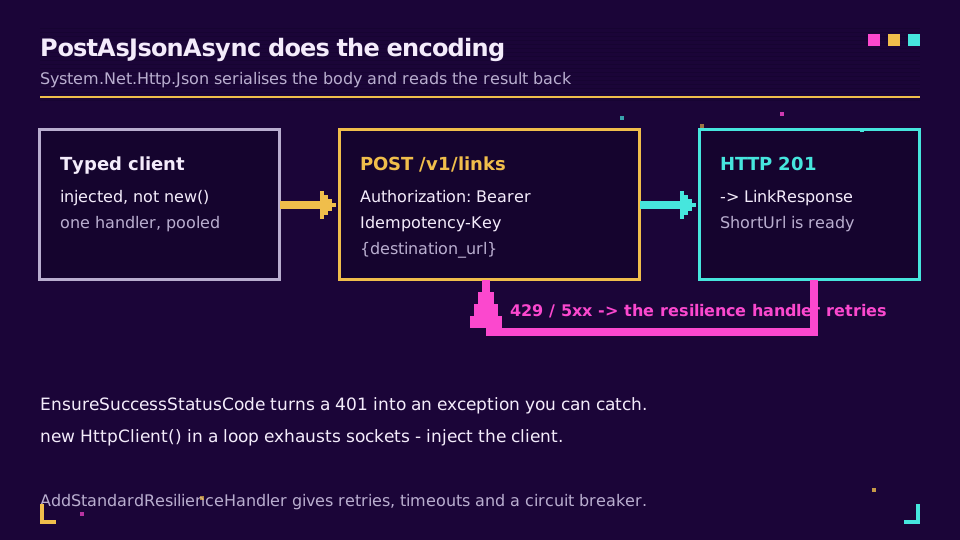
EnsureSuccessStatusCode to linia, która ma znaczenie. Bez niej odpowiedź 401 kończy się pomyślnie, ReadFromJsonAsync zwraca rekord z wartościami null, a awaria ujawnia się trzy warstwy dalej jako NullReferenceException w czymś niezwiązanym z wywołaniem.
Zarejestruj klienta zamiast tworzyć go za każdym razem
Powyższy fragment jest w porządku dla prototypu konsolowego, ale nie dla usługi. HttpClient tworzony przy każdym wywołaniu otwiera za każdym razem nową pulę połączeń, a jego usunięcie pozostawia gniazdo w stanie TIME_WAIT; jeśli robisz to w pętli, zabraknie Ci portów. IHttpClientFactory współdzieli handlery i poprawnie rotuje DNS.
builder.Services.AddHttpClient<ElidoClient>(client =>
    {
        client.BaseAddress = new Uri("https://api.elido.app");
        client.DefaultRequestHeaders.Authorization =
            new("Bearer", builder.Configuration["Elido:ApiKey"]);
        client.Timeout = TimeSpan.FromSeconds(10);
    })
    .AddStandardResilienceHandler();   // retries, timeout, circuit breaker
AddStandardResilienceHandler pochodzi z Microsoft.Extensions.Http.Resilience i zapewnia ponawianie z losowym opóźnieniem przy przejściowych awariach, całkowity limit czasu żądania oraz wyłącznik obwodu bez pisania polityki. W starszym projekcie Polly i AddTransientHttpErrorPolicy zapewniają podobne działanie.
Sam typowany klient pozostaje niewielki:
public sealed class ElidoClient(HttpClient http)
{
    public async Task<string> ShortenAsync(string destination, CancellationToken ct = default)
    {
        var request = new HttpRequestMessage(HttpMethod.Post, "/v1/links")
        {
            Content = JsonContent.Create(new LinkRequest(destination)),
        };

        // stable across retries and across re-runs of the same batch
        request.Headers.Add("Idempotency-Key",
            Convert.ToHexString(SHA256.HashData(Encoding.UTF8.GetBytes(destination))));

        using var response = await http.SendAsync(request, ct);
        response.EnsureSuccessStatusCode();

        var link = await response.Content.ReadFromJsonAsync<LinkResponse>(ct);
        return link!.short_url;
    }
}
To dzięki temu nagłówkowi można bezpiecznie włączyć handler odporności. Bez niego ponowienie po utracie odpowiedzi utworzy drugi link dla tego samego adresu docelowego; z nim API zwróci oryginał. Szczegółowe omówienie limitów zapytań i idempotencji wyjaśnia, dlaczego wyprowadzenie klucza z adresu docelowego jest lepsze dla pracy wsadowej niż nowy GUID.
Chcesz wypróbować działający endpoint? Utwórz klucz na darmowym planie, zapisz go w user secrets jako Elido:ApiKey, a powyższa rejestracja zadziała bez zmian.
Odczytuj treść błędu zamiast zgadywać
EnsureSuccessStatusCode to właściwe ustawienie domyślne, ale odrzuca najbardziej użyteczną część nieudanego wywołania. Komunikat wyjątku zawiera kod statusu i nic więcej, więc 422 mówi, że żądanie zostało odrzucone, ale nie wskazuje, któremu polu API się sprzeciwiło.
W przypadku wszystkiego, co będziesz musiał debugować o trzeciej nad ranem, najpierw odczytaj treść:
using var response = await http.SendAsync(request, ct);

if (!response.IsSuccessStatusCode)
{
    var problem = await response.Content.ReadAsStringAsync(ct);
    logger.LogWarning("shorten failed {Status}: {Body}", (int)response.StatusCode, problem);

    throw response.StatusCode switch
    {
        HttpStatusCode.Unauthorized      => new InvalidOperationException("API key rejected"),
        HttpStatusCode.TooManyRequests   => new HttpRequestException("rate limited"),
        _                                => new HttpRequestException($"shorten failed: {problem}"),
    };
}
Wynikają z tego dwie rzeczy. Wiersz logu wskazuje pole przy błędzie walidacji, zamiast zmuszać Cię do odtwarzania żądania, a instrukcja switch oddziela awarie, które warto ponawiać, od tych, które nigdy się nie powiodą. Trzykrotne ponowienie odpowiedzi 401 to trzy zmarnowane wywołania i wolniejsza awaria.
Standardowy handler odporności już traktuje 5xx i 429 jako błędy przejściowe, a 4xx pozostawia bez ponawiania, więc obie warstwy są zgodne: handler ponawia to, co warto ponowić, a Twój kod wyjaśnia resztę.
Masowo, ale bez przekraczania limitu szybkości
Task.WhenAll dla listy 3000 adresów URL uruchamia 3000 żądań. Parallel.ForEachAsync ogranicza liczbę żądań w toku i jest czytelniejszy niż ręcznie napisany semafor:
var results = new ConcurrentDictionary<string, string>();

await Parallel.ForEachAsync(
    urls,
    new ParallelOptions { MaxDegreeOfParallelism = 8 },
    async (url, ct) =>
    {
        try
        {
            results[url] = await client.ShortenAsync(url, ct);
        }
        catch (Exception ex)
        {
            results[url] = $"ERROR: {ex.Message}"; // one bad URL must not sink the batch
        }
    });
Osiem to punkt wyjścia, a nie stała. Obserwuj błędy 429 i nagłówek Retry-After wysyłany przez API, a następnie zmniejszaj wartość zamiast ją zwiększać. Kluczowanie wyników oryginalnym adresem URL sprawia, że nieukończony przebieg dokładnie wskazuje wiersze do ponowienia.
Gdzie powinien znajdować się kod
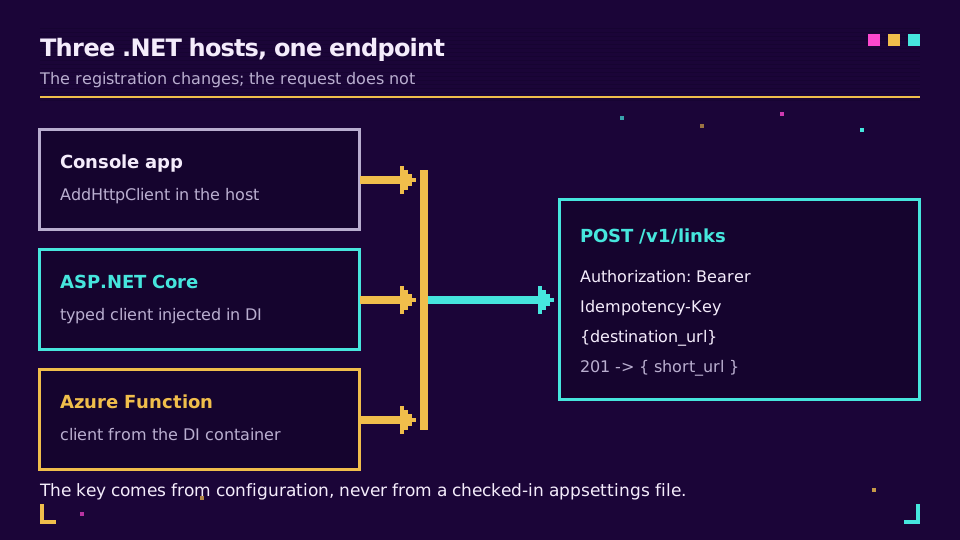
Narzędzie konsolowe skracające CSV, usługa hostowana tworząca link po wysłaniu zamówienia oraz Azure Function wywoływana przez kolejkę: ten sam typowany klient, trzy różne rejestracje. Jedyną rzeczą, która nie może się zmieniać, jest źródło klucza. User secrets podczas tworzenia aplikacji, zmienne środowiskowe lub magazyn kluczy na produkcji, pomiędzy nimi IOptions, a w appsettings.json żadnych danych, które trafią do repozytorium.
Gdy linki są już tworzone przez usługę, interesująca staje się reszta możliwości API dla deweloperów, a webhooki zdarzeń linków są lepsze od odpytywania przy danych o kliknięciach i skanach. Jeśli wolisz w ogóle nie utrzymywać klienta, strona API i SDK zawiera listę wygenerowanych bibliotek.
Zapoznaj się z serią artykułów filarowych
Ten artykuł należy do klastra engineering. Zacznij od przewodnika po darmowym API skracacza URL, aby poznać format endpointu i uwierzytelnianie, a następnie przeczytaj o limitach zapytań i idempotencji, aby zrozumieć zachowanie przy obciążeniu. Aktualną dokumentacją referencyjną jest dokumentacja API.
Powiązane wpisy na blogu
Najczęściej zadawane pytania
Jak skrócić adres URL w C#?
Wyślij długi adres URL metodą POST do API skracacza za pomocą HttpClient, używając PostAsJsonAsync, aby treść została zserializowana automatycznie, a następnie zdeserializuj odpowiedź do małego rekordu i odczytaj ShortUrl. Gdy nagłówek Authorization jest ustawiony na kliencie, samo wywołanie zajmuje jedną linię.
Dlaczego nie należy używać new HttpClient() w pętli?
Każda instancja otwiera własną pulę połączeń, a jej usunięcie pozostawia gniazdo w stanie TIME_WAIT, więc pętla może przy obciążeniu wyczerpać dostępne porty. Zarejestruj klienta za pomocą IHttpClientFactory i wstrzyknij go, aby handlery były współdzielone, a DNS poprawnie rotowany.
Czy HttpClient zgłasza wyjątek dla odpowiedzi 401 lub 500?
Nie domyślnie. Zadanie kończy się pomyślnie, a IsSuccessStatusCode ma wartość false, więc nieudane wywołanie wygląda jak działające, dopóki tego nie sprawdzisz. Wywołaj EnsureSuccessStatusCode, aby zamienić je na HttpRequestException, albo samodzielnie sprawdź status przed odczytaniem treści.
Jak dodać ponawianie do HttpClient w .NET?
Dodaj standardowy handler odporności z Microsoft.Extensions.Http.Resilience do rejestracji klienta. Zapewnia on ponawianie z losowym opóźnieniem, całkowity limit czasu żądania i wyłącznik obwodu bez kodu dla poszczególnych wywołań. W starszych projektach Polly i AddTransientHttpErrorPolicy wykonują tę samą pracę.
Jak skrócić wiele adresów URL naraz w C#?
Użyj Parallel.ForEachAsync z MaxDegreeOfParallelism ustawionym na około osiem, co ogranicza liczbę żądań w toku niezależnie od długości listy. Zbieraj wyniki w ConcurrentDictionary z kluczami będącymi oryginalnymi adresami URL, aby częściowa awaria pozostała widoczna, a wsad można było uruchomić ponownie.
Gdzie powinien znajdować się klucz API w aplikacji .NET?
W konfiguracji, która nie jest zatwierdzana w repozytorium: w user secrets podczas tworzenia aplikacji, w zmiennych środowiskowych lub magazynie kluczy na produkcji. Powiąż go za pomocą IOptions i odczytaj podczas rejestrowania klienta, aby rotacja klucza oznaczała zmianę konfiguracji, a nie ponowne budowanie aplikacji.
Wypróbuj Elido
Wklej URL, otrzymaj krótki link
Bez rejestracji. Link działa 30 dni. Zarejestruj się, aby zachować go na zawsze.
Za darmo, bez rejestracji · 2 dziennie