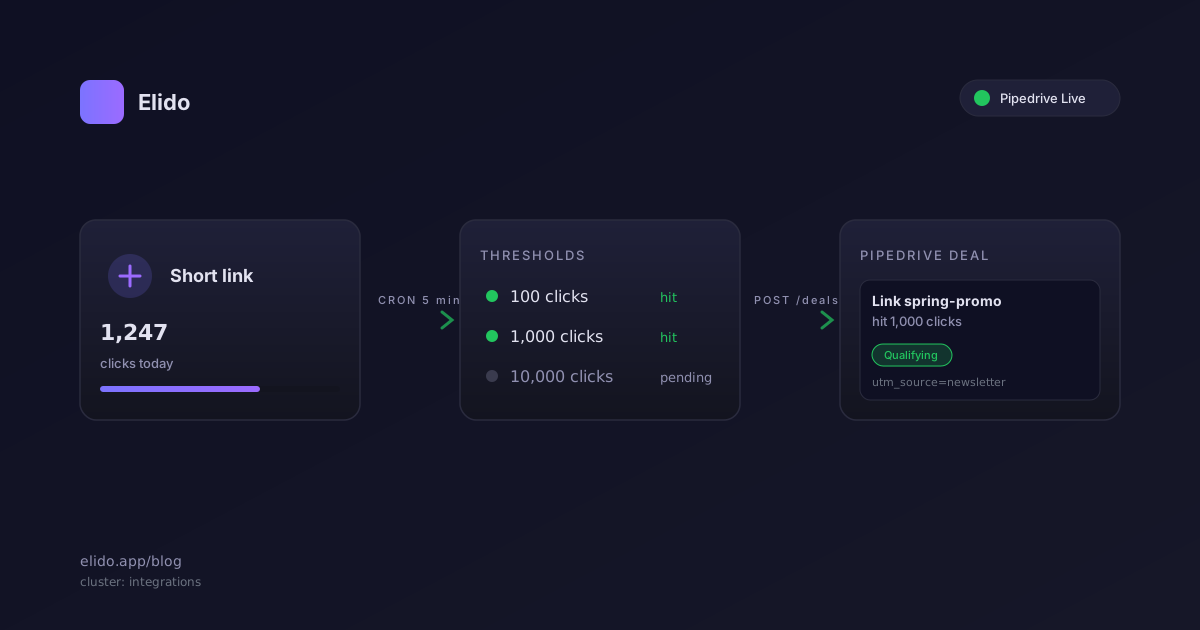
Pipedrive link click tracking in Elido turns short link milestones into pipeline events. When one of your links crosses 100, 1,000, or 10,000 clicks, a 5 minute cron creates a deal in the Pipedrive pipeline you picked, titled with the link slug and the milestone. Deal notes carrying the UTM source and a deep link back into Elido are planned. No Zapier in the middle, no manual export, no calendar reminder to check link reports.
That is the headline. The mechanics matter more, so this post walks through the three things sales ops teams need to trust before flipping this on. First, how the Connect flow actually works: where the Personal API token lives, what the pipeline picker is reading, and how the token is stored after you paste it. Second, what the threshold cron does on every run and how it avoids creating duplicate deals when a link goes viral overnight. Third, what you can and can't change past the three default thresholds, and what is planned next.
Pipedrive went Live for Elido on 22 May 2026. Before then it sat in Beta for two weeks while we shook out edge cases around stage IDs and token rotation. The integration code lives in services/api-core/internal/integrations/pipedrive/ if you self-host and want to read the source. Where something below is planned rather than shipped, the post says so.
Connecting Pipedrive in Two Minutes
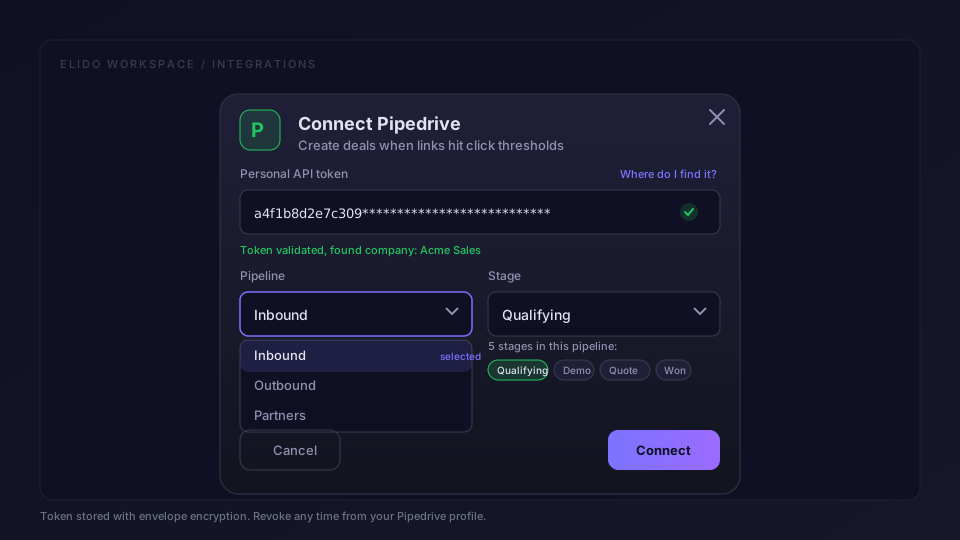
Open the integrations catalog in your Elido workspace and click the Pipedrive card. The Connect modal asks for one thing first: a Personal API token. You get it from your Pipedrive account by opening your profile menu, choosing Personal preferences, then the API tab. Pipedrive's own guide on how to find the Personal API token has the exact path with screenshots, since their UI shifts every quarter or so.
Paste the token. Elido does two things in the background. It validates the token by calling GET /users/me against the Pipedrive API, which confirms the token is live and tells us which Pipedrive company the token belongs to. It also pulls the list of active pipelines for that company, so the next step in the modal shows real options, not free text fields.
The modal then asks one more question: which pipeline should new deals land in? The dropdown is populated from your live Pipedrive data. If you have three pipelines named Inbound, Outbound, and Partners, you see those three. Pick the one that fits the work, usually Inbound for marketing driven signals, and click Connect. Deals land on the first stage of that pipeline; picking a different target stage is planned.
What happens to the token after Connect. Elido encrypts it before it touches Postgres, using envelope encryption with a per-tenant data encryption key wrapped by a workspace KMS key. The wrapped blob is what sits in the integration_credentials table. The plaintext token only exists in memory for the lifetime of a single API call, and we never log it, even at debug verbosity. If you rotate the token in Pipedrive, the next cron run gets a 401 and Elido marks the integration as needing reauth, which surfaces as a banner in the workspace, not a silent failure. Rotation hygiene is on you, the breakage is loud.
The pipeline picker is a small but important detail. A common failure mode in CRM integrations is creating deals in the wrong pipeline because the integration was built when the company had one pipeline and now has six. Letting the user pick at Connect, and showing the current list rather than caching one from a month ago, removes that whole class of mistake. You can also reconnect at any time to change the picker target without losing the threshold history.
What the 5 Minute Cron Actually Does
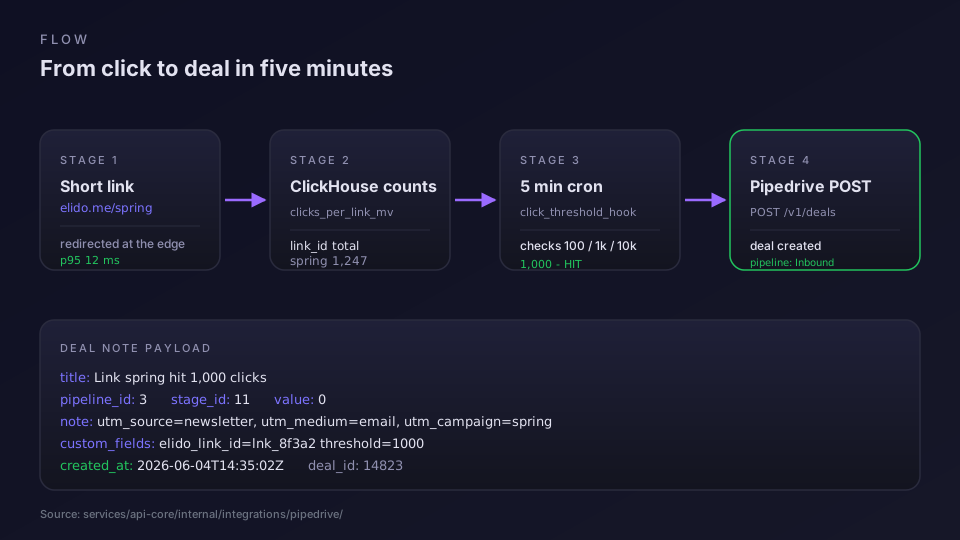
Inside services/api-core there is a job called click_threshold_hook. It runs every five minutes. On each tick it does three things in order, per workspace that has Pipedrive connected.
First, it lists the workspace's active links and reads each one's running click counter, the same counter the redirect service increments on every click. Deleted and inactive links are skipped.
Second, it diffs each link's new total against the recorded thresholds. The default thresholds are 100, 1,000, and 10,000. For each link, Elido records every threshold that already produced a deal in an integration_pipedrive_deals row keyed by workspace, link, and threshold. If a link sat at 80 clicks last run and is now at 240, the diff shows the 100 threshold was crossed and the 1,000 has not been touched yet. We mark 100 as reached and queue one deal creation. If a link jumped from 80 to 1,200, both 100 and 1,000 were crossed, so we queue two creations.
Third, for each queued deal, Elido calls Pipedrive's Deals API with a POST to /deals. The body sets the pipeline ID from the Connect picker, names the deal Engagement: <slug> (<threshold> clicks), and leaves the value at zero. Writing the UTM source, medium, and campaign into a deal note with a link back to the Elido analytics view is planned, and so is storing the link ID in a Pipedrive custom field.
A few things this cron does not do. It does not retry inside a tick. If Pipedrive returns an error, nothing is recorded for that threshold, so the next tick simply tries again. Pipedrive's rate limit is 100 requests per 2 seconds per company token in practice, which is plenty of headroom for the kinds of volumes most teams will hit. It also only looks at active links, so deleted or inactive links never create deals.
Duplicate prevention rests on that table. Before each create the cron checks for an existing (workspace_id, link_id, threshold_bucket) row, and the insert afterwards is guarded by a unique constraint on the same three columns, so a crash and a re-run do not produce a second deal for the same milestone.
Extending Beyond the Three Defaults
The shipped thresholds are 100, 1,000, and 10,000. Most teams keep those because they map naturally to a sales narrative. A hundred clicks is a soft signal worth a glance. A thousand is a campaign worth a call. Ten thousand is hot enough that a rep should already be moving. That said, you may want different numbers, and today you can't set them.
The Elido Pipedrive integration uses the same three buckets for every workspace, and there is no endpoint or setting for a custom threshold list yet.
Richer triggers are on the roadmap rather than shipped. The integration plan includes a threshold trigger scoped to a campaign with a deal-candidate UTM, and a conversion trigger that creates a deal carrying the captured order value. User-configurable target stages and Pipedrive custom fields such as Deal Source or Lead Channel are planned for the next version too. Until they land, if you need a UTM filter or a folder rollup, poll the Elido analytics API from your own job and create the deal through Pipedrive's API yourself.
Where the Token Lives and How to Rotate It
A short section because it comes up in every security review. The Personal API token is encrypted at rest using AES-256-GCM with a per-tenant data encryption key. The DEK is itself wrapped by a workspace level key in our KMS, and only the api-core process can unwrap it. There is no clear-text token in any log, any backup, or any error trace. We tested this with a fault injection that forced a Pipedrive 401 mid request, and the error path scrubs the token from the response before it reaches Sentry.
To rotate: generate a new Personal API token in Pipedrive, revoke the old one, then paste the new one into the Elido Connect modal again. The integration validates the new token, swaps it in place, and the next cron tick uses it. If you forget to update Elido after revoking the old token, the next cron tick gets a 401 and the integration goes into a Needs Reauth state, visible as a yellow banner on the workspace dashboard. No silent dead tokens.
On self-host the KMS is pluggable: file-backed by default, swap in HashiCorp Vault or your cloud KMS. ADR-0036 covers the long form.
Where This Fits in a Wider Funnel
Pipedrive deal triggers from clicks are one piece of a larger pattern. Click counts are a leading indicator, not a revenue number, so you usually want them to flow into a CRM where the rest of the sales context lives. The deal is the handoff: marketing has done its job, sales picks it up. From there your normal Pipedrive workflows take over: assigning the deal to a rep, scoring it, moving it through stages, closing it.
If you are also forwarding conversions to ad platforms, the same click data feeds both flows. The conversion tracking feature handles the ad side, the Pipedrive integration handles the CRM side, and the two never fight over the same event. We see this combination most often on the marketers solution page, where the entire stack is paid acquisition into branded links into a CRM funnel.
For analysts who want to keep their numbers honest, two earlier posts cover the upstream concerns. Short link analytics: what to measure covers which click metrics actually correlate with revenue, and Track UTM end to end covers the UTM hygiene that makes the deal notes useful instead of noisy. Both pair well with this integration, since the deal Pipedrive creates is only as useful as the UTM data it carries.
One last detail on plans. The Pipedrive integration is on every paid Elido tier, and the 14 day trial includes it so you can prove out your threshold list before signing up. Free workspaces can create the connection for testing, but the cron does not fire for free links. The pricing page has the per-tier breakdown.
Setup Checklist
Print this, do it once.
- In Pipedrive: profile menu, Personal preferences, API tab, copy the token.
- In Elido: Integrations, Pipedrive card, Connect.
- Paste the token. Wait for validation.
- Pick the pipeline. Default to Inbound; deals land on its first stage.
- Click Connect.
- Wait five minutes. Send some test clicks. Watch the first deal land.
That is it. If you self-host, the cron runs inside the api-core process rather than as a separate job, and it needs the Redis connection and the secrets master key configured; without either it skips silently. On Elido Cloud the cron is managed for you.
Veelgestelde vragen
How does Pipedrive link click tracking work in Elido?
Elido keeps a running click counter per short link, and a 5 minute cron checks each connected workspace for links that have crossed 100, 1,000, or 10,000 clicks. When a threshold trips, Elido calls the Pipedrive Deals API and creates a deal in the pipeline you picked at Connect, on its first stage. The deal title names the link slug and the milestone, for example Engagement: spring-sale (1000 clicks).
Do I need a paid Pipedrive plan to use the integration?
Any Pipedrive plan that lets you generate a Personal API token works, which today includes every Pipedrive tier from Essential up. The integration only uses the public Deals API, so you do not need Advanced or higher for the connection itself. Some downstream actions like custom fields exist on lower tiers too, but the per-tier field limits still apply on the Pipedrive side.
Why is the Pipedrive integration token-paste instead of OAuth?
Pipedrive supports OAuth for marketplace apps, but private workspace integrations still rely on a Personal API token, which is faster to ship and easier to rotate. The token is encrypted at rest with envelope encryption in Elido, never logged, and you can revoke it from your Pipedrive profile in two clicks. We will move the integration to OAuth when Pipedrive opens it for non-marketplace tenants.
Can I change which thresholds create deals?
The defaults are 100, 1,000, and 10,000 clicks, which match how most sales teams treat soft, mid, and hot signals. Today they are fixed for every workspace: there is no setting or API for a custom threshold list. A threshold trigger scoped to a campaign's UTM is on the integration roadmap, but it is not shipped yet.
What happens if a click count crosses two thresholds in five minutes?
The cron fires once per threshold per link, so a fast moving link that goes from 80 to 1,200 clicks between runs will create two deals back to back: one for the 100 milestone, one for the 1,000 milestone. Each threshold that already produced a deal is recorded per link, so a retry never creates a duplicate, and a single link can produce at most three deals in its lifetime, one per milestone.
Probeer Elido
Plak een URL, krijg een werkende korte link
Geen aanmelding nodig. Link blijft 30 dagen actief. Meld je aan om hem voor altijd te bewaren.
Gratis, geen aanmelding nodig · 2 per dag