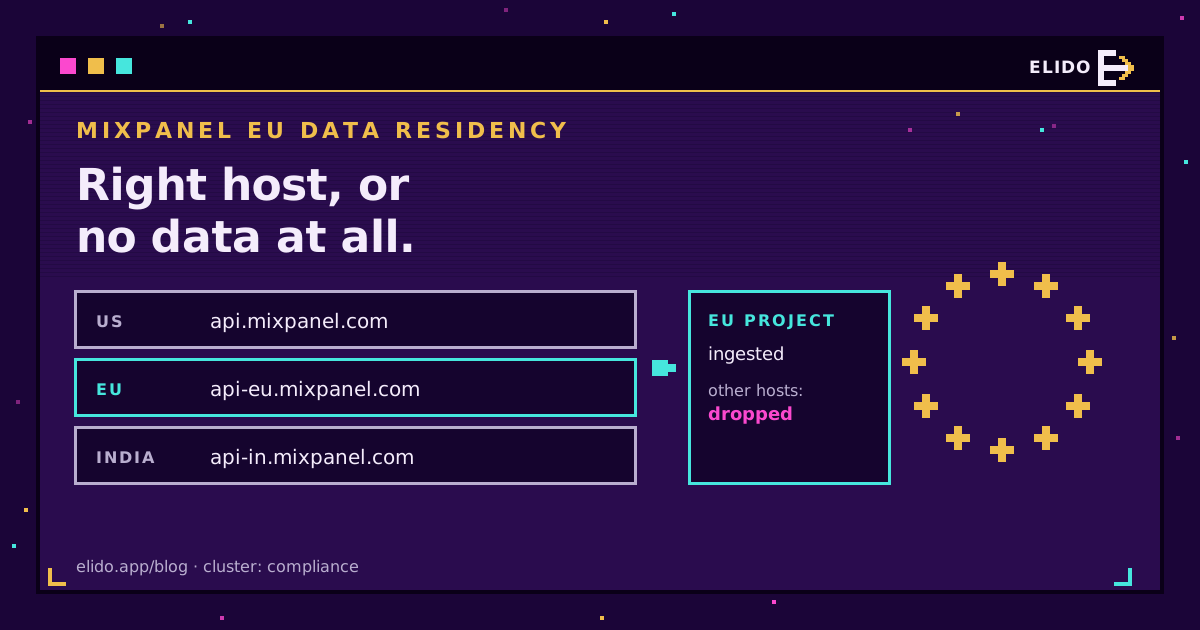
Mixpanel EU data residency means your project's events are processed and stored in Mixpanel's EU data centers, and it comes with one hard rule: events must be sent to the EU ingestion endpoint, api-eu.mixpanel.com. Send them to the default api.mixpanel.com and they aren't queued, redirected or flagged. They just never show up in the project.
India works the same way with api-in.mixpanel.com. The residency is picked when the project is created, it can't be flipped later, and every tool that writes into the project (browser SDK, backend, CDP, third-party forwarders) has to be told the right host separately.
That last part is where most breakage comes from, and it got worse this summer. Mixpanel used to forward events that older EU projects received on the US host. Per its EU residency documentation, that US-to-EU forwarding ended in July 2026 for most EU projects created before August 18, 2025. Setups that had quietly relied on it went silent. If you're working through the wider residency question for your stack, the EU data residency guide for marketing tools is the place to start; this post stays on Mixpanel.
What Mixpanel EU Residency Covers
EU residency is a project-level storage choice. You tick "EU Data Residency" when creating the project, and from then on Mixpanel processes and stores that project's data in the EU instead of its US default. Mixpanel runs a parallel program for India that it ties to the Digital Personal Data Protection Act.
Three things follow from it being project-level. Your organisation can hold US and EU projects side by side. The project token doesn't reveal its region. Nothing downstream can work it out from the token. And the UI moves too: EU projects live at eu.mixpanel.com, India projects at in.mixpanel.com, which is also why SSO postback URLs for EU need the eu. prefix.
What it doesn't cover is the path before the data reaches Mixpanel. Mixpanel says so itself: if events come in through a customer data platform, it "cannot guarantee" that ingestion, processing and storage stay in the EU. Your pipeline is your problem.
Ingestion Hosts for US, EU and India Projects
Ingestion isn't the only regional host. Every API family has one. If you only change the tracking host, your exports and query scripts will still hit the US hosts and fail against an EU project.
| API | US (default) | EU residency | India residency |
|---|---|---|---|
| Ingestion | api.mixpanel.com | api-eu.mixpanel.com | api-in.mixpanel.com |
| Query | mixpanel.com/api | eu.mixpanel.com/api | in.mixpanel.com/api |
| Raw data export | data.mixpanel.com/api/2.0/export | data-eu.mixpanel.com/api/2.0/export | data-in.mixpanel.com/api/2.0/export |
| Project UI address | mixpanel.com | eu.mixpanel.com | in.mixpanel.com |
The India column comes from Mixpanel's India residency page, which lists the same families plus Data Pipelines and Lexicon Schemas under data-in. and in.. The EU page mirrors it with -eu and eu..
Why Events Sent to the Wrong Host Are Dropped
Mixpanel's wording is blunt: no data is ingested into an EU residency project unless your implementation sends it to the EU ingestion URL. The India page says the same about api-in.mixpanel.com.
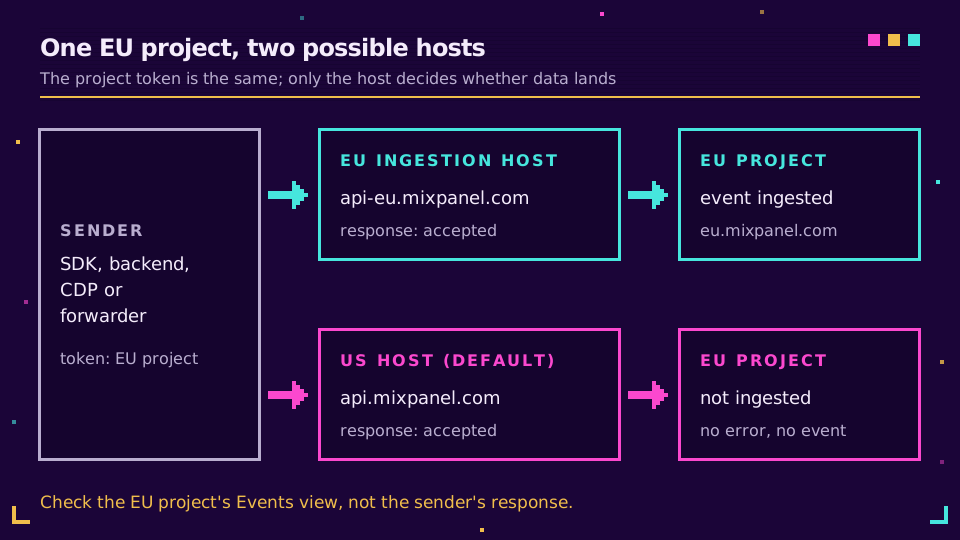
The painful part is that the wrong host doesn't reject the request in a way most tools notice. The /track endpoint takes the token at face value, so a sender pointed at the US host can see successful responses while the EU project stays empty. You find out from a flat chart, usually a week later.
So debug from the project. Never trust the sender's logs here. Open the Events view in the EU project, fire one event, and watch for it. Nothing within a minute or two means the host is wrong or the token belongs to a different project.
How to Check Your Residency and Move an Existing Project
Checking is quick. Project Settings shows a Data Residency value; or look at the address bar, where eu. or in. in front of mixpanel.com gives it away. I'd write the value down in whatever doc lists your integrations, because every tool you connect later needs it.
Moving is the hard bit. Mixpanel's docs state that if the wrong residency location was chosen, "you will need to create a new project with the applicable data storage option and migrate all your existing data," and that Mixpanel can't help with the migration. In practice that means:
- Create a new project with EU (or India) residency and point every sender at the new host and token.
- Re-import history you need, then retire the old project once reports and dashboards are rebuilt on the new one.
Nothing on those pages says whether a migrated history keeps its original IDs or dashboards. I didn't find a documented shortcut, and I'd assume there isn't one.
Mixpanel Data Residency and GDPR: IPs and Transfers
Residency answers one GDPR question well: where the stored data sits. With an EU project, your event history doesn't sit in the US, which takes a Chapter V transfer out of the storage picture. The GDPR guide for URL shorteners covers the article-level duties that remain.
The IP address is the detail people miss. Server-side senders usually attach the visitor's IP as the ip property so Mixpanel can geolocate the event instead of placing everyone at the sender's server. According to Mixpanel's geolocation documentation, the IP is used to derive country, region and city and is then discarded before the event is stored. Good. But the IP still travels in the request, and a request to api.mixpanel.com is a request to a US endpoint. So a wrong host isn't only a data-loss bug. It's also personal data leaving the EU for an endpoint your records of processing say you don't use.
If you don't need city-level location, you can send ip as 0 and Mixpanel skips geolocation altogether. Everything else stays yours to handle: lawful basis, consent for any cookie the browser SDK sets, the DPA, and what each forwarding tool keeps on its side. The Schrems II and tracking pixels post goes through how the transfer debate plays out for browser-side tags.
Sending Events to the EU Ingestion Endpoint From Any Tool
Every sender needs its own setting. There's no account-wide switch, so list them and fix each one:
- Browser SDK. Set
api_hostat init, for examplemixpanel.init(TOKEN, { api_host: "https://api-eu.mixpanel.com" }), or theapi-inhost for India. - Server SDKs and raw HTTP calls: point the host at
api-eu.mixpanel.com(each SDK has its own config option for it) or POST directly tohttps://api-eu.mixpanel.com/track. - CDPs, reverse-ETL jobs and no-code connectors: find their region or endpoint field, and ask the vendor in writing if you can't.
- Third-party forwarders that post on your behalf, like a link shortener that sends clicks. They can't see your residency from the token either.
Then verify each one in the EU project. One test event per sender is enough.
Worked Example: Elido's Mixpanel Forwarder
Elido forwards every short link click to Mixpanel as a server-side link_click event carrying the slug, link ID, country, device, destination, timestamp and the visitor ip. Since 22 September 2026 the connection dialog has a Data residency field with three options, and each one maps to a fixed host:
- United States:
api.mixpanel.com(also used when the field is empty) - EU:
api-eu.mixpanel.com - India:
api-in.mixpanel.com
The value is validated on save; anything other than those three is rejected, so a typo can't turn into a silent fallback to the US host. Connections saved before the field existed have no value and keep going to the US host, so if your project is EU-resident, reopen the Mixpanel connection with Update key, paste the project token again (the dialog never shows the stored one), pick EU and save.
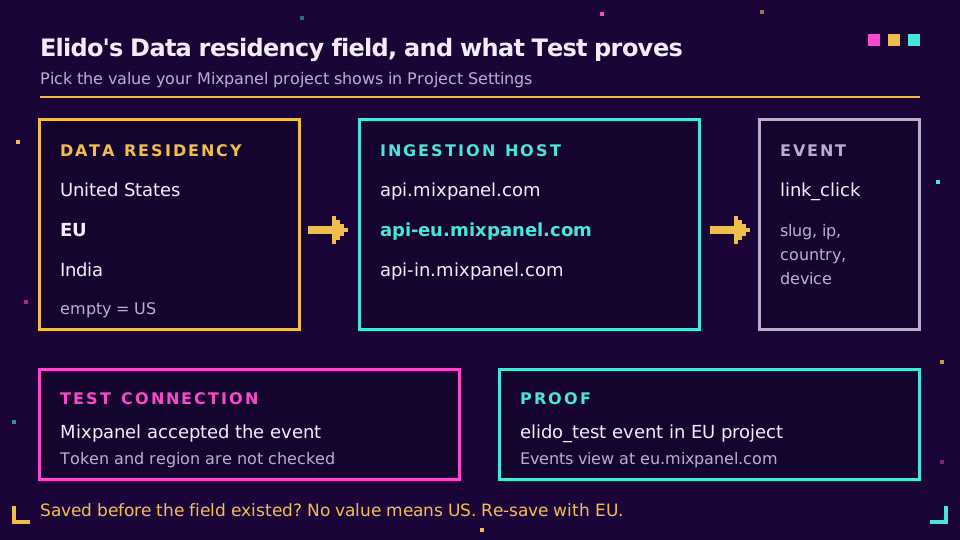
Here's the limit I'd want spelled out if I were reviewing it. The Test connection button can't prove the region. It sends one link_click marked elido_test: true and shows Mixpanel's answer, but /track accepts any token and doesn't check residency, so a green result on the wrong host looks identical to a green result on the right one. The panel says as much in its note. The proof is that test event arriving in the Events view of your EU project.
Clicks themselves are recorded in an EU region on Elido's side, and our sub-processor list names who touches them. If you want link clicks to land in an EU Mixpanel project without writing the forwarder yourself, start a workspace and connect it from the Mixpanel integration.
Two gaps worth knowing: the forwarder always sends ip (there's no switch for ip: 0 today), and it doesn't set $insert_id, which the Mixpanel link tracking guide covers alongside the per-link distinct_id. For the broader choice of where click data should live, see Mixpanel vs GA4 for link analytics.
Related on the Blog
- Mixpanel link tracking: short link clicks as events - setup, properties and verification for the forwarder.
- EU data residency for marketing tools - what your DPO asks beyond storage location.
- Is Google Analytics GDPR compliant? - the same question for a tool with no residency option.
- Server-side conversion tracking - why events move off the browser and what that changes.
Veelgestelde vragen
What is the Mixpanel EU ingestion endpoint?
It's api-eu.mixpanel.com. A project created with EU Data Residency only ingests events that arrive at that host. The EU project UI lives at eu.mixpanel.com, and query and export calls use the eu. and data-eu. hosts.
What happens if I send events for an EU project to api.mixpanel.com?
They aren't ingested. Mixpanel's documentation says no data is ingested into an EU residency project unless your implementation sends it to the EU ingestion URL. For most EU projects created before August 18, 2025, the old US-to-EU forwarding that used to catch these events ended in July 2026.
How do I check whether my Mixpanel project uses EU residency?
Open Project Settings and look at the Data Residency value. A quicker tell is the browser address bar: EU projects are served from eu.mixpanel.com, India projects from in.mixpanel.com, and US projects from plain mixpanel.com.
Can I switch an existing Mixpanel project to EU residency?
Not in place. Mixpanel's docs say that if the wrong residency was chosen, you need to create a new project with the right storage location and migrate your data yourself, and that Mixpanel can't assist with that migration. Plan it like a re-implementation, not a settings change.
What is api-in.mixpanel.com used for?
It's the ingestion host for projects created with India Data Residency, which Mixpanel positions for teams that need data held in India under rules like the Digital Personal Data Protection Act. The same rule applies as for the EU: events sent to any other host are not ingested.
Does Mixpanel EU residency make my setup GDPR compliant?
It settles where the events are stored, which removes one transfer question. It doesn't settle lawful basis, consent for any cookies your SDK sets, the DPA, or what your own tools send before the data reaches Mixpanel. Treat residency as one control on the list, not the whole list.
Probeer Elido
Plak een URL, krijg een werkende korte link
Geen aanmelding nodig. Link blijft 30 dagen actief. Meld je aan om hem voor altijd te bewaren.
Gratis, geen aanmelding nodig · 2 per dag