Si votre équipe commerciale vit dans HubSpot mais que votre suivi de campagnes vit dans un outil de liens courts, vous avez deux chronologies qui ne se parlent jamais. Le marketeur voit les clics ; le chargé de compte voit l'étape du deal. Personne ne voit la ligne entre les deux. Ce guide passe en revue le câblage d'Elido vers HubSpot pour que chaque clic sur lien court apparaisse sur la chronologie du contact, que les valeurs UTM atterrissent dans les propriétés CRM, et que les seuils de volume de clics puissent pousser les étapes de deal en avant. Pour le même câblage vers un CRM différent, suivi de liens Salesforce couvre la voie des événements de plateforme.
La plomberie repose sur trois API HubSpot : l'API Timeline Events pour les enregistrements par clic, l'API Contacts pour les écritures de propriétés, et l'API Deals pour l'avancement d'étape. L'authentification est OAuth 2.0 avec les scopes documentés sous scopes OAuth HubSpot. Le connecteur HubSpot est en production pour l'installation OAuth, la rotation des jetons de rafraîchissement, et une action de workflow Shorten. Le flux de chronologie par clic est intégré au connecteur mais attend le flux d'événements de clic par clic d'Elido, qui est sur la feuille de route, donc traitez le clic-vers-chronologie comme à venir plutôt que disponible aujourd'hui. Le reste, c'est de la configuration.
En bref
- Connectez-vous via OAuth avec cinq scopes :
oauth,crm.objects.contacts.read,crm.objects.contacts.write,timeline,automation. Moins que cela et HubSpot rejettera l'installation. - Elido publie chaque clic comme un événement de chronologie avec un
eventTemplateIdprovisionné à l'installation. Les paramètres UTM atterrissent sur la charge utile de l'événement et sur trois propriétés de contact personnalisées (elido_last_utm_source,_campaign,_medium). - Les propriétés analytiques de HubSpot comme
original_source_drill_down_1sont premier-contact uniquement. Utilisez des propriétés personnalisées pour l'attribution continue, pas les propriétés intégrées. - Les règles de seuil de clics (par ex. « 50 clics sur le lien de proposition fait avancer le deal vers Engagé ») s'exécutent côté serveur dans api-core. Configurez-les dans les Paramètres de l'espace de travail, pas dans les workflows HubSpot.
- Les erreurs 401 sur l'intégration signifient presque toujours une chaîne de jeton de rafraîchissement brisée. Réinstallez depuis la tuile de la marketplace, ne collez pas de jetons à la main.
Comment les clics atteignent la chronologie de contact HubSpot
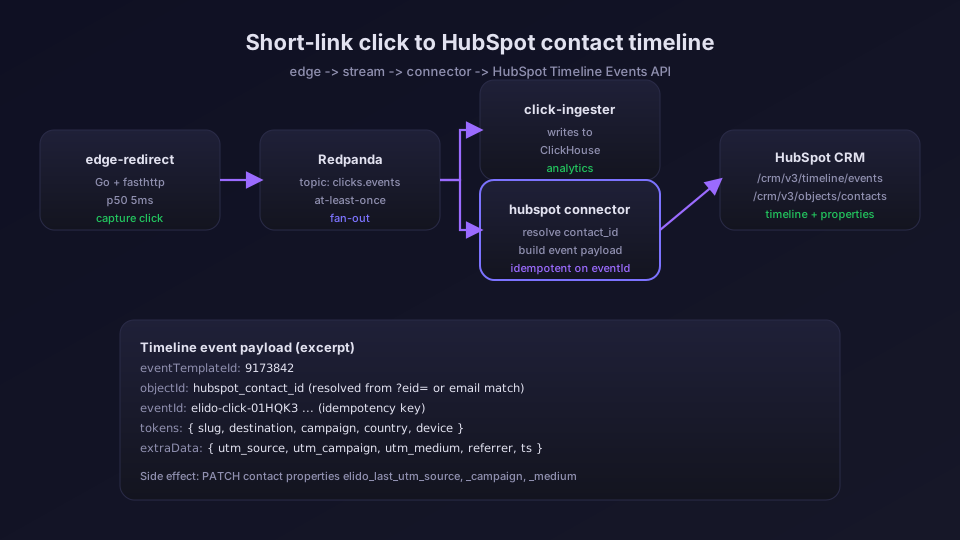
Un clic sur lien court dans Elido suit un chemin en cinq étapes avant de faire surface dans HubSpot.
- Le gestionnaire de redirection à la bordure (
services/edge-redirect) lit le clic, décide de la destination, et écrit l'événement de clic dans Redpanda. C'est le chemin critique, p50 autour de 5 ms ; HubSpot n'est jamais sur le chemin de la requête. click-ingesterlit le topic Redpanda et persiste dans ClickHouse pour l'analyse.- Le connecteur HubSpot, un service séparé, s'abonne à un topic de diffusion. Pour chaque clic sur un espace de travail avec HubSpot connecté, il construit une charge utile d'événement de chronologie.
- Le connecteur résout le contact par e-mail. Il cherche une adresse dans les métadonnées
emaildu lien, dansutm_content, ou dans un paramètreemail=sur l'URL de destination, puis recherche dans les contacts HubSpot une correspondance exacte. Aucun e-mail ou aucun contact correspondant signifie aucune écriture de chronologie pour ce clic. - Le connecteur envoie une requête POST à
/crm/v3/timeline/eventsavec l'ID de modèle d'événement provisionné à l'installation. L'écriture de chronologie est idempotente sureventId, donc les nouvelles tentatives sont sûres.
La charge utile de l'événement porte cinq tokens que l'interface de chronologie de HubSpot affiche : l'URL courte, l'URL de destination, la campagne UTM, la source UTM, et l'horodatage du clic.
La correspondance UTM-vers-propriété
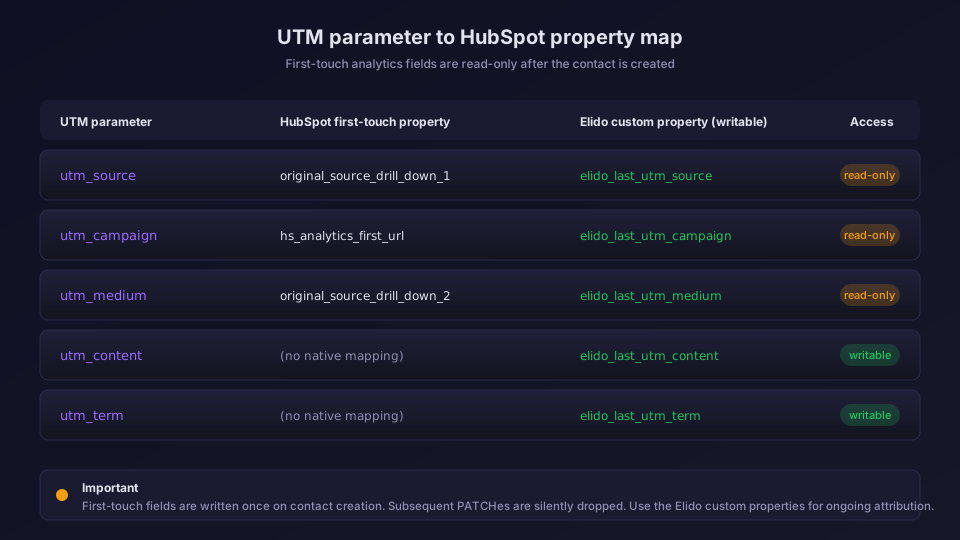
C'est la partie qui mord les équipes qui essaient de la câbler elles-mêmes. HubSpot a deux classes de propriétés « source » et elles se comportent différemment.
Propriétés analytiques (premier contact uniquement). original_source_drill_down_1, hs_analytics_first_url, hs_analytics_first_referrer, et le reste de la famille hs_analytics_* sont définies une fois, à la création du contact. Les écritures suivantes via l'API Contacts sont abandonnées silencieusement. HubSpot ne renvoie pas d'erreur, la valeur ne change simplement pas. Si vous vous êtes déjà demandé pourquoi votre valeur de « dernière campagne » semble figée en 2024, c'est pour cette raison.
Propriétés personnalisées (lecture/écriture). Tout ce que vous définissez vous-même est librement modifiable. Elido en provisionne trois à la première connexion : elido_last_utm_source, elido_last_utm_campaign, elido_last_utm_medium. Chaque clic corrige ces valeurs sur le contact résolu. L'agrégation au niveau du deal utilise les valeurs les plus récentes via un workflow HubSpot qui copie depuis le contact principal.
La figure 2 ci-dessous résume la correspondance qu'Elido applique par défaut. Vous pouvez remplacer n'importe quelle ligne dans Paramètres de l'espace de travail, puis Intégrations, HubSpot, Correspondance des champs. Pour les articles qui approfondissent l'hygiène UTM, le tutoriel UTM de bout en bout couvre les conventions de nommage, et le guide des modèles UTM explique comment les appliquer au moment de la création du lien.
Un exemple réel
Un compte SaaS B2B réserve un webinaire. L'e-mail de suivi contient un lien court Elido vers un PDF de tarification avec l'UTM utm_source=webinar&utm_campaign=q2-pricing&utm_medium=email. Le destinataire clique deux fois sur deux jours. Dans HubSpot :
- Deux nouveaux événements de chronologie apparaissent sur le contact, tous deux intitulés « Cliqué : PDF tarification Q2 (s.elido.me/abc123) ».
elido_last_utm_source = webinar,elido_last_utm_campaign = q2-pricing,elido_last_utm_medium = email.- Le
original_source_drill_down_1existant du contact (défini en septembre dernier lorsqu'il a téléchargé un ebook) ne change pas. C'est un comportement de premier contact correct, pas un bug. - La propriété
elido_recent_link_clicksdu deal associé augmente de 2 via un workflow HubSpot écoutant sur la propriété de contact.
Le chargé de compte qui regarde le deal voit désormais un compteur de clics qui monte avant même d'appeler. Le marketeur qui gère le webinaire peut extraire un filtre de liste HubSpot sur elido_last_utm_campaign = q2-pricing et l'envoyer vers une séquence de réengagement. Mêmes données, deux vues.
Câbler les seuils de clics vers les étapes de deal
La visibilité de chronologie, c'est la base. Les règles de seuil sont là où l'intégration prouve sa valeur, car elles convertissent le signal de clic en action CRM sans que personne surveille un tableau de bord.
La forme d'une règle :
trigger:
  link_tag: "sales-collateral" # tous les liens tagués ainsi comptent
  contact_window: 30d # glissant
  click_threshold: 50
action:
  type: advance_deal_stage
  pipeline: "default"
  from_stage: "appointmentscheduled"
  to_stage: "qualifiedtobuy"
  guard:
    require_associated_contact: true
    deal_amount_min: 5000 # seuls les deals valant la peine d'avancer
Les règles vivent dans api-core et tournent sur le même topic de diffusion qui alimente les écritures de chronologie. Chaque clic recalcule le compte glissant par (contact_id, link_tag). Quand le compte franchit le seuil et que le contact est associé à un deal dans from_stage, le connecteur corrige /crm/v3/objects/deals/{dealId} avec properties.dealstage = qualifiedtobuy.
Quelques remarques pratiques.
Utilisez-le pour des ressources à forte intention. Pages de tarification, PDF de proposition, replays d'enregistrement de démo. Un avancement piloté par seuil sur un tag de lien de prospection à froid polluera votre pipeline en une semaine. Le moyen le plus rapide de perdre la confiance d'un chargé de compte est de faire avancer un deal parce que quelqu'un a scrapé un lien avec curl.
Le bloc guard compte. Sans require_associated_contact, des clics anonymes (quelqu'un transférant le lien à un ami) peuvent déclencher la règle. Sans deal_amount_min, vous ferez avancer des deals d'essai à 400 $ vers des étapes réservées aux dossiers entreprise.
Les règles inverses ne sont pas symétriques. Elido ne rétrograde pas automatiquement les étapes en cas d'inactivité, car les rapports HubSpot traitent les retours en arrière d'étape comme suspects. Si vous voulez gérer les deals dormants, construisez-le comme un workflow HubSpot sur hs_lastmodifieddate, pas comme une règle Elido.
Pour la mécanique de transmission de conversion sous le capot, le guide de transmission de conversion documente le schéma d'événement, la politique de nouvelle tentative, et la file d'attente de messages morts. La page fonctionnalité de suivi des conversions montre le même flux pour Meta CAPI, GA4 et Mixpanel ; HubSpot est une destination parmi plusieurs.
Choisir entre règles basées sur le tag et règles basées sur le lien
Vous avez deux façons de cadrer une règle de seuil. Basée sur le tag couvre un ensemble de liens partageant un tag (par ex. les 12 liens de votre séquence de nurturing Q2 comptent tous vers le même seuil). Basée sur le lien cible un seul lien court.
Utilisez la règle basée sur le tag quand le parcours du prospect traverse plusieurs points de contact (c'est le cas de la plupart du B2B). Utilisez la règle basée sur le lien quand la ressource elle-même est le signal - un seul lien de proposition où le troisième clic et au-delà signifie que le deal est réel. Les deux types de règles coexistent ; un ingénieur de compte a récemment configuré un espace de travail avec 8 règles basées sur le tag et 14 règles basées sur le lien tournant en parallèle sans conflit.
Rotation des jetons de rafraîchissement et l'erreur 401 que vous allez voir
HubSpot OAuth utilise des jetons de rafraîchissement rotatifs. Chaque appel à /oauth/v1/token avec grant_type=refresh_token renvoie un nouveau jeton de rafraîchissement et invalide le précédent. C'est bon pour la sécurité et terrible pour quiconque essaie de gérer des jetons à la main.
Le connecteur d'Elido gère la rotation correctement. Le flux :
- Le jeton d'accès expire toutes les 30 minutes (valeur par défaut de HubSpot ; la valeur
expires_indans la réponse de jeton le confirme). - Environ 90 secondes avant expiration, le connecteur appelle le point d'entrée de rafraîchissement avec le jeton de rafraîchissement actuel.
- HubSpot renvoie un nouveau
access_token+ un nouveaurefresh_token+ un nouveauexpires_in. - Elido stocke les deux de manière atomique dans la table de jetons. L'ancien jeton de rafraîchissement est désormais mort.
Les endroits où cela casse :
Restaurations de base de données. Si vous restaurez une sauvegarde plus ancienne que votre dernier rafraîchissement, le jeton de rafraîchissement stocké est déjà invalidé en amont. Le premier appel de rafraîchissement renvoie une erreur 401 avec BAD_REFRESH_TOKEN. Symptômes : chaque appel API HubSpot depuis Elido échoue jusqu'à ce que vous réinstalliez.
Copies de jetons entre environnements. Un développeur copie les jetons HubSpot d'un espace de travail depuis la préproduction vers son poste local. Les deux environnements essaient désormais de rafraîchir avec le même jeton. Celui qui s'exécute en premier gagne ; l'autre meurt à la tentative suivante.
Modifications manuelles de la ligne de jeton. Tentant pendant le débogage, jamais une bonne idée. La colonne token_version est incrémentée de manière atomique avec le rafraîchissement ; les modifications manuelles brisent la vérification de concurrence optimiste et le rafraîchissement suivant échoue.
Longues périodes d'inactivité. HubSpot ne documente pas d'expiration stricte sur les jetons de rafraîchissement, mais en pratique les jetons inutilisés pendant 6 mois ou plus renvoient parfois une erreur 401. Si vous avez un espace de travail dormant depuis l'été dernier, attendez-vous à devoir réinstaller.
La correction dans les quatre cas est la même : ouvrez la tuile de la marketplace HubSpot depuis les Paramètres de l'espace de travail, cliquez sur Réinstaller, acceptez les scopes. HubSpot émet un nouveau code d'autorisation, Elido l'échange contre une nouvelle paire de jetons, et l'intégration reprend. Aucune donnée n'est perdue ; les événements de chronologie mis en file d'attente pendant la panne se vident en moins d'une minute. La documentation OAuth HubSpot décrit le flux de code d'autorisation plus en détail, et les règles de rotation sont liées depuis la section jeton de rafraîchissement.
Et les intégrations par collage de jeton ?
Certains fournisseurs vous laissent coller un jeton d'accès d'application privée au lieu de faire OAuth. HubSpot prend cela en charge, et cela contourne entièrement le problème de rotation - les jetons d'application privée n'expirent pas et ne tournent pas. Elido n'utilise pas cette voie pour HubSpot car les applications privées sont liées à un seul compte HubSpot et ne peuvent pas s'installer sur plusieurs portails depuis un seul espace de travail Elido. Si vous n'avez qu'un seul portail HubSpot et voulez éviter l'installation depuis la marketplace, contactez-nous via /contact ; le connecteur prend en charge les deux modes, il n'est simplement pas exposé dans l'interface par défaut.
Surveiller la chaîne de rafraîchissement
Deux signaux vous disent si le rafraîchissement est sain.
Le compteur Prometheus hubspot_refresh_attempts_total{result="ok|error"} vit dans api-core. Un taux d'erreur soutenu au-dessus de 1 % sur un espace de travail est l'avertissement précoce. La plupart des espaces de travail affichent zéro erreur sur des semaines. Le guide d'observabilité détaille le câblage vers des alertes.
La page Intégrations dans les Paramètres de l'espace de travail affiche l'horodatage du dernier rafraîchissement réussi par intégration. Si HubSpot affiche « Dernier rafraîchissement : il y a 6 jours » alors que tout le reste affiche des minutes, c'est l'espace de travail à examiner en premier.
Mettre tout ensemble
Une séquence de déploiement raisonnable pour une équipe adoptant l'intégration :
- Installez depuis
/integrations, acceptez les cinq scopes. Laissez 60 secondes à HubSpot pour provisionner le modèle d'événement de chronologie. - Confirmez le premier clic. Envoyez-vous un lien court Elido dont la destination porte
?email=<votre_email_contact_hubspot>, cliquez dessus depuis un autre appareil, actualisez votre page de contact HubSpot. L'événement de chronologie devrait apparaître en moins de 30 secondes. - Ajoutez les trois propriétés personnalisées Elido à votre vue de contact. Paramètres de l'espace de travail, puis Contacts, puis Personnaliser la barre latérale. C'est là que le marketing et les ventes voient enfin les mêmes valeurs UTM.
- Attendez deux semaines avant de configurer des règles de seuil. Vous avez besoin de vraies données de clic pour savoir à quoi ressemble une « forte intention » pour votre mix de ressources ; les seuils arbitraires définis le jour de l'installation sont généralement faux. La page solution marketeurs et le dossier analyses de liens aident à cadrer ce qu'il faut mesurer.
- Configurez votre première règle sur une seule ressource à forte intention (page de tarification, lien de proposition). Observez-la pendant une semaine. Ajustez le seuil et le garde-fou de montant de deal. Répétez.
L'ensemble complet des fonctionnalités est documenté dans le catalogue d'intégrations et le code source du connecteur vit dans services/hubspot-connector. Si vous évaluez la plateforme plus largement, tarifs Elido couvre le niveau où l'intégration HubSpot est incluse (Pro et supérieur), et l'aperçu du suivi des conversions côté serveur compare HubSpot aux autres destinations CRM et analytiques vers lesquelles Elido transmet.
Une dernière règle empirique. Traitez les événements de chronologie comme la source de vérité pour l'engagement ; traitez les propriétés personnalisées comme la source de vérité pour la campagne la plus récente ; ne faites jamais confiance à la famille hs_analytics_* pour quoi que ce soit au-delà du premier contact. Ce triplet couvre 95 % de ce sur quoi le marketing et les ventes se disputent, et le modèle de données de HubSpot commence enfin à paraître honnête.
Questions fréquentes
Comment suivre les clics de liens dans HubSpot ?
Connectez Elido à HubSpot via OAuth. Le connecteur enregistre chaque clic de lien court comme un événement de chronologie sur le contact HubSpot dont l'e-mail correspond, avec l'URL courte, la destination, la campagne et la source comme jetons d'événement. Ce flux par clic dépend du flux d'événements de clic d'Elido, qui est sur la feuille de route, donc attendez-vous à ce qu'il s'active quand ce flux sera lancé.
Quels scopes HubSpot Elido nécessite-t-il ?
Le connecteur demande cinq scopes : oauth, crm.objects.contacts.read (pour trouver le contact par e-mail), crm.objects.contacts.write, timeline (pour émettre des événements de chronologie personnalisés), et automation (pour l'action de workflow Shorten). Le flux OAuth demande ceux-ci à l'installation, et HubSpot bloquera l'intégration si l'un d'eux manque de la liste de scopes de l'application.
Un clic de lien peut-il faire avancer un deal HubSpot à l'étape suivante ?
Oui, avec des règles de seuil de clics. Dans Elido, définissez une règle comme « quand le contact X atteint 50 clics sur un lien commercial, faire avancer le deal associé à l'étape Engagé ». Elido surveille les compteurs de clics par contact et corrige le deal via l'API Deals une fois le seuil franchi. Utilisez ceci pour des ressources à forte intention comme des PDF de tarification ou des liens de proposition, pas pour de la prospection à froid où cela gonflerait le pipeline.
Pourquoi mon intégration HubSpot renvoie-t-elle constamment une erreur 401 ?
Les jetons de rafraîchissement OAuth de HubSpot tournent à chaque appel de rafraîchissement, et une erreur 401 signifie presque toujours que le jeton de rafraîchissement stocké est périmé ou a été utilisé deux fois. Le hubspot-connector d'Elido gère la rotation automatiquement, mais si vous avez restauré une sauvegarde de base de données ou copié un jeton entre environnements, la chaîne de rotation se brise. Réinstallez l'application depuis l'écran de la marketplace HubSpot pour émettre une nouvelle paire de jetons.
HubSpot me laissera-t-il écraser original_source_drill_down_1 ?
Partiellement. Les propriétés analytiques de HubSpot ont une politique de « premier contact » : original_source_drill_down_1 est défini une fois, à la création du contact, et les écritures suivantes sont ignorées silencieusement. Pour une attribution continue, vous devez utiliser des propriétés de contact personnalisées (Elido provisionne elido_last_utm_source, elido_last_utm_campaign, elido_last_utm_medium à la connexion) ou envoyer les valeurs comme métadonnées d'événement de chronologie à la place.
Essayer Elido
Collez une URL, obtenez un lien court
Sans inscription. Lien actif 30 jours. Inscrivez-vous pour le garder pour toujours.
Gratuit, sans inscription · 2 par jour
Lire la suite
- IntégrationsRaccourcisseur d'URL Brevo : liens courts de marque dans les campagnes
- IntégrationsMonitoring d'URL Datadog : métriques de redirection pour les liens courts
- IntégrationsRaccourcisseur d'URL GitHub Actions : des liens courts depuis votre CI
- IntégrationsRaccourcir les liens des notes de version et suivre chaque téléchargement