Die Managed-Version von Elido läuft auf EU-Region-Infrastruktur mit einer Privacy-by-Default-Konfiguration. Für die meisten Nutzer ist das ausreichend. Für einige nicht.
Wenn Ihr Security-Team verlangt, dass Short-Link-Zieldaten und Click Events ein bestimmtes Rechenzentrum niemals verlassen, wenn Ihre Audit-Policy vollständige Kontrolle über den Datenbankserver fordert, oder wenn Sie Elido in eine interne Plattform einbauen, die air-gapped laufen muss, dann existiert der Self-Hosted-Pfad genau zu diesem Zweck.
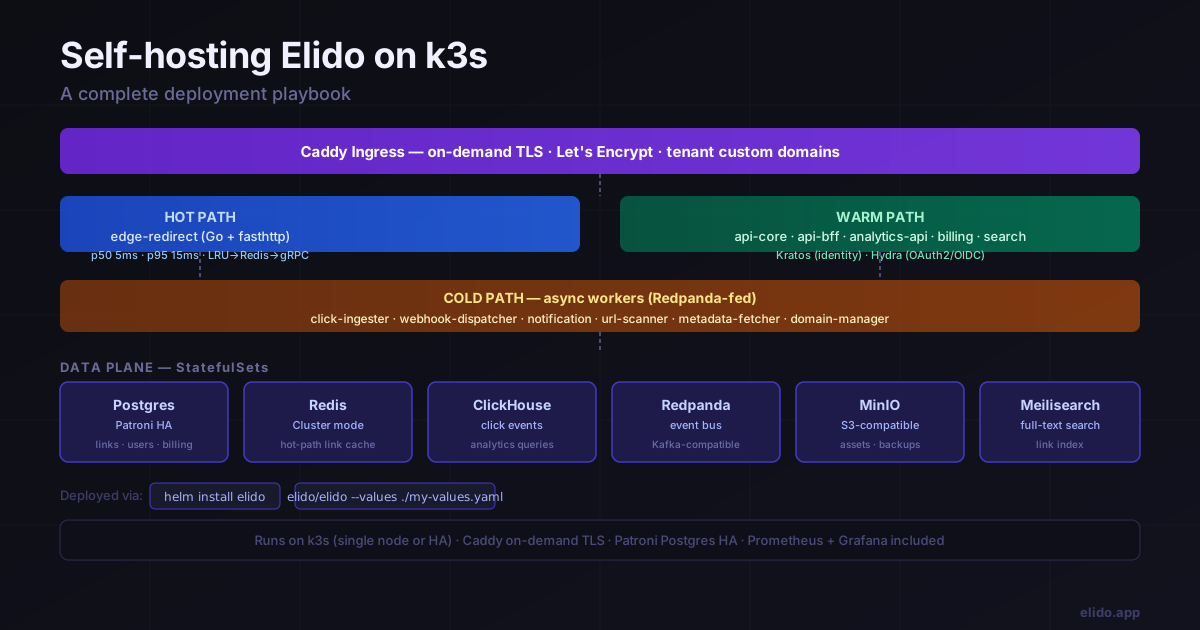
Diese Anleitung führt durch das Deployment von Elido auf k3s, einer produktionsreifen, minimalen Kubernetes-Distribution, die problemlos auf einer einzelnen VM oder einem kleinen HA-Cluster läuft. Am Ende laufen alle Services, TLS ist bereitgestellt, Backups sind verkabelt und ein wiederholbarer Upgrade-Pfad steht. Die Anleitung geht davon aus, dass Sie ein funktionierendes System wollen, kein Tutorial über Kubernetes-Konzepte - Erklärungen sind kurz gehalten und operative Schritte explizit.
Warum selbst hosten
Bevor wir in das Playbook einsteigen, lohnt es sich, präzise über die Trade-offs zu sein. Self-Hosting ist nicht automatisch besser - es verschiebt operatives Risiko von einem Anbieter auf Ihr eigenes Team.
Data Residency und Compliance. Wenn Ihr Compliance-Framework (ISO-27001-Scope, interne Datenklassifizierungs-Policy oder vertragliche Data-Residency-Klausel) verlangt, dass Link-Metadaten und Analytics-Events auf Infrastruktur bleiben, die Sie direkt kontrollieren, kann Managed SaaS diese Anforderung unabhängig vom physischen Standort nicht erfüllen. Ein selbst gehostetes Deployment auf einer EU-Region-VM, die Ihnen gehört, hingegen schon. Siehe die Compliance-Übersicht für Details darüber, wie Elidos Architektur auf gängige Frameworks abbildet.
Kostenvorhersehbarkeit bei Skalierung. Managed-Pläne werden nach aktiven Links und Click-Volumen bepreist. Oberhalb eines bestimmten Schwellenwerts - typischerweise irgendwo über mehreren Millionen Clicks pro Monat - überschreiten die Pro-Event-Kosten der Managed-Pläne die Infrastrukturkosten, das äquivalente StatefulSet-Workload selbst zu betreiben. Der Crossover-Punkt hängt von Ihrer Traffic-Form ab, aber er existiert.
Audit-Kontrolle. Manche Organisationen benötigen Zugriff auf die rohen Postgres-Tabellen und die ClickHouse-Click-Event-Daten zur Evidence-Verpackung, für Legal Holds oder SIEM-Integration. Die Elido-API bietet Audit-Log-Endpunkte und Evidence-Exporte, aber direkter Datenbankzugriff ist nur in selbst gehosteten Deployments verfügbar.
Was Sie eintauschen. k3s erfordert, dass jemand Upgrades, Node-Health, Backup-Verifikation und Incident Response übernimmt. Wenn Ihr Team keine Kubernetes-Betriebserfahrung hat, ist die Managed-Version an einem compliance-konformen Hosting-Standort fast sicher die richtige Antwort. Siehe den letzten Abschnitt dieses Beitrags für eine direktere Behandlung der Frage, wann Self-Hosting die falsche Entscheidung ist.
Voraussetzungen
- Ein k3s-Cluster. Eine einzelne Node mit 4 vCPU und 8 GB RAM bewältigt leichte Workloads. Für HA ist die Mindestempfehlung drei Control-Plane-Nodes plus zwei oder mehr Worker-Nodes. k3s' eingebautes etcd deckt Control-Plane-HA ab; Data-Plane-HA übernimmt Patroni (Postgres) innerhalb des Helm-Charts.
kubectlkonfiguriert mit einem Context, der auf Ihren Cluster zeigt.- Helm 3.14 oder neuer.
- Eine Domain, die Sie kontrollieren, mit der Möglichkeit, DNS-Records zu erstellen. Die k3s-Ingress-IP muss auf Ports 80 und 443 aus dem Internet erreichbar sein, damit die Let's-Encrypt-ACME-Challenges erfolgreich sind.
- Wenn compliance-getrieben, eine EU-Region-VM. Hetzner (Falkenstein, Helsinki, Nürnberg) und OVH (Gravelines, Roubaix) sind die zwei Anbieter, die Elidos eigene Edge-Infrastruktur nutzt.
Auf einer frischen Hetzner CX32 (4 vCPU / 8 GB) mit Ubuntu 24.04 installiert sich k3s in etwa 30 Sekunden:
curl -sfL https://get.k3s.io | sh -
# Copy the kubeconfig to your local machine:
scp root@<your-vm>:/etc/rancher/k3s/k3s.yaml ~/.kube/elido-self-host.yaml
export KUBECONFIG=~/.kube/elido-self-host.yaml
kubectl get nodes  # should show Ready
Klonen Sie das Elido-Repository, um das Helm-Chart zu erhalten (das Chart liegt im Repository unter deploy/helm/elido/ - es gibt kein separates öffentliches Helm-Repository):
git clone https://github.com/elidoapp/elido.git
cd elido
Quickstart
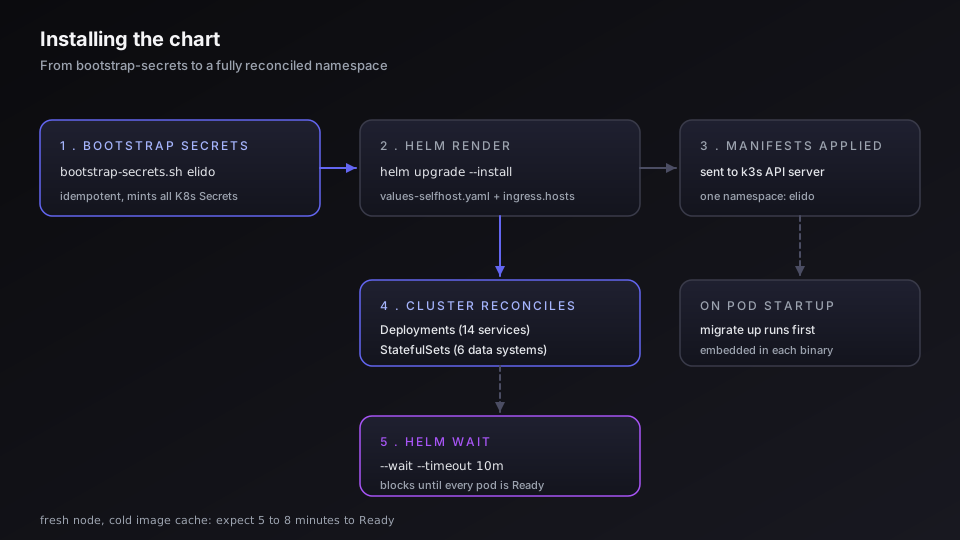
Das Self-Host-Preset (deploy/helm/elido/values-selfhost.yaml) ist der empfohlene Ausgangspunkt für ein Single-Node-k3s-Deployment. Zuerst Secrets bootstrappen, dann installieren:
# 1. Mint all required Kubernetes Secrets in one shot (idempotent)
./scripts/bootstrap-secrets.sh elido

# 2. Install using the self-host preset
helm -n elido upgrade --install elido ./deploy/helm/elido \
  -f ./deploy/helm/elido/values-selfhost.yaml \
  --set ingress.hosts.redirect[0]=r.example.com \
  --set ingress.hosts.api=api.example.com \
  --set ingress.hosts.dashboard=app.example.com \
  --set image.tag=$(git rev-parse --short HEAD) \
  --create-namespace \
  --wait --timeout 10m
Für individuelle Overrides (Produktions-Replica-Counts, gemanagte externe Services etc.) kopieren Sie values-selfhost.yaml in eine lokale my-values.yaml, editieren diese und übergeben sie mit -f. Die wichtigsten Top-Level-Werte-Bereiche sind ingress.hosts.* (Ihre Hostnamen), image.registry/image.tag und die Pro-Service-resources-Blöcke. Verwenden Sie nicht global.domain - das Chart nutzt ingress.hosts.* für die Domain-Konfiguration.
Das --wait-Flag blockiert, bis alle Deployments und StatefulSets ihren Ready-Zustand erreichen. Auf einer frischen Node ohne gecachte Images sind 5–8 Minuten auf einer 1-Gbps-Leitung zu erwarten.
Prüfen Sie, ob alles hochgekommen ist:
kubectl -n elido get pods
kubectl -n elido get svc
Siehe die Werte-Referenz des Charts mit helm show values ./deploy/helm/elido für die vollständige Parameter-Oberfläche. Die deploy/helm/elido/README.md im Repository ist die autoritative Quelle für spezifische Feldnamen und die Nutzung des Bootstrap-Skripts.
Welche Architektur Sie deployen
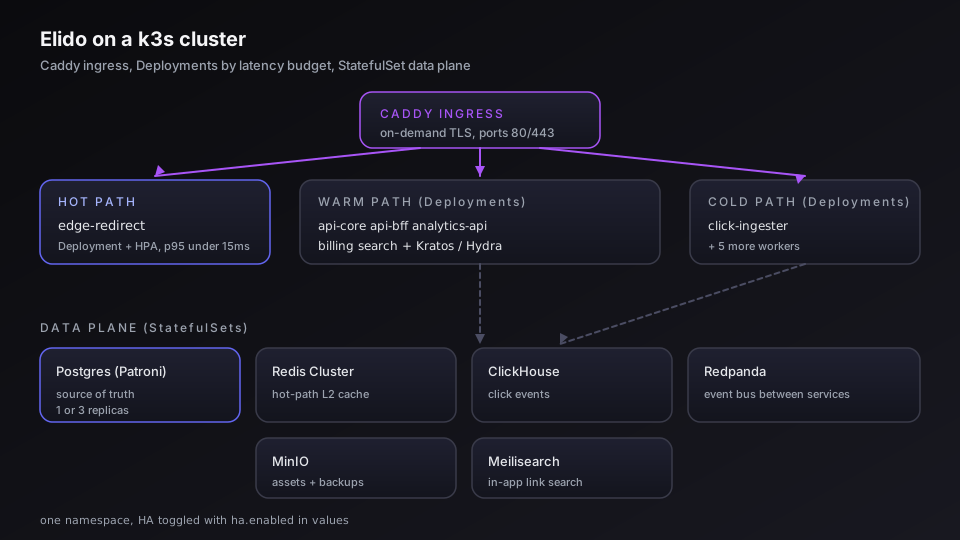
Elidos Architektur ist nach Latenzbudget aufgeteilt. Dieses Verständnis hilft Ihnen, informierte Entscheidungen zur Ressourcenallokation zu treffen.
Hot Path: edge-redirect
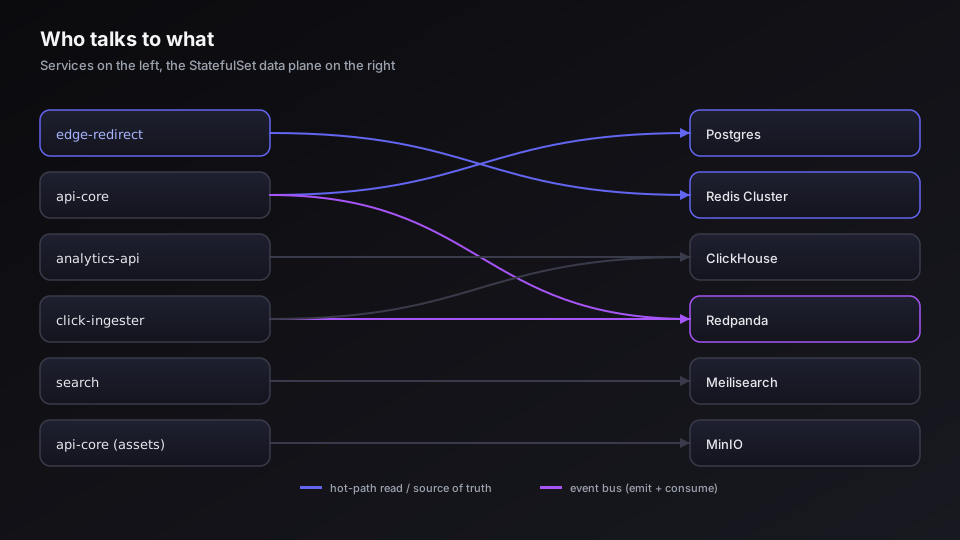
edge-redirect ist der einzige Service auf dem synchronen Pfad einer Redirect-Anfrage. Er ist in Go mit fasthttp geschrieben und hat ein hartes Latenzbudget: p50 5 ms, p95 15 ms bei einem Cache-Hit. Der Service unterhält einen zweistufigen Cache: einen In-Process-LRU (L1), abgesichert durch Redis Cluster (L2). Bei einem Cache-Miss fällt er auf einen gRPC-Aufruf an api-core zurück. Click-Events werden fire-and-forget in Redpanda emittiert - die Redirect-Antwort wartet niemals auf den Abschluss des Event-Writes.
Das Helm-Chart deployt edge-redirect als Deployment mit einem HorizontalPodAutoscaler. In einem Single-Region-Self-Hosted-Setup sind zwei Replicas ein vernünftiger Ausgangspunkt. Der L2-Redis-Cache wird über Replicas hinweg geteilt, sodass Cache-Warming nach einem Rolling Update schnell ist.
Warm Path: API-Oberfläche
Fünf Services übernehmen synchrone API- und Business-Logik-Arbeit:
api-core- Go + chi, REST und gRPC. Source of Truth für Links, Workspaces, Memberships, Custom Domains, Audit Events.api-bff- Node/Hono-BFF-Layer für das Web-Dashboard und mobile Clients. Aggregiert überapi-coreundanalytics-api.analytics-api- Go, ClickHouse-Abfragen. Bedient die Analytics-Dashboards.billing- Go + chi + sqlc. EU-VAT-Engine, LiqPay-Payment-Integration, Rechnungserstellung.search- Go, Proxy für Link-Search-Anfragen an Meilisearch.
Auth übernehmen Ory Kratos (Identity, Sessions, E-Mail-Verifikation) und Ory Hydra (OAuth2/OIDC-Tokens für Drittanbieter-Integrationen und die Browser-Extension). Beide werden als Deployments im Chart bereitgestellt.
Cold Path: Asynchrone Worker
Sechs Services konsumieren Events aus Redpanda-Topics und haben kein Response-Time-Budget:
click-ingester- konsumiert Click-Events, schreibt nach ClickHouse.webhook-dispatcher- fächert signierte Webhook-Payloads zu Kunden-Endpunkten aus.notification- E-Mail- und In-App-Benachrichtigungen (Account-Events, Link-Alerts).url-scanner- scannt Ziel-URLs gegen Google Safe Browsing, PhishTank, SURBL.metadata-fetcher- holt Open-Graph-Metadaten für Link-Previews.domain-manager- DNS-Verifikation und Caddy-On-Demand-TLS-Provisioning für Custom Domains.
Data Plane: StatefulSets
Sechs zustandsbehaftete Systeme unterstützen die obigen Services:
| System | Rolle | Chart-Ressource |
|---|---|---|
| Postgres (Patroni) | Source of Truth für Links, Nutzer, Billing | StatefulSet, 3 Replicas im HA-Modus |
| Redis Cluster | Hot-Path-Link-Cache | StatefulSet |
| ClickHouse | Click-Event-Speicherung und Analytics-Abfragen | StatefulSet |
| Redpanda | Event-Bus zwischen Services | StatefulSet |
| MinIO | Vom Nutzer hochgeladene Assets (QR-Bilder, Exporte) | StatefulSet |
| Meilisearch | In-App-Link-Search | StatefulSet |
In einem Single-Node-Deployment läuft jedes StatefulSet mit einer Replica. Im HA-Modus (aktivierbar durch Setzen von ha.enabled: true in den Values) skaliert Postgres unter Patroni auf drei Replicas, Redis auf sechs (drei Primaries, drei Replicas) und Redpanda auf drei Broker.
Caddy Ingress
Caddy übernimmt TLS-Termination und On-Demand TLS für Tenant-Custom-Domains. Wenn ein Workspace-Operator eine Custom Domain über das Dashboard (oder die API) hinzufügt, verifiziert domain-manager die DNS-Ownership, registriert den Hostnamen als erlaubt, und Caddy stellt das Let's-Encrypt-Zertifikat beim ersten HTTP-Request auf diesen Hostnamen bereit. Das Chart deployt Caddy als DaemonSet auf Nodes mit dem Label elido.app/ingress=true oder als Deployment im Default-Single-Node-Setup.
Der Ablauf für eine Tenant-Custom-Domain go.company.com:
- Operator erstellt einen CNAME:
go.company.com → <your-k3s-ingress-ip>(oder einen A-Record, der direkt zeigt). - Operator ruft
POST /v1/workspaces/{id}/domainsauf oder klickt im Dashboard auf "Add domain". domain-managerfragt DNS ab, um zu bestätigen, dass der CNAME zur Ingress-IP auflöst.- Caddy empfängt den ersten HTTPS-Request, prüft die von Elido ausgestellte Allow-List und fordert ein Zertifikat von Let's Encrypt über ACME HTTP-01 an.
- Das Zertifikat wird im Caddy-State-Volume gespeichert und automatisch erneuert.
First-Run-Bootstrap
Nachdem helm install abgeschlossen ist, ist die Admin-API verfügbar, aber es existiert noch kein Nutzerkonto.
Admin-Nutzer bootstrappen
# Port-forward to the api-core admin interface (not exposed by default)
kubectl -n elido port-forward svc/api-core 8081:8081 &

# Create the first admin account
curl -X POST http://localhost:8081/internal/admin/bootstrap \
  -H 'Content-Type: application/json' \
  -d '{
    "email": "[email protected]",
    "password": "your-secure-password"
  }'
Der Bootstrap-Endpunkt ist nur aus dem Cluster-Netzwerk heraus aufrufbar und wird nach dem ersten erfolgreichen Aufruf deaktiviert. Sobald das Admin-Konto existiert, melden Sie sich über das Dashboard an Ihrer konfigurierten Domain an.
Ersten Workspace erstellen
Nach dem Login fordert das Dashboard bei der ersten Nutzung zur Workspace-Erstellung auf. Alternativ per API:
curl -X POST https://links.example.com/v1/workspaces \
  -H "Authorization: Bearer <your-session-token>" \
  -H 'Content-Type: application/json' \
  -d '{"name": "My Workspace", "slug": "my-workspace"}'
Custom Domain hinzufügen
Gehen Sie in den Workspace-Einstellungen zu Domains und fügen Sie Ihre Short-Link-Domain hinzu. Setzen Sie den DNS-Record (CNAME oder A) bevor Sie auf "Verify" klicken - domain-manager prüft DNS sofort und gibt einen Fehler zurück, wenn der Record noch nicht propagiert ist. Bei erfolgreicher Verifikation stellt Caddy das Zertifikat beim ersten Redirect-Request auf diese Domain bereit. Die Zertifikatsausstellung dauert beim ersten Request typischerweise 10–30 Sekunden.
Prüfen Sie, dass TLS funktioniert:
curl -I https://go.company.com/healthz
# Expect: HTTP/2 200
Betriebliche Aspekte
Backups
Postgres. Das Chart liefert einen CronJob aus, der pg_dump nach einem konfigurierbaren Zeitplan ausführt (Standard: täglich um 02:00 UTC) und den komprimierten Dump in den in den Values konfigurierten MinIO-Bucket hochlädt. Bei HA-Deployments läuft pg_dump gegen eine Replica, um die Primary nicht zu belasten. In den Values aktivieren:
backups:
  postgres:
    enabled: true
    schedule: "0 2 * * *"
    retentionDays: 30
    s3Bucket: "elido-backups"
Für Point-in-Time Recovery aktivieren Sie WAL-Archivierung (postgres.walArchive.enabled: true in den Values), wodurch WAL-Segmente kontinuierlich an MinIO geschickt werden. Kombinieren Sie tägliches pg_dump mit WAL-Archivierung für ein RPO unter 5 Minuten.
ClickHouse. ClickHouse speichert Click-Events, die append-only sind und sich aus Redpanda replayen lassen, sofern die Retention es erlaubt. Das Chart enthält einen CronJob, der BACKUP TABLE-SQL nach MinIO über ClickHouses natives Backup-Interface ausführt. Aktivieren mit backups.clickhouse.enabled: true.
Redpanda. Redpanda ist ein Streaming-Bus, keine Datenbank. Retention ist zeitbasiert (Standard: 7 Tage) und wird in den Values unter redpanda.retention konfiguriert. Wenn Ihr click-ingester um mehr als das Retention-Fenster zurückfällt, gehen Events verloren. Beobachten Sie den Consumer-Group-Lag - das Chart liefert einen Prometheus-Alert (ElidoRedpandaConsumerLag) aus, der feuert, wenn eine Consumer-Group mehr als 100.000 Nachrichten zurückliegt.
Backup-Verifikation. Ein Backup, das nie getestet wurde, ist ein Backup, auf das Sie sich nicht verlassen können. Führen Sie mindestens vierteljährlich einen Restore-Drill in einen separaten Namespace durch:
kubectl -n elido-restore create ns elido-restore || true
helm install elido-restore ./deploy/helm/elido \
  --namespace elido-restore \
  --values ./my-values.yaml \
  --set restore.fromBackup=true \
  --set restore.backupDate="2026-05-01"
Monitoring
Das Chart enthält einen ServiceMonitor für jeden Service, sofern die Prometheus-Operator-CRD im Cluster vorhanden ist. Schlüsselmetriken, auf die alertiert werden sollte:
monitoring:
  prometheus:
    enabled: true # requires prometheus-operator in cluster
  grafana:
    enabled: true # deploys bundled dashboards
    adminPassword: "change-me"
Die mitgelieferten Grafana-Dashboards decken ab:
edge-redirectp50/p95-Latenz, Cache-Hit-Ratio, Click-Volumenapi-coreRequest-Rate, Error-Rate, gRPC-Latenzclick-ingesterConsumer-Lag pro Redpanda-Partition- Postgres Primary/Replica Replication Lag (Patroni)
- Redis Eviction-Rate und Memory Pressure
Wenn Sie bereits einen Prometheus-Stack im Cluster haben, setzen Sie monitoring.prometheus.install: false und richten Ihren bestehenden Stack auf die ServiceMonitors aus.
Patroni HA für Postgres
Im HA-Modus übernimmt Patroni Leader-Election und Failover. Das Chart konfiguriert Patroni mit dem kubernetes-Distributed-Configuration-Store (nutzt Kubernetes-ConfigMaps, kein separates etcd nötig). Failover schließt typischerweise in 15–30 Sekunden ab. Während des Failover erleben api-core und billing kurze Schreibfehler; beide Services wiederholen bei 5xx mit exponentiellem Backoff.
Um den Zustand des Patroni-Clusters zu inspizieren:
kubectl -n elido exec -it postgres-0 -- patronictl -c /etc/patroni/config.yml list
Upgrade-Flow
Elido folgt Semantic Versioning. Patch-Releases enthalten Bugfixes und erfordern keine manuellen Migrationsschritte. Minor- und Major-Releases können Datenbank-Schema-Migrationen enthalten, die in die Service-Binaries eingebettet sind und beim Pod-Start automatisch über den Migration Runner laufen.
Der empfohlene Upgrade-Pfad:
# 1. Pull the latest chart (git pull in your cloned repo)
git pull origin main

# 2. Review the upgrade notes
helm show chart ./deploy/helm/elido | grep -A10 'version\|appVersion'

# 3. Diff the values changes (requires helm-diff plugin)
helm diff upgrade elido ./deploy/helm/elido \
  --namespace elido \
  --values ./my-values.yaml

# 4. Upgrade
helm upgrade elido ./deploy/helm/elido \
  --namespace elido \
  --values ./my-values.yaml \
  --wait --timeout 10m
Migrations-Handling. Jede Go-Service-Binary enthält ihre Schema-Migrationen (über golang-migrate gegen ein eingebettetes Migrations-Verzeichnis). Beim Pod-Start führt die Binary migrate up aus, bevor sie Requests bedient. In einem Rolling Update wendet der neue Pod alle ausstehenden Migrationen an, bevor der alte Pod terminiert. Migrationen müssen rückwärtskompatibel zur vorherigen Minor-Version sein - eine in v1.5 hinzugefügte neue Spalte muss nullable sein oder einen Default tragen, damit die parallel laufende v1.4-Binary während des Rollout-Fensters nicht in Fehler läuft.
Blue/Green für Major-Upgrades. Für Major-Versions-Upgrades, bei denen Schema-Änderungen nicht rückwärtskompatibel sind, nutzen Sie die Blue/Green-Strategie: Installieren Sie die neue Version unter einem separaten Helm-Release-Namen in einem Staging-Namespace, migrieren Sie einen Produktions-Datenbank-Snapshot dort hinein, führen Sie Smoke-Tests aus und führen Sie dann den DNS-Cutover auf Ingress-Ebene durch. Nach der Validierung des Green-Stacks löschen Sie den Blue-Release.
# Install green stack
helm install elido-green ./deploy/helm/elido \
  --namespace elido-green \
  --create-namespace \
  --values ./green-values.yaml

# After validation, cut over DNS at your registrar
# Then decommission blue
helm uninstall elido --namespace elido
Wann man nicht selbst hosten sollte
Self-Hosting ist in einer engen Reihe von Umständen die richtige Entscheidung. In mehr Fällen, als Sie vielleicht denken, ist sie die falsche.
Ihre Workload ist klein. Wenn Sie weniger als 100.000 Links pro Monat erstellen und keine strikten Data-Residency-Anforderungen haben, kostet Managed Elido weniger Geld und weniger operative Zeit als der Betrieb von k3s. Das Hosted-Tier inkludiert Backups, Upgrades und On-Call für die Infrastruktur, die Sie sonst selbst betreiben müssten.
Sie haben keine Kubernetes-Betriebserfahrung. k3s ist minimal, aber Kubernetes ist nicht einfach. Wenn niemand in Ihrem Team StatefulSets betrieben, etcd-Backup/Restore gehandhabt oder einen CrashLoopBackOff in Patroni um 2 Uhr morgens debuggt hat, fügt Self-Hosting eine Kategorie operativen Risikos hinzu, die die Infrastruktur-Kostenersparnis nicht ausgleicht.
Ihre Compliance-Anforderung ist EU-Data-Residency, nicht spezifische Tenancy. EU-Data-Residency bedeutet, dass Daten in der EU gespeichert und verarbeitet werden. Elidos Managed-Infrastruktur läuft in Hetzner FRA und OVH GRA, die beide die Anforderungen von Art. 44 DSGVO ohne grenzüberschreitenden Transfer erfüllen. Wenn die tatsächliche Anforderung Ihres Compliance-Teams "Daten in der EU" lautet, erfüllt das Managed-Produkt sie bereits ohne ein Self-Hosted-Deployment - siehe die Pricing-Seite für die in jedem Plan verfügbaren Compliance-Features.
Sie möchten Multi-Region-Edge-Performance. Der Managed Service betreibt Edge-POPs in Frankfurt, Ashburn und Singapur, mit dem Hot-Path-edge-redirect an jedem Standort. Ein Single-Region-Self-Hosted-k3s-Cluster hat eine Redirect-Latenz, die durch die geografische Distanz der VM zum Endnutzer begrenzt ist. Multi-Region-Self-Hosting ist möglich, multipliziert aber die operative Oberfläche erheblich - es ist ein anderes Unterfangen als das, was diese Anleitung behandelt.
Fragen zu den Helm-Chart-Werten, zu StatefulSet-Ressourcenanforderungen für spezifische Traffic-Volumina oder zu Upgrade-Pfaden für bestimmte Versionen gehören auf das GitHub-Discussions-Board für die Self-Hosted-Edition. Für compliance-bezogene Fragen - insbesondere was die Self-Hosted-Konfiguration über EU-Residency hinaus bietet - behandelt die Compliance-Seite das Audit-Log, den Evidence-Export und die RBAC-Kontrollen im Detail.
Verwandt im Blog
Elido testen
URL einfügen, kurzer Link in Sekunden
Kein Konto nötig. Link bleibt 30 Tage aktiv. Konto erstellen, um ihn dauerhaft zu behalten.
Kostenlos, keine Anmeldung erforderlich · 2 pro Tag